Quick Thought
As of July 7, 2011, Facebook changed their chat popup to include a seemingly random group of friends rather than friends who are available to chat with in real time. This seems illogical. I used the Facebook Chat popup because it was extremely useful. One of the first things I would do when opening up Facebook would be to see who is online that I might want to chat with. A green dot means that they are currently online and a moon meant that they were idle. This worked out perfectly because it was akin to someone hanging out at a social space that may or may not want to engage in a conversation if prompted.
Now we are left with a random list of friends with some showing availability and most not at all. And this ‘sidebar is atrocious. First it appears exactly like the original chat popup.
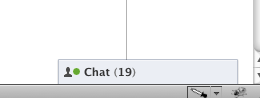
And now it is just some amorphous field hogging up space of random friend.
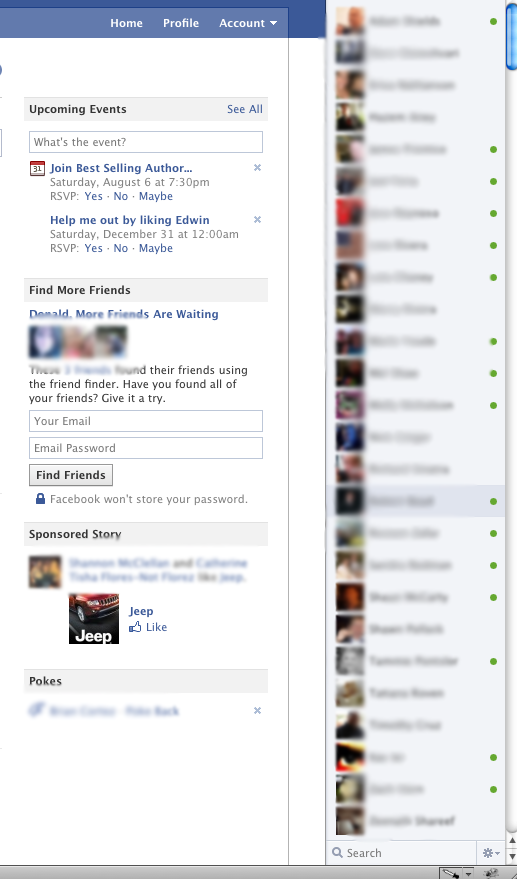
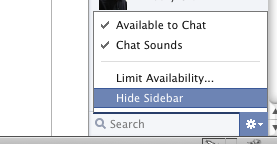
And I can’t easily hide this sidebar. It takes two clicks to get rid of it.
Why would I want to see a list of random friends? If I wanted to see who I was friends list then I would click “Friends” on my profile. This seems like absolute nonsense to me. But then it hit me; could this be Facebook’s way of trying to get it’s users to contact friends that they haven’t conversed with in a long time? Is Facebook trying to increase the connectedness between users who may not have connected via chat otherwise? Is this a strange counter move against Google+?
I have the feeling that this is a Facebook fail.
Update 7/11/2011
I found it funny that so many people were visiting this post through some search keywords that would suggest they weren’t happy with the Facebook sidebar and that they wanted to turn it off. Here’s a list of the top 15 keywords of the day. In all, I found 14 visitors through Google search out of 48 came to this post using keywords that denoted negativity toward the sidebar, hiding it, or getting the old chat popup back. This is from a single day of visits.
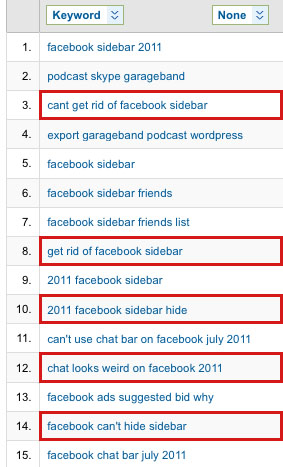
Update 7/11/2011
It looks like there’s an extension for Chrome users to disable the Facebook Chat Sidebar. And it’s called the FB Chat Sidebar Disabler! Write back if you tried this out. I’m a Chrome purist, not a single Extension. Sorry…

I dislike the new chat side bar. Mainly due to the list populating those who are unavailable to chat. Unless I’m missing the point, that aspect seems completely pointless. It feels as if they are just throwing crap my way rather than an efficient and useful product.
I too dislike how one has to hide the chat bar. I would find it a little more acceptable if it was one click in and one click out, but to close it you have to pull up a menu to find the option. Then when you access the chat again, the whole damn window pops up and you’re back at square one.
They should at least offer the option in settings to use the old chat popup or the new chat side bar, and leave it to the preference of the user.
Right, it seems so bizarre. I doubt Facebook would do something for no reason whatsoever. I thought at first that Facebook did this as a lashing back at Google+’s Hangout. But it doesn’t make sense to propagate a bunch of users who aren’t even online. That’s why it must be Facebook trying to create more interaction between users who are on AND offline. Notice how Facebook integrated their email program with chat? So if you message someone offline it automatically goes into their email. Perhaps this is just trying to get people to simply message each other more?
Honestly, it’s all very messy. I like to know who’s online so I can chit chat with them when they are available, not when they aren’t.
Not a fan…it’s huge! Why would I want to see a list of people who are offline? Maybe there is something coming?
any idea hot to rollback to old chat side bar?
Sorry federico. It appears that there is no way to revert back to the old chat. Facebook likes each of its users to have the same exact experience with the site.
Solution: All you can do is to use link: http://www.facebook.com/presence/popout.php and give them into your bookmark, especially good solution is Opera sidebar. It looks and it working like old chat, but you will have it next to page that you actually use. It is the best and the one and only solution. This new chat is a big FAIL – it is my opinion!
And this is why I’m glad I started using Digsby for all my instant messaging needs. All my friends still show up available to chat along side my AIM, MSN and gchat friends.
Steven. I’m using Adium on my macs and it works great. However, Facebook keeps changing their API which is squeezing out any usage of Adium with Facebook. It’s a big bummer because I really like Adium a lot, but I can’t have two-way conversations with it in Facebook anymore.
That does seem to be a good solution Hunter. Except that we know not everyone will use that workaround. Facebook just ruined something that worked well.
I don’t even know whether I like the chat sidebar or not because it DOESN’T FUCKING WORK. It doesn’t pop up at all, just stays down in the corner so I can’t even get at the “hide sidebar” option. Thank you, people on this page, for showing me the popout URL so I can USE CHAT AT ALL NOW THAT FACEBOOK HAS BROKEN IT.
Fuck Facebook. Seriously, FUCK FACEBOOK. I have fucking HAD IT with this bullshit. STOP BREAKING THINGS, FACEBOOK. LEAVE THEM THE FUCK ALONE FOR FIVE MINUTES SO WE CAN USE YOUR FUCKING SITE TO STAY IN TOUCH WITH OUR FRIENDS.
God, I hope I can persuade all my friends to switch to Google+ soon.
Yeah, I on Google+ myself FF. I have to say that I am enjoying the layout a lot more than Facebook. It’s all about adoption though. I hope a lot more of my folks will be on there soon.
🙁 I hate this new chat. Can we have the old one back please.
Do you mind if I quote a few of your posts as long as I provide
credit and sources back to your webpage? My blog is in the exact same area of interest as yours and my
users would genuinely benefit from some of the information you
present here. Please let me know if this ok with you.
Thanks!
Aw, this was an extremely good post. Finding the time and actual effort to
generate a superb article… but what can I say… I procrastinate a whole lot and don’t manage to get nearly anything
done.
Howdy! Do you know if they make any plugins to protect against hackers?
I’m kinda paranoid about losing everything I’ve worked hard on. Any suggestions?
you are in point of fact a good webmaster.
The website loading pace is incredible. It seems that you’re doing any unique trick.
In addition, The contents are masterpiece. you’ve performed a excellent job on this topic!
Pretty great post. I simply stumbled upon your weblog and wanted to mention that I have truly loved browsing your weblog
posts. After all I will be subscribing for your feed and I am hoping you write once more very soon!
Incredible story there. What happened after? Take care!
Hello! Someone in my Facebook group shared this site
with us so I came to look it over. I’m definitely loving the
information. I’m book-marking and will be tweeting this to my followers!
Excellent blog and brilliant style and design.
I always spent my half an hour to read this weblog’s articles every day along with a mug of coffee.
This is a topic which is near to my heart…
Cheers! Where are your contact details though?
Way cool! Some very valid points! I appreciate you penning this post plus the rest of the site is also very good.
This piece of writing offers clear idea designed for the new
people of blogging, that genuinely how to do running a blog.
Appreciate the recommendation. Let me try it out.
Hey there just wanted to give you a quick heads up.
The text in your article seem to be running off the screen in Ie.
I’m not sure if this is a formatting issue or something to do with browser compatibility but I figured I’d post to let you
know. The layout look great though! Hope you get the
issue fixed soon. Kudos
Have you ever considered about adding a little bit
more than just your articles? I mean, what you say is valuable and all.
However just imagine if you added some great pictures or
video clips to give your posts more, “pop”! Your
content is excellent but with images and videos, this blog could certainly be one of the best
in its field. Fantastic blog!
Excellent web site. Plenty of useful info here. I am sending it to some buddies ans additionally sharing in delicious.
And naturally, thank you for your effort!
I go to see day-to-day a few sites and information sites to read articles, except this webpage gives feature based content.
I am curious to find out what blog platform you’re working with?
I’m having some small security problems with my latest blog and I’d like
to find something more risk-free. Do you have any solutions?
Greetings from Carolina! I’m bored to death at work so I decided to check out
your site on my iphone during lunch break. I love the
knowledge you present here and can’t wait to take a look when I get home.
I’m surprised at how fast your blog loaded on my phone ..
I’m not even using WIFI, just 3G .. Anyhow, very good blog!
If you wish for to get much from this paragraph then you have
to apply such strategies to your won web site.
There’s definately a lot to learn about this topic.
I really like all the points you have made.
Please let me know if you’re looking for a article writer for your site.
You have some really great posts and I feel I would
be a good asset. If you ever want to take some of the load off, I’d
really like to write some material for your blog in exchange for a link back to mine.
Please send me an e-mail if interested. Cheers!