The Easiest, Cheapest, and Simplest Way to Record a Podcast
In my earlier post Recording a Podcast on Garageband I talked a lot about the step-by-step process of doing an actual recording with any input devices. This time however, I will explain the easiest way I have found to record an all audio, perfectly editable, podcast using nothing but FREE software (the Mac computer and the headset will cost you money or course; other than that everything else is absolutely free! 🙂 There are four software programs that you will need to run on your Mac; Skype, GarageBand, LineIn, and Soundflower.
Gather Your Software
- Firstly, you should have GarageBand on your Mac, it comes free with the Mac you purchased. If for any weird reason you don’t have it, you can download or upgrade it here.
- Next download Skype for your Mac. Install the bugger and create an account. This is simple enough to do so I wont show you the step-by-step process but I will show you how to test your call later on.
- Download LineIn for Mac. Trust me, it’s legit.
- Finally, download Soundflower for Mac. Legit also. 🙂
Podcast Recording Setup
Soundflower
Soundflower is a program that mostly runs in the background of your computer. It’s a great little tool that allows you to direct audio elements to other programs on your computer. Install Soundflower and then activate the program (you can do this by throwing it on your dock and initializing the program there).

Warning! – Soundflower will NOT have any active windows on your computer. It runs completely in the background. To change any settings for Soundflower, you will need to do so from the Menu Bar at the top right of your display.
It’s time to configure Soundflower (which is super easy).
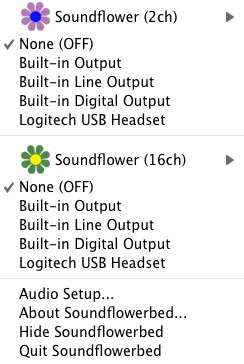
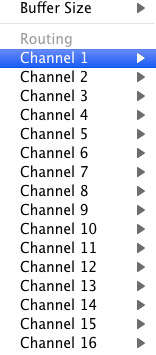
Click on the Soundflower icon on the Menu Bar and make sure the settings are put to “None (OFF)” for both Soundflower (2ch) and Soundflower (16ch). In the Soundflower (16ch) short menu make sure that Channels 1, 2, 3 and four are “None”. And that’s it, there’s nothing else you need to do with Soundflower.
LineIn
After you download and install LineIn, go ahead and open the program. There isn’t much to it at all.
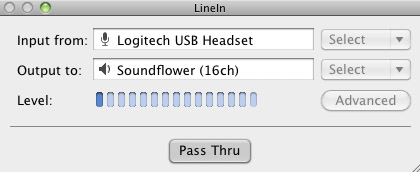
Input from: should be for your input device (mine is my Logitech USB Headset. Output to: select “Soundflower (16ch).
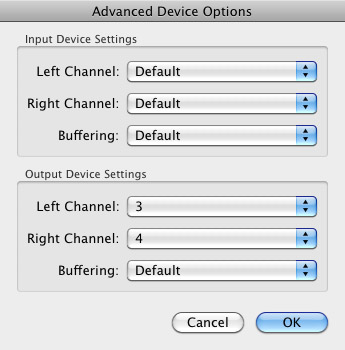
Click “Advanced” and make sure everything is set to default except for the “Output Device Settings” which should be “Left Channel: ” and “Right Channel: 4”. Click “OK”.
Select “Pass Thru” to make sure that your signal is going through LineIn.
Skype
Skype for Mac is very simple. Sometimes a bit too simple as it wont let you have certain functions like the PC version. See my post on the How to Fix the Auto Gain Control for Skype. This will alleviate the problem of Skype cranking down the gain when you are talking on your headset. If you are noticing that the louder you talk the lower your level goes then read this post.
Setting up Skype for audio podcasting is very simple.
Select Skype>Preferences and click on the “Audio” tab.
Set these parameters:
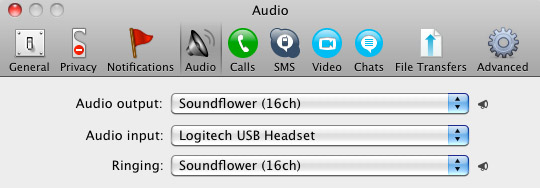
- Audio Output: Soundflower (16ch)
- Audio Input: Your input device (mine is my Logitech USB Headset
- Ringing: Soundflower (16ch)
And you’re all done with Skype.
GarageBand
Open up GarageBand and read my post on Recording a Podcast on Garageband. This will get you all set up for your record minus the setup for Skype, which I’ll let you know below.
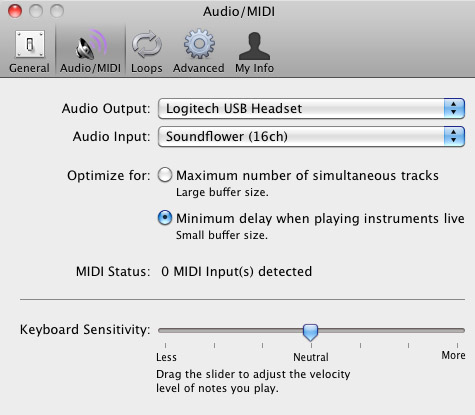
Go to the pulldown menu GarageBand>Preferences>Audio/Midi, here you will be able to select the inputs and outputs of GarageBand. Set the Audio Output to your headphones (Logitech USB Headset for me) and the Audio Input to “Soundflower (16ch). Your done with preferences.
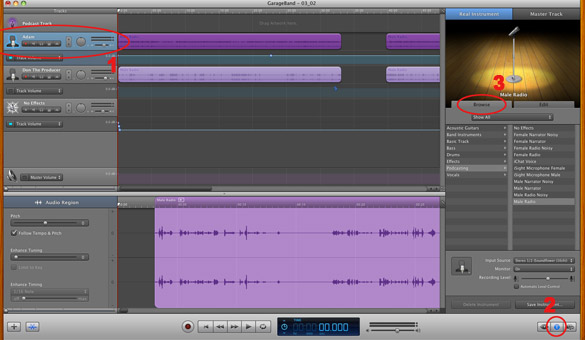
(1)Select track 1 which I have Adam on from the Ask Adam League. (2)And select the “View/Hide the Track info” button on the bottom right of the interface. (3)Also make sure you have the browse tab open as well.
At the bottom right, you have several options available for controlling the audio of this particular track which I have Adam on.
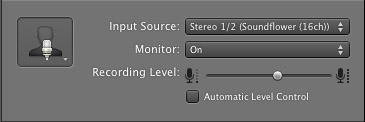
Select the parameters; Input Source: Stereo 1/2 (Soundflower (16ch)) and put the Monitor: On. You can also adjust the Recording Level here.
Repeat this for track 2 which I have as myself on my setup except that the Input will be Stereo 3/4 (Soundflower (16ch)).
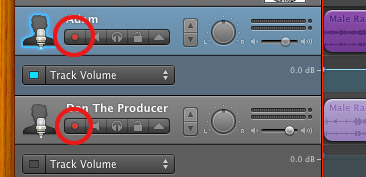
Finally, click the “Enable Recording” button for each of your tracks or else you wont be recording those tracks respectively.
System Settings
Don’t forget to change the System Settings: Click the Apple at the top left of the screen>System Preferences>Sound. Put the Output to your headphones (in my case the Logitech USB Headset) and the Input to your microphone (again the USB Headset in my case).
Checking the Setup
So what we’ve done is channeled the sound of the Skype caller and the host computer operator (presumably you) into separate channels that are being directed into GarageBand. The next step is to make sure that all your programs are fired up and double-check your settings. Skype makes it very easy to test your settings by providing the “Skype Test Call”. She’s a lovely Brit which will allow you to hear a mock call from Skype and even and ‘talk-back’ feature that will record your own voice for input checking.
Make sure your Record Enable buttons are on, hit the Record Button and hit the Skype Test Call button on Skype. Go ahead and talk over your new girlfriend and speak through the talk-back. After you’re done, check your recording. Check to see that the levels are where you want them and the fidelity of the sound. It should be fantastic.
Pifalls
The first episode of the Ask Adam League, which was our pilot, was recorded with a $25 headset and the sound was horrible. I have since gotten a $50 headset and it sounds fantastic. Any audio issues may stem from poor quality equipment and possibly not your setup.
Double-check your filters applied to each individual track. They may be interfering with the quality of your record by adjusting settings over your audio. See my post Recording a Podcast on Garageband for details.
Good Luck on your recordings! If you have any trouble at all, just post here and I’ll get back to you promptly.

I like the helpful info you provide in your articles.
I will bookmark your weblog and check again here regularly.
I am quite sure I’ll learn plenty of new stuff right here!
Best of luck for the next!
Hi are using WordPress for your blog platform? I’m new to the blog world but I’m trying to
get started and set up my own. Do you require any html coding knowledge to make your
own blog? Any help would be greatly appreciated!
After having a LOT of research, I am obtaining virtually
fully polar other views of living in Florida (Sandiego particularly).
My web-site … oceanside harbor hotels
Hello, after reading this remarkable post i am too cheerful to share my familiarity here
with colleagues.
Ahaa, its good discussion on the topic of this paragraph at
this place at this web site, I have read all that, so at this time me also commenting here.
Feel free to visit my page Chrinstine
I read this piece of writing completely regarding the difference of most up-to-date
and earlier technologies, it’s awesome article.
Buenas, he completado de analizar tú reseña y me
a parecido muy sugestivo tu aportación. A partir de este momento voy a
atesorar todos tus recomendaciones y los trataré
seguir en el futuro. Te doy la congratulación por tu site.
Look into my page: aprender inglés desde el principio
Excellent blog here! Also your website loads up fast!
What host are you using? Can I get your affiliate link to your host?
I wish my website loaded up as quickly as yours lol
Edad de siete a 8 años: a esta edad ya podemos introducir
ciertos conocimientos escritos de la lengua inglesa combinándolos con diferentes talleres y actividades en el sala.
, Canadá, Irlanda, Inglaterra, Francia, Alemania…
Tampoco podemos dejar a un lado su programa de Trimestre Académico en Australia y Resulta conveniente que los pequeños se hagan su maleta, para saber identificar su ropa.
y también Irlanda, campamentos de verano en ingles para adultos de verano urbanos, campamento de verano internacional, campamento polÃglota, campamento intensivo de
inglés, En SeaWorld Camps los alumnos de 3 a
catorce años tienen la oportunidad de vivir la naturaleza con otros alumnos
americanos para consolidar sus conocimientos de inglés.
You need to take part in a contest for one of the
highest quality sites on the internet. I will highly recommend this website!
The plans show detailed layouts for all walls and how to
frame door and window openings.
Here is my web site; storage shed kits for sale
Hiya very nice web site!! Guy .. Excellent .. Wonderful ..
I’ll bookmark your web site and take the feeds additionally?I am glad
to seek out so many helpful info here in the submit, we need work out more
techniques on this regard, thank you for sharing.
Hi there, just became aware of your blog through Google, and found that it’s truly informative.
I am gonna watch out for brussels. I will be grateful if
you continue this in future. Lots of people will be benefited from your writing.
Cheers!
Black suits can be very sharp but also harsh especially if you have fair skin. It’s for that reason you’ll want to invest in your footwear when your dress is selected.
No one is best well wishers than them and their decision will
be completely un-biased. These shirts are defined by designers as garments
that have buttons, a stiff and formally designed collar and a full length opening in the front,
which is also called a button-front or simply a button shirt.
The fusible not resistant to successive dry cleaning, and eventually deteriorate
and peel off the jacket, making it unusable (well say that the jacket will have a dirty look.
A plus size maxi dress can be fabulously flattering as well as stylish, and they come in a great range of colours and
styles.
Hey there just wanted to give you a quick heads up. The text
in your post seem to be running off the screen in Firefox.
I’m not sure if this is a format issue or something to do with internet browser compatibility but I figured I’d
post to let you know. The style and design look great though!
Hope you get the issue fixed soon. Thanks
Hello, of course this piece of writing is actually good
and I have learned lot of things from it on the topic
of blogging. thanks.
Dave Howland (4-2), his foe on Sunday evening, trains in the Compound in Oceanside, CA.
Feel free to visit my website; oceanside breweries
We only have one enviornment obtainable for rent – we’ll notify you
if it is already booked. Comes with the Sumo Fits, helmets, neck braces,
crash mat and enviornment (elective)!
It’s very simple to find out any topic on net as compared to textbooks, as I found this
article at this web page.
Thank you for the good writeup. It in fact was a amusement account it.
Look advanced to more added agreeable from you! By
the way, how could we communicate?
Also visit my web site youtubeonfirefree.com
What i don’t realize is if truth be told how you are no longer really much more smartly-preferred than you may be now.
You are very intelligent. You realize thus considerably relating to
this matter, produced me in my view imagine it from
numerous various angles. Its like women and men don’t seem to be fascinated unless it’s something to do with Girl gaga!
Your personal stuffs excellent. At all times deal with
it up!
I appreciate the time and energy you place into your web site
and also thorough information you offer. It’s great to come
across a blog every now and then which isn’t similar with many other materials.
Exceptional post! I’ve saved your site and I’m including your RSS feeds to my Google account.
Here is my homepage :: best male Enlargement products
Merely wanna comment on few general things, The website
style is perfect, the articles is rattling goodd :D.
Have a look at my web page … tyre and plastic pyrolysis machines
Marvelous, what a web site it is! This webpage presents helpful
facts to us, keep it up.
Really top quality blog posts on this website, saved to fav.
my blog post … male extra
I’ve been surfing online more than three hours today, yet I never found any interesting
article like yours. It’s pretty worth enough for
me. In my view, if all website owners and bloggers made good content as you did,
the net will be much more useful than ever before.
Full Lotus Pose: This is taken into account as the perfect meditation posture,
one thing of which you might immediately affiliate with meditation once you
see it executed.
Also visit my blog; meditation timer online mac
Hey, you used to write excellent, but the last few
posts have been kinda boring… I miss your tremendous writings.
Past several posts are just a little out of track! come on!
Hey man, This was a fantastic page for such a hard subject to discuss.
I look forward to reading a lot more great posts such as these.
Thanks.
My web page … male extra (Dgtm.hk)
I do accept as true with all of the ideas you have introduced in your post.
They’re very convincing and can certainly work. Still, the posts are very short
for newbies. May you please lengthen them a little from subsequent time?
Thanks for the post.
Good replies in return of this matter with firm arguments and telling all regarding that.
Visit my site … xt_blog
You’re in reality a great webmaster. The website loading pace is incredible.
It appears that you’re doing any special trick. Furthermore, the contents are
a masterpiece. you have done a fantastic task on this subject!
Here is my homepage Natural Male Enhancement Ingredients
A blog like yours should be earning a lot of money from adsense.
my weblog – male Extra
Thank you a lot for sharing this with all folks you actually recognize what you’re talking about!
Bookmarked. Please also consult with my web site =). We will have
a link exchange arrangement among us
I have a question with the post, where am i able to make contact with the creator?
And as regular, any thoughts, feelings, or sensations that arise while doing every particular person activity
merely gets gently acknowledged and I proceed to
going back to my object of meditation.
Here is my blog; loving kindness meditation audio free [Margareta]
If you desire to take much from this piece of writing
then you have to apply such techniques to your
won website.
Thanks for sharing your thoughts about garageband. Regards
I have desired to write about something like this on my web page and you gave me an idea.
Cheers.
my web blog male extra sex pills (http://mxjf8.com/)
We’re a group of volunteers and opening a new scheme in our community.
Your site offered us with valuable info to work on. You’ve done an impressive job
and our whole community will be grateful to you.
Here is my webpage: credit monitoring services
Hello there! Would you mind if I share your blog with my zynga group?
There’s a lot of folks that I think would really appreciate your content.
Please let me know. Cheers
You should take part in a contest for one of the highest quality sites on the net.
I most certainly will recommend this site!
Excellent pieces. Keep posting such kind of information on your site.
Im really impressed by your site.
Hi there, You have done a fantastic job. I will certainly
digg it and personally suggest to my friends. I am confident they’ll be benefited from this web
site.
Personally, we see this as cheating because they have
been in fact paid in genuine money for each survey you and I
completed, so, there is no reason whatsoever that warrant paying us in Present Cards alone.
Here is my web-site … how to make quick money in 2 Days [http://s3.Amazonaws.com]
This site truly has all of the information I wanted concerning this subject and didn’t know who to ask.
I am regular reader, how are you everybody? This paragraph posted at this
site is truly good.
I am really impressed with your writing skills as well as with the layout on your weblog.
Is this a paid theme or did you customize it yourself? Either way keep up the nice quality writing, it is rare to see a nice blog like this one these days.
We’re a gaggle of volunteers and starting a new scheme
in our community. Your web site offered us with valuable info to work on.
You have performed a formidable task and our
entire neighborhood shall be grateful to you.
I enjoy reading an article that can make people think.
Also, thank you for permitting me to comment!
Also visit my web site :: best credit monitoring service (bit.ly)
Before you walk out to pay money for an outdoor stream spout you have to be sure
you have a proper and good plan for your backyard of
your home. Don’t forget to ask if they take care of the excess dirt.
Fortunately, nowadays you do not need to be like an emperor to adopt an indoor wall mounted waterfall.
Look at my page Website