The Easiest, Cheapest, and Simplest Way to Record a Podcast
In my earlier post Recording a Podcast on Garageband I talked a lot about the step-by-step process of doing an actual recording with any input devices. This time however, I will explain the easiest way I have found to record an all audio, perfectly editable, podcast using nothing but FREE software (the Mac computer and the headset will cost you money or course; other than that everything else is absolutely free! 🙂 There are four software programs that you will need to run on your Mac; Skype, GarageBand, LineIn, and Soundflower.
Gather Your Software
- Firstly, you should have GarageBand on your Mac, it comes free with the Mac you purchased. If for any weird reason you don’t have it, you can download or upgrade it here.
- Next download Skype for your Mac. Install the bugger and create an account. This is simple enough to do so I wont show you the step-by-step process but I will show you how to test your call later on.
- Download LineIn for Mac. Trust me, it’s legit.
- Finally, download Soundflower for Mac. Legit also. 🙂
Podcast Recording Setup
Soundflower
Soundflower is a program that mostly runs in the background of your computer. It’s a great little tool that allows you to direct audio elements to other programs on your computer. Install Soundflower and then activate the program (you can do this by throwing it on your dock and initializing the program there).

Warning! – Soundflower will NOT have any active windows on your computer. It runs completely in the background. To change any settings for Soundflower, you will need to do so from the Menu Bar at the top right of your display.
It’s time to configure Soundflower (which is super easy).
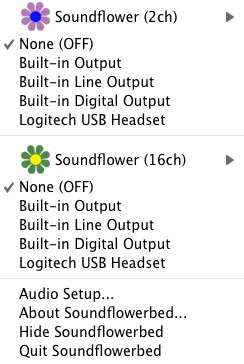
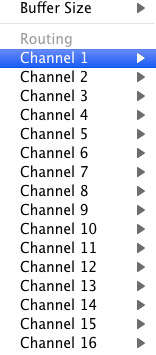
Click on the Soundflower icon on the Menu Bar and make sure the settings are put to “None (OFF)” for both Soundflower (2ch) and Soundflower (16ch). In the Soundflower (16ch) short menu make sure that Channels 1, 2, 3 and four are “None”. And that’s it, there’s nothing else you need to do with Soundflower.
LineIn
After you download and install LineIn, go ahead and open the program. There isn’t much to it at all.
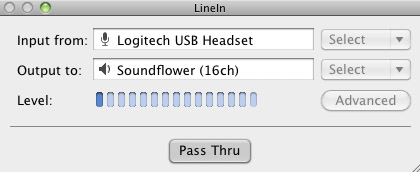
Input from: should be for your input device (mine is my Logitech USB Headset. Output to: select “Soundflower (16ch).
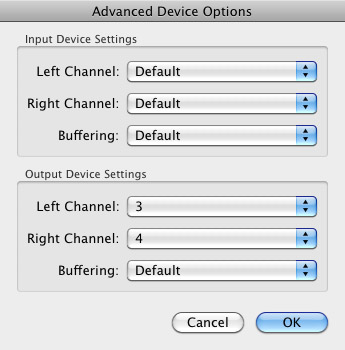
Click “Advanced” and make sure everything is set to default except for the “Output Device Settings” which should be “Left Channel: ” and “Right Channel: 4”. Click “OK”.
Select “Pass Thru” to make sure that your signal is going through LineIn.
Skype
Skype for Mac is very simple. Sometimes a bit too simple as it wont let you have certain functions like the PC version. See my post on the How to Fix the Auto Gain Control for Skype. This will alleviate the problem of Skype cranking down the gain when you are talking on your headset. If you are noticing that the louder you talk the lower your level goes then read this post.
Setting up Skype for audio podcasting is very simple.
Select Skype>Preferences and click on the “Audio” tab.
Set these parameters:
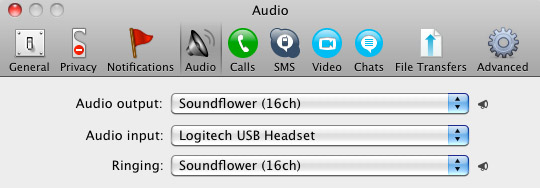
- Audio Output: Soundflower (16ch)
- Audio Input: Your input device (mine is my Logitech USB Headset
- Ringing: Soundflower (16ch)
And you’re all done with Skype.
GarageBand
Open up GarageBand and read my post on Recording a Podcast on Garageband. This will get you all set up for your record minus the setup for Skype, which I’ll let you know below.
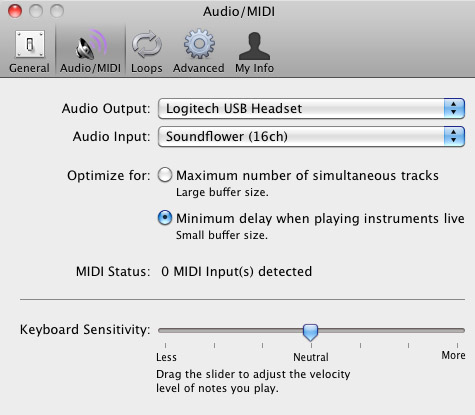
Go to the pulldown menu GarageBand>Preferences>Audio/Midi, here you will be able to select the inputs and outputs of GarageBand. Set the Audio Output to your headphones (Logitech USB Headset for me) and the Audio Input to “Soundflower (16ch). Your done with preferences.
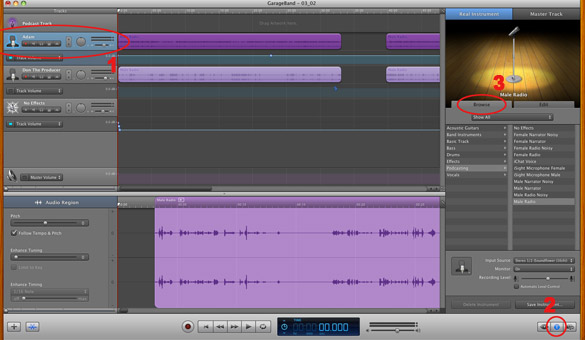
(1)Select track 1 which I have Adam on from the Ask Adam League. (2)And select the “View/Hide the Track info” button on the bottom right of the interface. (3)Also make sure you have the browse tab open as well.
At the bottom right, you have several options available for controlling the audio of this particular track which I have Adam on.
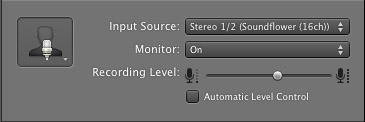
Select the parameters; Input Source: Stereo 1/2 (Soundflower (16ch)) and put the Monitor: On. You can also adjust the Recording Level here.
Repeat this for track 2 which I have as myself on my setup except that the Input will be Stereo 3/4 (Soundflower (16ch)).
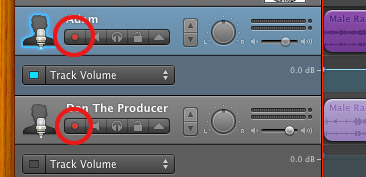
Finally, click the “Enable Recording” button for each of your tracks or else you wont be recording those tracks respectively.
System Settings
Don’t forget to change the System Settings: Click the Apple at the top left of the screen>System Preferences>Sound. Put the Output to your headphones (in my case the Logitech USB Headset) and the Input to your microphone (again the USB Headset in my case).
Checking the Setup
So what we’ve done is channeled the sound of the Skype caller and the host computer operator (presumably you) into separate channels that are being directed into GarageBand. The next step is to make sure that all your programs are fired up and double-check your settings. Skype makes it very easy to test your settings by providing the “Skype Test Call”. She’s a lovely Brit which will allow you to hear a mock call from Skype and even and ‘talk-back’ feature that will record your own voice for input checking.
Make sure your Record Enable buttons are on, hit the Record Button and hit the Skype Test Call button on Skype. Go ahead and talk over your new girlfriend and speak through the talk-back. After you’re done, check your recording. Check to see that the levels are where you want them and the fidelity of the sound. It should be fantastic.
Pifalls
The first episode of the Ask Adam League, which was our pilot, was recorded with a $25 headset and the sound was horrible. I have since gotten a $50 headset and it sounds fantastic. Any audio issues may stem from poor quality equipment and possibly not your setup.
Double-check your filters applied to each individual track. They may be interfering with the quality of your record by adjusting settings over your audio. See my post Recording a Podcast on Garageband for details.
Good Luck on your recordings! If you have any trouble at all, just post here and I’ll get back to you promptly.

I labored out very arduous the complete week before starting
this diet although so the soreness mixed with the sensation of malnutrition really combined and made me feel like crap so I just gave in.
Oh my goodness! Awesome article dude! Thank you so much,
However I am encountering problems with your RSS.
I don’t know the reason why I can’t join it. Is there
anyone else having the same RSS problems? Anyone that knows the solution can you kindly
respond? Thanks!!
Feel free to visit my webpage :: online shopping
Greetings from Colorado! I’m bored to tears at work so I decided to check out your site on my
iphone during lunch break. I really like the information you provide here and can’t wait
to take a look when I get home. I’m shocked at how quick your blog loaded on my cell phone ..
I’m not even using WIFI, just 3G .. Anyways, great blog!
whoah this weblog is great i like studying your articles.
Keep up the good work! You know, many people are hunting around for this information, you can aid them greatly.
Hi I am so thrilled I found your weblog, I really found you by error, while I was
looking on Askjeeve for something else, Regardless I am here now and would just like to say thanks for
a tremendous post and a all round entertaining blog (I also
love the theme/design), I don’t have time to look over it all at
the moment but I have book-marked it and also added your RSS feeds, so
when I have time I will be back to read more, Please do keep up the excellent jo.
You may well be surprised how significantly this will aid to.
Also visit my homepage; low carb Diet and exercise
I am really enjoying the theme/design of your blog. Do you ever run into any web browser compatibility issues?
A handful of my blog readers have complained about my website
not working correctly in Explorer but looks great in Safari.
Do you have any advice to help fix this issue?
I like what you guys tend to be up too. This sort of clever work and coverage!
Keep up the superb works guys I’ve added you guys to our blogroll.
Primeiro, trein os grandes grupos musculares (espinhaço, coxas e tônico), seguidos dos exercÃcios para os grupos musculares menores
(bÃceps, trÃceps, ombro e panturrilhas).
Useful information. Lucky me I found your web site accidentally,
and I am shocked why this accident didn’t happened earlier!
I bookmarked it.
Hello there! This article couldn’t be written any better!
Looking at this post reminds me of my previous roommate!
He constantly kept talking about this. I’ll send this information to him.
Pretty sure he’ll have a good read. Thanks for sharing!
Hi, i think that i saw you visited my weblog so i came to
“return the favorâ€.I’m trying to find things to improve my web site!I suppose its ok to use some of y
\
This paragraph is actually a nice one it helps new web visitors, who are wishing in favor of blogging.
Walk on the many Oceanside beaches’ sands and
take a walk down Oceanside Pier for a fantastic sunset view.
Here is my homepage … hotels oceanside ca
Pretty portion of content. I simply stumbled upon your
web site and in accession capital to say that I get actually loved account your blog
posts. Anyway I will be subscribing in your augment or
even I achievement you access constantly rapidly.
This is a formal acknowledgment.
What’s up Dear, are you genuinely visiting this web site
daily, if so afterward you will without doubt obtain fastidious
experience.
My weblog: pro adjuster chiropractic locations
Very soon this website will be famous amid all blogging and site-building users, due to it’s nice articles
Hi there mates, how is everything, and what you desire to say about this article, in my view its genuinely amazing in favor of me.
Stop by my webpage; tsohost promo code
Link exchange is nothing else however it is simply placing
the other person’s weblog link on your page at appropriate place and other person will also do similar in favor
of you.
Here is my homepage :: Crowdfunding
I think this is among the most important info for me. And i’m glad reading your article.
But wanna remark on some general things, The website style is perfect, the articles is really excellent :
D. Good job, cheers
My website plasticsurgerydetroit.xyz
Excellent post! We are linking to this particularly great post on our website.
Keep up the good writing.
Wow, marvelous blog structure! How long have you been running a blog for?
you made blogging glance easy. The total look of your site is wonderful,
let alone the content material!
Look into my blog :: chiropractor costs
Can you tell us more about this? I’d want to find out some additional information.
It’s impressive that you are getting ideas from this article as
well as from our discussion made at this place.
Terrific work! This is the kind of info that should be shared across the internet.
Shame on the seek engines for not positioning this put up upper!
Come on over and consult with my website . Thanks =)
Hello my loved one! I wish to say that this post is
amazing, great written and come with approximately all
important infos. I’d like to look extra posts like this .
Very good article. I will be dealing with a few of these issues as well..
I delight in, result in I discovered just what I was having a look for.
You have ended my four day lengthy hunt! God Bless you man. Have a nice day.
Bye
Hi, after reading this remarkable paragraph i am also glad to share
my familiarity here with friends.
I don’t make it a habit to make comments on a lot of articles, yet this one
deserves attention. I agree with the information you’ve
written so beautifully here. Many thanks.
Feel free to surf to my webpage … ge.tt
If you would like to increase your know-how simply
keep visiting this web page and be pdated with the newest information posted here.
Keep on working, great job!
Also visit my web page … quia.com
Amazing post, you have stated some fantastic points , I additionally think
this a very outstanding website.
Also visit my site probiotics supplements
I like this site a lot. Excellent info.
my web-site: probiotics benefits
I do not even know how I ended up here, but I thought this post was
great. I do not know who you are but definitely you are
going to a famous blogger if you are not already 😉 Cheers!
My programmer is trying to convince me to move to .net from PHP.
I have always disliked the idea because of the costs.
But he’s tryiong none the less. I’ve been using WordPress on a number of websites for about a year and am worried about switching to
another platform. I have heard fantastic things about blogengine.net.
Is there a way I can import all my wordpress posts into it?
Any kind of help would be greatly appreciated!
I think that is among the so much vital information for me.
And i’m glad reading your article. But want to statement on few normal things, The site style is great, the articles is really nice : D.
Excellent task, cheers
Admiring the hard work you put into your site and detailed information you present.
It’s great to come across a blog every once in a while that isn’t the same unwanted rehashed information. Excellent read!
I’ve saved your site and I’m including your RSS feeds to my Google account.
Look into my web page PopcornTime
I would like to thank you for the efforts you’ve put in penning this site.
I’m hoping to check out the same high-grade content from you later on as well.
In truth, your creative writing abilities has encouraged me to get my own website now 😉
You should ƅe a paгt off a contest for one
oof thᥱ finest sites on the internet. I mosst certainly wiull highly recommend this blog!
magnificent post, very informative. I ponder why the opposite experts of this sector do not understand this.
You must continue your writing. I am confident, you have a great readers’
base already!
We’re a group of volunteers and starting a
new scheme in our community. Your website offered us with valuable info to work
on. You’ve done a formidable job and our entire community will be thankful to you.
I have wanted to write about something like
this on my web page and you gave me an idea.
Many thanks.
Also visit my webpage :: bowflex dumbbells 552
Howdy I am so delighted I found your webpage, I really found you
by error, while I was looking on Yahoo for something else, Anyhow I am
here now and would just like to say kudos for a incredible post and a all
round entertaining blog (I also love the theme/design), I don’t have time
to look over it all at the moment but I have bookmarked it and also included
your RSS feeds, so when I have time I will be back to
read a lot more, Please do keep up the superb jo.
It is in reality a nice and helpful piece of info. I am
satisfied that you simply shared this helpful info with
us. Please keep us up to date like this. Thanks for sharing.
http://drwell.in/author/deonbobadil/
I every time used to study paragraph in news papers but now
as I am a user of web thus from now I am using net for articles, thanks to web.
You’re so great! I don’t think I can learn something like this before.
So good to find someone with some creative ideas about this subject.
really thanks for bringing this up. this website is something that is needed online, somebody
with somewhat creativity. excellent job for bringing something new to the internet!
Have a look at my homepage … brain enhancement
I think the admin of this web site is genuinely working hard in support of his web page, as here every stuff is quality
based information.