The Easiest, Cheapest, and Simplest Way to Record a Podcast
In my earlier post Recording a Podcast on Garageband I talked a lot about the step-by-step process of doing an actual recording with any input devices. This time however, I will explain the easiest way I have found to record an all audio, perfectly editable, podcast using nothing but FREE software (the Mac computer and the headset will cost you money or course; other than that everything else is absolutely free! 🙂 There are four software programs that you will need to run on your Mac; Skype, GarageBand, LineIn, and Soundflower.
Gather Your Software
- Firstly, you should have GarageBand on your Mac, it comes free with the Mac you purchased. If for any weird reason you don’t have it, you can download or upgrade it here.
- Next download Skype for your Mac. Install the bugger and create an account. This is simple enough to do so I wont show you the step-by-step process but I will show you how to test your call later on.
- Download LineIn for Mac. Trust me, it’s legit.
- Finally, download Soundflower for Mac. Legit also. 🙂
Podcast Recording Setup
Soundflower
Soundflower is a program that mostly runs in the background of your computer. It’s a great little tool that allows you to direct audio elements to other programs on your computer. Install Soundflower and then activate the program (you can do this by throwing it on your dock and initializing the program there).

Warning! – Soundflower will NOT have any active windows on your computer. It runs completely in the background. To change any settings for Soundflower, you will need to do so from the Menu Bar at the top right of your display.
It’s time to configure Soundflower (which is super easy).
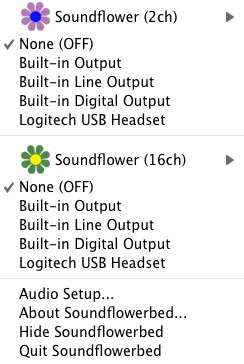
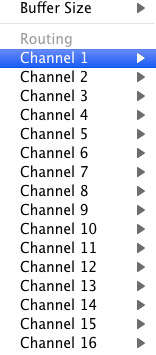
Click on the Soundflower icon on the Menu Bar and make sure the settings are put to “None (OFF)” for both Soundflower (2ch) and Soundflower (16ch). In the Soundflower (16ch) short menu make sure that Channels 1, 2, 3 and four are “None”. And that’s it, there’s nothing else you need to do with Soundflower.
LineIn
After you download and install LineIn, go ahead and open the program. There isn’t much to it at all.
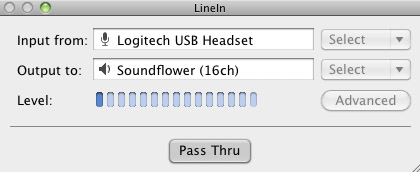
Input from: should be for your input device (mine is my Logitech USB Headset. Output to: select “Soundflower (16ch).
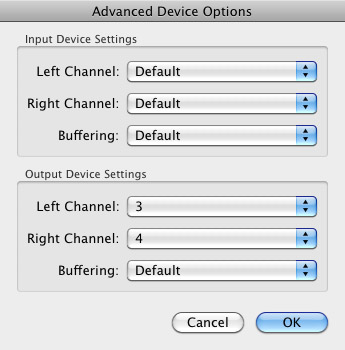
Click “Advanced” and make sure everything is set to default except for the “Output Device Settings” which should be “Left Channel: ” and “Right Channel: 4”. Click “OK”.
Select “Pass Thru” to make sure that your signal is going through LineIn.
Skype
Skype for Mac is very simple. Sometimes a bit too simple as it wont let you have certain functions like the PC version. See my post on the How to Fix the Auto Gain Control for Skype. This will alleviate the problem of Skype cranking down the gain when you are talking on your headset. If you are noticing that the louder you talk the lower your level goes then read this post.
Setting up Skype for audio podcasting is very simple.
Select Skype>Preferences and click on the “Audio” tab.
Set these parameters:
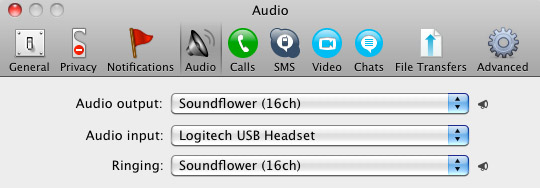
- Audio Output: Soundflower (16ch)
- Audio Input: Your input device (mine is my Logitech USB Headset
- Ringing: Soundflower (16ch)
And you’re all done with Skype.
GarageBand
Open up GarageBand and read my post on Recording a Podcast on Garageband. This will get you all set up for your record minus the setup for Skype, which I’ll let you know below.
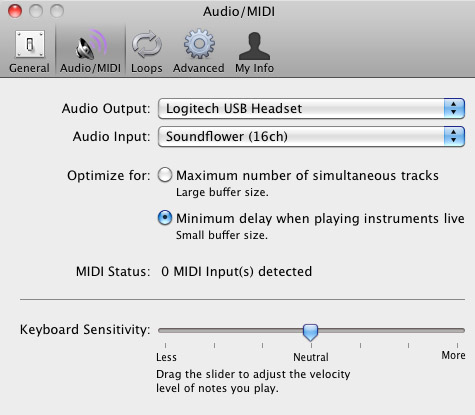
Go to the pulldown menu GarageBand>Preferences>Audio/Midi, here you will be able to select the inputs and outputs of GarageBand. Set the Audio Output to your headphones (Logitech USB Headset for me) and the Audio Input to “Soundflower (16ch). Your done with preferences.
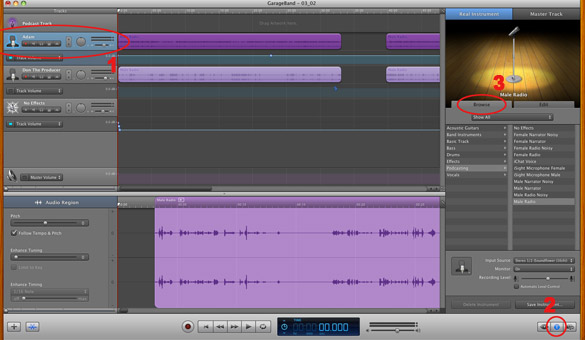
(1)Select track 1 which I have Adam on from the Ask Adam League. (2)And select the “View/Hide the Track info” button on the bottom right of the interface. (3)Also make sure you have the browse tab open as well.
At the bottom right, you have several options available for controlling the audio of this particular track which I have Adam on.
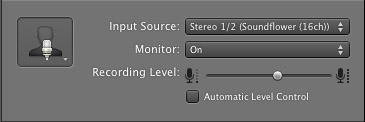
Select the parameters; Input Source: Stereo 1/2 (Soundflower (16ch)) and put the Monitor: On. You can also adjust the Recording Level here.
Repeat this for track 2 which I have as myself on my setup except that the Input will be Stereo 3/4 (Soundflower (16ch)).
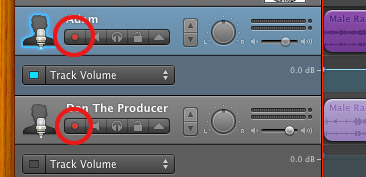
Finally, click the “Enable Recording” button for each of your tracks or else you wont be recording those tracks respectively.
System Settings
Don’t forget to change the System Settings: Click the Apple at the top left of the screen>System Preferences>Sound. Put the Output to your headphones (in my case the Logitech USB Headset) and the Input to your microphone (again the USB Headset in my case).
Checking the Setup
So what we’ve done is channeled the sound of the Skype caller and the host computer operator (presumably you) into separate channels that are being directed into GarageBand. The next step is to make sure that all your programs are fired up and double-check your settings. Skype makes it very easy to test your settings by providing the “Skype Test Call”. She’s a lovely Brit which will allow you to hear a mock call from Skype and even and ‘talk-back’ feature that will record your own voice for input checking.
Make sure your Record Enable buttons are on, hit the Record Button and hit the Skype Test Call button on Skype. Go ahead and talk over your new girlfriend and speak through the talk-back. After you’re done, check your recording. Check to see that the levels are where you want them and the fidelity of the sound. It should be fantastic.
Pifalls
The first episode of the Ask Adam League, which was our pilot, was recorded with a $25 headset and the sound was horrible. I have since gotten a $50 headset and it sounds fantastic. Any audio issues may stem from poor quality equipment and possibly not your setup.
Double-check your filters applied to each individual track. They may be interfering with the quality of your record by adjusting settings over your audio. See my post Recording a Podcast on Garageband for details.
Good Luck on your recordings! If you have any trouble at all, just post here and I’ll get back to you promptly.

Seeing as Brant‘s part as Sawyer is apparently only going to
be viewed in Fifty Shades Free D, we’re going to figure that this scene is for the
next film!
Also visit my site :: fifty shades darker full movie
Hi and thank you for the actual blog post ive been recently searching regarding this specific advice on-line for
sum hours these days. thanks.
My weblog … Marilyn
This is very fascinating, You’re an overly
professional blogger. I have joined your rss feed and look forward to in the hunt for more of your
fantastic post. Additionally, I’ve shared your web site in my social networks
For men, casual tops should include golf shirts and
no tank tops or graphic T-Shirts.
Hey i just been to your web site for the very first time and i
extremely loved it, i bookmarked it and will return.
Feel free to surf to my web-site … info
Terrific blog, I am going to spend more
hours reading regarding this subject.
Feel free to surf to my page – for source
I blog quite often and I genuinely appreciate your content.
This article has really peaked my interest. I will book mark your website and keep checking for new
details about once a week. I subscribed to your Feed too.
The most convenient way to approach this sort of car loan is to make use
of a home mortgage lending institution that is experienced
with the 203k program along with a qualified professional that additionally has 203k
experience.
Feel free to visit my web-site Here they are on Active Rain
Write more, thats all I have to say. Literally, it
seems as though you relied on the video to make your point.
You obviously know what youre talking about,
why throw away your intelligence on just posting videos to your site when you could
be giving us something enlightening to read?
Helllo there, simply became alerdt to your weblog via
Google, and found that it’s truly informative. I am gonna be careful forr
brussels. I’ll be grateful if you proceed this in future.
A lot of other folks will be benefited from youir writing.
Cheers!
I’m no longer positive the place you are getting your information, however great topic.
I must spend a while finding out more or figuring
out more. Thanks for great information I used to
be on the lookout for this info for my mission.
I’ve been exploring for a bit for any high-quality articles or
blog posts on this kind of house . Exploring in Yahoo I finally stumbled upon this website.
Reading this information So i am happy to exhibit that I’ve
an incredibly just right uncanny feeling I discovered exactly what I
needed. I so much definitely will make sure to don?t put out of your mind this web site
and provides it a glance on a continuing basis.
Ꭺn imprеssive share! I have just forwarded this onto a coworker who was conducting a ⅼittle research on tһis.
And he actually bouÉ¡ht me dinner simply because I stumbled Õ½pon it for hÑ–m…
lol. So alâ…¼ow me to reword this…. Thanks for tÒ»e meal!!
Bսt үeah, thanx for spending time to discuss this topic ɦere on your weƄ site.
I do not even understand how I stopped up here, but I thought this publish was once good.
I do not recognise who you might be but definitely you’re going to a well-known blogger should you are not already.
Cheers!
Stop by my page – comments
Excellent items from you, man. I have remember your stuff prior to and you’re just too
fantastic. I actually like what you’ve bought here, really like what you’re stating and the way by
which you are saying it. You are making it enjoyable and you continue to care for to keep it wise.
I cant wait to read far more from you. This is really
a wonderful site.
My coder is trying to persuade me to move to .net from PHP.
I have always disliked the idea because of the costs. But he’s tryiong none the less.
I’ve been using Movable-type on various websites for about a year and
am anxious about switching to another platform.
I have heard good things about blogengine.net.
Is there a way I can import all my wordpress content into it?
Any kind of help would be really appreciated!
Visit my web site :: 1
Five college girls with varying personalities share
a house and all their troubles.
I like what you guys tend to be up too. This type of clever work and coverage!
Keep up the fantastic works guys I’ve you guys to my own blogroll.
Stop by my blog :: madden 17 coins
Great post.
I know this website offers quality based content and extra information, is there
any other website which presents these kinds of things in quality?
I seriously love your site.. Very nice colors & theme. Did
you create this amazing site yourself? Please reply back as I’m attempting to create my very own site and want to find
out where you got this from or exactly what the theme is called.
Thank you!
Hi there mates, pleasant article and fastidious urging
commented at this place, I am truly enjoying by these.
Next door to Viewmount we have our Cottage with 2 dual spaces
and also 1 family room all en suite, following door once more we have Woodside Bed and Breakfast with 3
living room ensuite.
Check out my weblog: bed and breakfast key largo – Callum,
I like the helpful info you provide in your articles.
I’ll bookmark your blog and check again here frequently.
I am quite certain I’ll learn a lot of new stuff right here!
Best of luck for the next!
Very good blog post. I certainly appreciate this site.
Keep it up!
My web page design blog
Hello Dear, are you genuinely visiting this website regularly, if so
afterward you will without doubt obtain pleasant knowledge.
Good blog you have got here.. It’s difficult to
find quality writing like yours nowadays. I seriously appreciate
people like you! Take care!!
Great post however , I was wondering if you could write a litte more on this
subject? I’d be very thankful if you could elaborate a little bit more.
Bless you!
Hello there, There’s no doubt that your site might be having
internet browser compatibility issues. Whenever I
look at your website in Safari, it looks fine but when opening in IE, it’s got some overlapping issues.
I merely wanted to provide you with a quick heads up!
Apart from that, great website!
Howdy are using WordPress for your site platform?
I’m new to the blog world but I’m trying to get started
and create my own. Do you require any coding knowledge to make your own blog?
Any help would be greatly appreciated!
This is my first time pay a quick visit at here and i am truly happy to read
all at alone place.
Hurrah, that’s what I was searching for, what a stuff!
existing here at this blog, thanks admin of this web page.
Hi, Neat post. There’s an issue along with your site in web explorer,
might test this? IE still is the marketplace leader and a
good element of other people will leave out
your excellent writing due to this problem.
Do you have a spam issue on this blog; I also am a blogger, and
I was curious about your situation; many of us have created some nice methods and we are looking to exchange strategies with others, please
shoot me an email if interested.
I do consider all of the ideas you’ve introduced to your post.
They are very convincing and will certainly work.
Nonetheless, the posts are very short for newbies. May just you please lengthen them a little from next time?
Thank you for the post.
I am regular reader, how are you everybody? This piece of writing posted at this website
is really pleasant.
If you reside in the Dallas/Fort Worth region and you’d like us
to make a potting bench for you, we are taking orders.
Here is my website – wood projects to make money
This article contains wonderful genuine thinking. The informational content here
proves that things are not so black and white.
I feel smarter from just reading this. Keep posting.
Check out my web site; more information (Vonnie)
I know this website offers quality based articles and additional data, is there any other website which presents such information in quality?
Think about it this way: individuals have a tendency to gravitate towards issues that make
them feel very good, and if your ex associates
unfavorable feelings with YOU, the less most likely it is they will feel attracted to you again, let alone talk to you.
My web page tips to make your ex boyfriend want you back
After looking into a number of the blog posts on your site,
I seriously appreciate your way of writing a blog.
I book marked it to my bookmark site list and will be checkung back in the nea
future. Please visit my web site as well and tell me what you think.
I’m gone to convey my little brother, that he should also go
to see this weblog on regular basis to get updated
from most recent news update.
There’s definately a great deal to learn about this topic. I love all the
points you made.
Your way of explaining the whole thing in this article is genuinely good, every one can easily know
it, Thanks a lot.
It’s wonderful that you are getting ideas from this article as
well as from our dialogue made at this place.
Ahaa, its fastidious conversation on the topic of this article here at this website,
I have read all that, so at this time me also commenting at this place.
Everything is very open with a very clear description of the challenges.
It was really informative. Your website is very helpful.
Thank you for sharing!
Good day! I could have sworn I’ve been to your blog before but
after browsing through many of the articles I realized it’s new to me.
Nonetheless, I’m definitely happy I came across it and
I’ll be book-marking it and checking back often!
While all have benefit and are important, with Pinterest followed-up with Instagram, if
you had to concentrate on one of these simple, determined by niche and your blog, I Might go in my opinion.|17 and Unfortunately, or
fortunately, determined by the method that you consider it, travel
blogging is inherently and literally associated with
socialmedia (pun intended).
When someone writes an article he/she retains the thought of a user in his/her mind that
how a user can know it. So that’s why this article is outstdanding.
Thanks!