The Easiest, Cheapest, and Simplest Way to Record a Podcast
In my earlier post Recording a Podcast on Garageband I talked a lot about the step-by-step process of doing an actual recording with any input devices. This time however, I will explain the easiest way I have found to record an all audio, perfectly editable, podcast using nothing but FREE software (the Mac computer and the headset will cost you money or course; other than that everything else is absolutely free! 🙂 There are four software programs that you will need to run on your Mac; Skype, GarageBand, LineIn, and Soundflower.
Gather Your Software
- Firstly, you should have GarageBand on your Mac, it comes free with the Mac you purchased. If for any weird reason you don’t have it, you can download or upgrade it here.
- Next download Skype for your Mac. Install the bugger and create an account. This is simple enough to do so I wont show you the step-by-step process but I will show you how to test your call later on.
- Download LineIn for Mac. Trust me, it’s legit.
- Finally, download Soundflower for Mac. Legit also. 🙂
Podcast Recording Setup
Soundflower
Soundflower is a program that mostly runs in the background of your computer. It’s a great little tool that allows you to direct audio elements to other programs on your computer. Install Soundflower and then activate the program (you can do this by throwing it on your dock and initializing the program there).

Warning! – Soundflower will NOT have any active windows on your computer. It runs completely in the background. To change any settings for Soundflower, you will need to do so from the Menu Bar at the top right of your display.
It’s time to configure Soundflower (which is super easy).
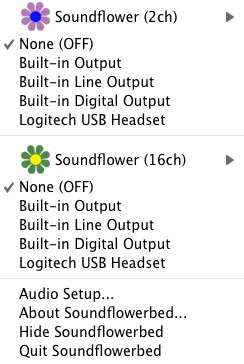
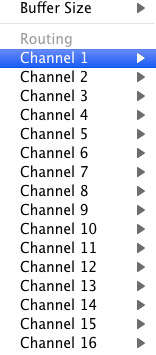
Click on the Soundflower icon on the Menu Bar and make sure the settings are put to “None (OFF)” for both Soundflower (2ch) and Soundflower (16ch). In the Soundflower (16ch) short menu make sure that Channels 1, 2, 3 and four are “None”. And that’s it, there’s nothing else you need to do with Soundflower.
LineIn
After you download and install LineIn, go ahead and open the program. There isn’t much to it at all.
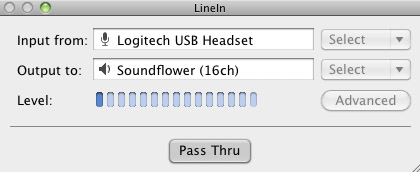
Input from: should be for your input device (mine is my Logitech USB Headset. Output to: select “Soundflower (16ch).
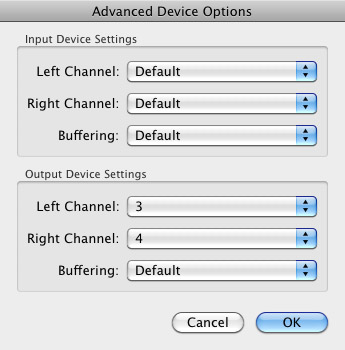
Click “Advanced” and make sure everything is set to default except for the “Output Device Settings” which should be “Left Channel: ” and “Right Channel: 4”. Click “OK”.
Select “Pass Thru” to make sure that your signal is going through LineIn.
Skype
Skype for Mac is very simple. Sometimes a bit too simple as it wont let you have certain functions like the PC version. See my post on the How to Fix the Auto Gain Control for Skype. This will alleviate the problem of Skype cranking down the gain when you are talking on your headset. If you are noticing that the louder you talk the lower your level goes then read this post.
Setting up Skype for audio podcasting is very simple.
Select Skype>Preferences and click on the “Audio” tab.
Set these parameters:
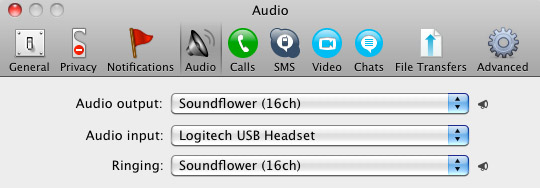
- Audio Output: Soundflower (16ch)
- Audio Input: Your input device (mine is my Logitech USB Headset
- Ringing: Soundflower (16ch)
And you’re all done with Skype.
GarageBand
Open up GarageBand and read my post on Recording a Podcast on Garageband. This will get you all set up for your record minus the setup for Skype, which I’ll let you know below.
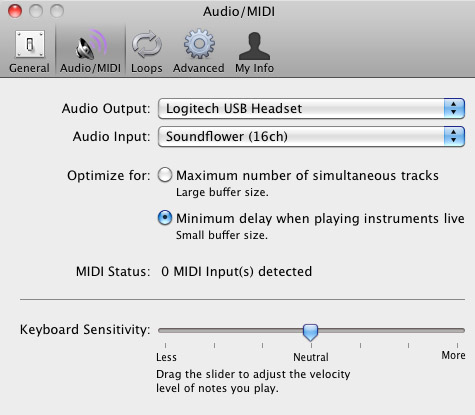
Go to the pulldown menu GarageBand>Preferences>Audio/Midi, here you will be able to select the inputs and outputs of GarageBand. Set the Audio Output to your headphones (Logitech USB Headset for me) and the Audio Input to “Soundflower (16ch). Your done with preferences.
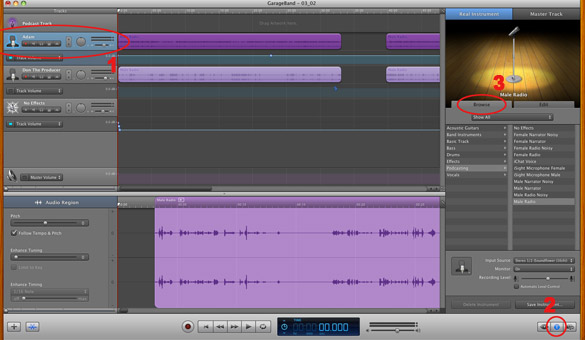
(1)Select track 1 which I have Adam on from the Ask Adam League. (2)And select the “View/Hide the Track info” button on the bottom right of the interface. (3)Also make sure you have the browse tab open as well.
At the bottom right, you have several options available for controlling the audio of this particular track which I have Adam on.
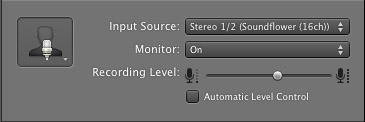
Select the parameters; Input Source: Stereo 1/2 (Soundflower (16ch)) and put the Monitor: On. You can also adjust the Recording Level here.
Repeat this for track 2 which I have as myself on my setup except that the Input will be Stereo 3/4 (Soundflower (16ch)).
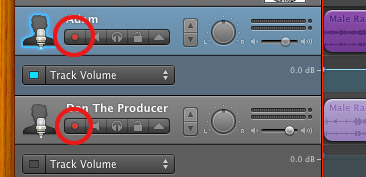
Finally, click the “Enable Recording” button for each of your tracks or else you wont be recording those tracks respectively.
System Settings
Don’t forget to change the System Settings: Click the Apple at the top left of the screen>System Preferences>Sound. Put the Output to your headphones (in my case the Logitech USB Headset) and the Input to your microphone (again the USB Headset in my case).
Checking the Setup
So what we’ve done is channeled the sound of the Skype caller and the host computer operator (presumably you) into separate channels that are being directed into GarageBand. The next step is to make sure that all your programs are fired up and double-check your settings. Skype makes it very easy to test your settings by providing the “Skype Test Call”. She’s a lovely Brit which will allow you to hear a mock call from Skype and even and ‘talk-back’ feature that will record your own voice for input checking.
Make sure your Record Enable buttons are on, hit the Record Button and hit the Skype Test Call button on Skype. Go ahead and talk over your new girlfriend and speak through the talk-back. After you’re done, check your recording. Check to see that the levels are where you want them and the fidelity of the sound. It should be fantastic.
Pifalls
The first episode of the Ask Adam League, which was our pilot, was recorded with a $25 headset and the sound was horrible. I have since gotten a $50 headset and it sounds fantastic. Any audio issues may stem from poor quality equipment and possibly not your setup.
Double-check your filters applied to each individual track. They may be interfering with the quality of your record by adjusting settings over your audio. See my post Recording a Podcast on Garageband for details.
Good Luck on your recordings! If you have any trouble at all, just post here and I’ll get back to you promptly.

Demand before concerning China that if the
physical is required within China after you get here, that the
institution pay for the solution.
Here is my web blog … china travel packing tips (Quinn)
It’s actually a cool and useful piece of info.
I’m glad that you simply shared this helpful info
with us. Please stay us up to date like this.
Thank you for sharing.
Thanks in favor of sharing such a nice thinking, article is good, thats why i have read it fully
My website aprilbess.weebly.com
Thanks for sharing superb informations. Your web-site is very cool.
I’m impressed by the details that you simply have on this web site.
It reveals how nicely someone perceives this subject. Bookmarked this web site, will keep coming back for extra posts.
You, my pal, ROCK!
Here is my web-site; Maritaogg298.waphall.Com
I’m not that much of a online reader to be honest but your sites really nice, keep it up!
I’ll go ahead and bookmark your site to come back down the road.
All the best
Glad to be one of the visitors on this awe inspiring
web site : D.
Look at my webpage: keen psychic readings
.
Also visit my web-site … high risk merchant accounts (Norman)
It is not my first time to go to see this website, i am browsing this site dailly and get nice data from here everyday.
Have you ever considered concerning adding a
little bit more than just your articles? I mean, what you say
is basic and everything. Nevertheless think about if you
included some great pictures or video clips to
give your posts more, “popâ€! Your content is superb
however with images and clips, this website could certainly
be among the most valuable in its field. Fantastic blog!
Feel free to visit my webpage pyschics
An outstanding share! I’ve just forwarded this onto a coworker who has been conducting
a little research on this. And he in fact bought me dinner simply because I
found it for him… lol. So allow me to reword this…. Thank
YOU for the meal!! But yeah, thanx for spending
time to talk about this matter here on your website.
Everything is very open with a really clear clarification of the issues.
It was definitely informative. Your site is very helpful.
Thanks for sharing!
Wow, amazing blog structure! Just how long have you been writing a blog for?
you made blogging and site-building look effortless. The total look of your website is fantastic, not to mention the content material!
Also visit my web-site … psychic readings by phone
I don’t think I’ve read anything like this before.
And so good to discover somebody with some original
ideas on this topic. thanks for sharing this up. This
web site is something that is needed online, an individual with
a little originality. Good job for bringing something new online!
Also visit my web blog :: computer Repair media pa
I’m truly pleased to find this site, just what I was trying to find.
Saved it to bookmarks.
my web blog :: Iphone Repair Media Pa
We are a group of volunteers and opening a new scheme in our community.
Your website provided us with valuable info to work on.
You’ve done an impressive job and our entire community will
be grateful to you.
Can I simply just say what a comfort to discover a person that truly knows what they are
talking about on the web. You certainly understand how to bring a problem to light and make it important.
More and more people should read this and understand this
side of the story. I was surprised you’re not more popular given that you most certainly have the gift.
I do not think I’ve read anything such as this before. So great to find
an individual with some original thoughts on this topic.
great one for starting this up. This website is something that’s
needed on the web, someone witha little creativity. Great job for bringing new things to the internet!
my blog post: Havertown PA Computer Repair, http://Jsdirectory.com/listing/havertown-phone-computer-repair/,
Well composed articles like yours renews my faith in today’s writers.
You’ve written information I can ultimately agree with and use.
Thanks for sharing.
Here is my blog – ask now psychic reviews
You have mentioned terribly attention-grabbing details.
Thanks for sharing.
My site; Havertown PA Computer Repair
Pelos motivos que expliquei acima, nenhuma máscara tem poder de estimular crescimento dos
fios, que não significa que elas não prestem. http://rightwaygroup.com/t/home.php?mod=space&uid=5162&do=profile&from=space
I have been surfing online more than 3 hours today, yet I never found
any interesting article like yours. It is pretty worth enough for me.
Personally, if all site owners and bloggers made good content as
you did, the net will be a lot more useful than ever before.
I’ve viewed this tiny town undergo a great deal of improvements in the past 30 years, from the Canadian company attempting to construct 11-story enterprise systems, to W Market wanting to create 360 miles directly
into a master planned beach neighborhood, to a collection from Detroit planning to develop six square blocks along in the beach.
Look at my site plumber in oceanside
That tune is just not in the picture, but Straus says the
first drafts of the script did comprise a scene in which Dr.
Dre viciously attacks TV host Dee Barnes during a record release party.
Also visit my site: straight outta compton full movie
I like the helpful information you provide in your articles.
I will bookmark your blog and check again here frequently.
I’m quite sure I’ll learn a lot of new stuff right here!
Best of luck for the next!
Magnificent website. Lots of useful information here. I’m sending it to
several buddies ans additionally sharing in delicious. And
obviously, thanks for your effort!
I read this piece of writing fully on the topic of the resemblance
of most up-to-date and preceding technologies, it’s amazing article.
An trainingsfreien Tagen können 4 Kapseln Shape Caps auf 2
Portionen zu je 2 Kapseln aufgeteilt werden. http://Kfyst.com/comment/html/index.php?page=1&id=110881
Admiring the commitment you put into your website and in depth information you present.
It’s good to come across a blog every once in a while
that isn’t the same unwanted rehashed information. Excellent
read! I’ve bookmarked your site and I’m including your RSS feeds to my Google account.
Hey would you mind stating which blog platform you’re using?
I’m looking to start my own blog soon but I’m
having a hard time deciding between BlogEngine/Wordpress/B2evolution and Drupal.
The reason I ask is because your design and style
seems different then most blogs and I’m looking for something completely
unique. P.S My apologies for getting off-topic but I had to ask!
Your style is so unique in comparison to other folks
I’ve read stuff from. Thank you for posting when you have the opportunity, Guess I will just bookmark
this blog.
You’ll find currently closing fees, fix-up real estate commissions that have to be
settled and costs, therefore decreasing the web earnings to be divided between you.
Feel free to surf to my homepage; oceanside plumber
Ein Virenscanner & Browserschutz sind das Mindeste, was ihr euch gönnen solltet,
bevor ihr mit der Suche nach Filmen zum downloaden beginnt.
Very good blog! Do you have any helpful
hints for aspiring writers? I’m planning to start my own blog soon but I’m a little lost on everything.
Would you advise starting with a free platform like WordPress or go for a paid option? There are so many
options out there that I’m totally overwhelmed .. Any ideas?
Many thanks!
Howdy! I simply would really like to give a big thumbs up found it for you the good
data you have here on this post. I will probably be
returning again to your weblog for more soon.
Sharp nosed pliers are very best. There are a lot of books exhibiting how one can complete the tasks and you may be assured to
attract compliments.
my web site – joma jewellery heart earrings –
Justine,
you are in point of fact a good webmaster. The web site loading velocity is incredible.
It kind of feels that you are doing any distinctive
trick. Also, The contents are masterwork. you have performed a magnificent task on this subject!
Thanks for sharing your thoughts on garageband. Regards
Greate post. Keep posting such kind of information on your page.
Im really impressed by it.
Hello there, You’ve done an excellent job.
I’ll certainly digg it and in my view recommend to my friends.
I am sure they will be benefited from this web site.
This website truly has all of the info I wanted about this subject and didn’t know who to ask.
A range of homemade granolas are another preferred specialized of Large Mill Bed and Breakfast.
Feel free to visit my web-site :: bed and breakfast
highlands nc (Martha)
Does your site have a contact page? I’m having problems locating it but, I’d like to shoot you an e-mail.
I’ve got some recommendations for your blog you might be
interested in hearing. Either way, great blog and I look forward to seeing
it develop over time.
These are genuinely great ideas in on the topic of blogging.
You have touched some nice things here. Any way keep up wrinting.
If you would like to grow your knowledge just keep visiting this web page and be updated with the latest news update posted here.
my webpage … game
Hi there! This post could not be written any better! Reading this post
reminds me of my good old room mate! He always kept talking about
this. I will forward this article to him. Fairly certain he
will have a good read. Many thanks for sharing!
Nice blog here! Also your site loads up fast! What web host are you
using? Can I get your affiliate link to your host?
I wish my site loaded up as quickly as yours lol
I just put the link of your blog on my Facebook Wall. good
blog indeed.
my website :: spiritual readings
This is a very good content! I am swept away by your presentation and also unique viewpoints.
I agree with so much. I’ll come back for more excellent articles.
Have a look at my web page absolutely free psychic reading online chat
Hi there! Do you know if they make any plugins to help with SEO?
I’m trying to get my blog to rank for some targeted keywords but I’m not seeing very good success.
If you know of any please share. Thank you!
You’ve really written a very good quality article here.
Thank you very much for sharing.
Take a look at my web site: spiritual reader
Amazing post,I am going to spend more time exploring this topic.
My blog Milagro