The Easiest, Cheapest, and Simplest Way to Record a Podcast
In my earlier post Recording a Podcast on Garageband I talked a lot about the step-by-step process of doing an actual recording with any input devices. This time however, I will explain the easiest way I have found to record an all audio, perfectly editable, podcast using nothing but FREE software (the Mac computer and the headset will cost you money or course; other than that everything else is absolutely free! 🙂 There are four software programs that you will need to run on your Mac; Skype, GarageBand, LineIn, and Soundflower.
Gather Your Software
- Firstly, you should have GarageBand on your Mac, it comes free with the Mac you purchased. If for any weird reason you don’t have it, you can download or upgrade it here.
- Next download Skype for your Mac. Install the bugger and create an account. This is simple enough to do so I wont show you the step-by-step process but I will show you how to test your call later on.
- Download LineIn for Mac. Trust me, it’s legit.
- Finally, download Soundflower for Mac. Legit also. 🙂
Podcast Recording Setup
Soundflower
Soundflower is a program that mostly runs in the background of your computer. It’s a great little tool that allows you to direct audio elements to other programs on your computer. Install Soundflower and then activate the program (you can do this by throwing it on your dock and initializing the program there).

Warning! – Soundflower will NOT have any active windows on your computer. It runs completely in the background. To change any settings for Soundflower, you will need to do so from the Menu Bar at the top right of your display.
It’s time to configure Soundflower (which is super easy).
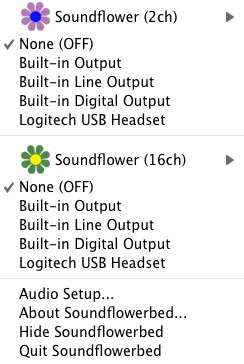
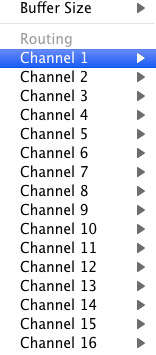
Click on the Soundflower icon on the Menu Bar and make sure the settings are put to “None (OFF)” for both Soundflower (2ch) and Soundflower (16ch). In the Soundflower (16ch) short menu make sure that Channels 1, 2, 3 and four are “None”. And that’s it, there’s nothing else you need to do with Soundflower.
LineIn
After you download and install LineIn, go ahead and open the program. There isn’t much to it at all.
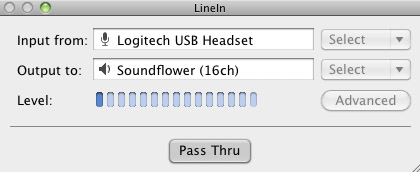
Input from: should be for your input device (mine is my Logitech USB Headset. Output to: select “Soundflower (16ch).
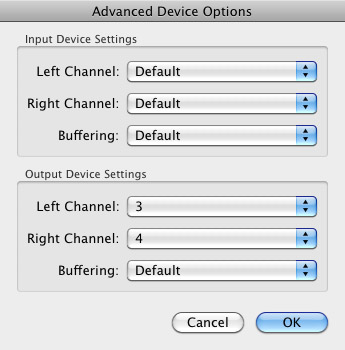
Click “Advanced” and make sure everything is set to default except for the “Output Device Settings” which should be “Left Channel: ” and “Right Channel: 4”. Click “OK”.
Select “Pass Thru” to make sure that your signal is going through LineIn.
Skype
Skype for Mac is very simple. Sometimes a bit too simple as it wont let you have certain functions like the PC version. See my post on the How to Fix the Auto Gain Control for Skype. This will alleviate the problem of Skype cranking down the gain when you are talking on your headset. If you are noticing that the louder you talk the lower your level goes then read this post.
Setting up Skype for audio podcasting is very simple.
Select Skype>Preferences and click on the “Audio” tab.
Set these parameters:
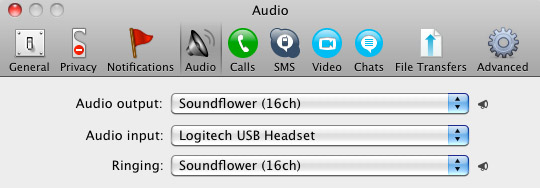
- Audio Output: Soundflower (16ch)
- Audio Input: Your input device (mine is my Logitech USB Headset
- Ringing: Soundflower (16ch)
And you’re all done with Skype.
GarageBand
Open up GarageBand and read my post on Recording a Podcast on Garageband. This will get you all set up for your record minus the setup for Skype, which I’ll let you know below.
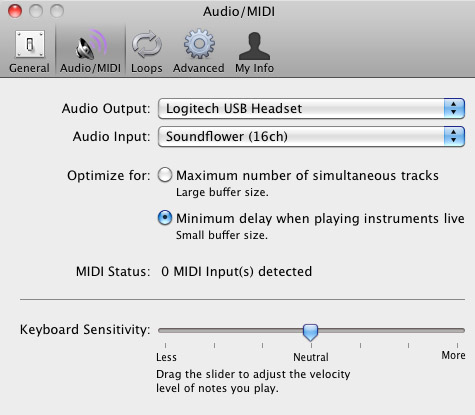
Go to the pulldown menu GarageBand>Preferences>Audio/Midi, here you will be able to select the inputs and outputs of GarageBand. Set the Audio Output to your headphones (Logitech USB Headset for me) and the Audio Input to “Soundflower (16ch). Your done with preferences.
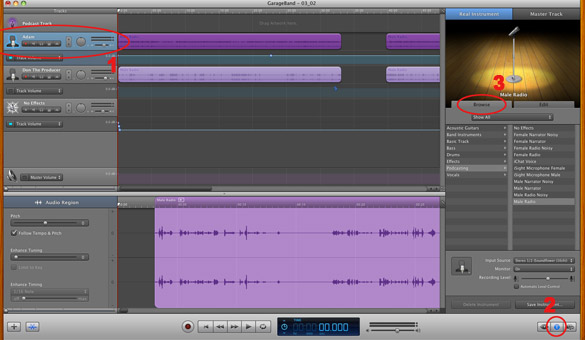
(1)Select track 1 which I have Adam on from the Ask Adam League. (2)And select the “View/Hide the Track info” button on the bottom right of the interface. (3)Also make sure you have the browse tab open as well.
At the bottom right, you have several options available for controlling the audio of this particular track which I have Adam on.
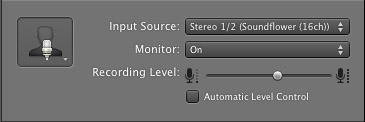
Select the parameters; Input Source: Stereo 1/2 (Soundflower (16ch)) and put the Monitor: On. You can also adjust the Recording Level here.
Repeat this for track 2 which I have as myself on my setup except that the Input will be Stereo 3/4 (Soundflower (16ch)).
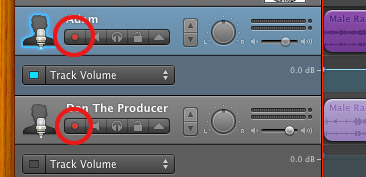
Finally, click the “Enable Recording” button for each of your tracks or else you wont be recording those tracks respectively.
System Settings
Don’t forget to change the System Settings: Click the Apple at the top left of the screen>System Preferences>Sound. Put the Output to your headphones (in my case the Logitech USB Headset) and the Input to your microphone (again the USB Headset in my case).
Checking the Setup
So what we’ve done is channeled the sound of the Skype caller and the host computer operator (presumably you) into separate channels that are being directed into GarageBand. The next step is to make sure that all your programs are fired up and double-check your settings. Skype makes it very easy to test your settings by providing the “Skype Test Call”. She’s a lovely Brit which will allow you to hear a mock call from Skype and even and ‘talk-back’ feature that will record your own voice for input checking.
Make sure your Record Enable buttons are on, hit the Record Button and hit the Skype Test Call button on Skype. Go ahead and talk over your new girlfriend and speak through the talk-back. After you’re done, check your recording. Check to see that the levels are where you want them and the fidelity of the sound. It should be fantastic.
Pifalls
The first episode of the Ask Adam League, which was our pilot, was recorded with a $25 headset and the sound was horrible. I have since gotten a $50 headset and it sounds fantastic. Any audio issues may stem from poor quality equipment and possibly not your setup.
Double-check your filters applied to each individual track. They may be interfering with the quality of your record by adjusting settings over your audio. See my post Recording a Podcast on Garageband for details.
Good Luck on your recordings! If you have any trouble at all, just post here and I’ll get back to you promptly.

To ensure that digital call facilities or hosted name centers are running effectively and producing an optimum R-I, the usage of state-of-the-art
name center software program is now not a luxurious.
I’m truly glad to find this website on yahoo, just what
I was looking for. Saved to favorites.
My web blog – phone psychic Reading
You have some interesting info here, well written as
well as your website is user-friendly.
Feel free to visit my weblog – phone psychic reading
Thank you for another excellent article. Great job.
my website; psychic readings by phone or in person
I just now discovered your blog post and today I’m among your
followers.
Also visit my site … free psychic online question
When Groupon became popular and started making tons of money,
literally a whole bunch of sites like them were created.
I enjoy looking through an article that can make men and women think.
Also, many thanks for permitting me to comment!
I’m impressed, I have to admit. Seldom do I come across a blog
that’s both equally educative and amusing, and let me tell you,
you’ve hit the nail on the head. The problem is something too few folks are speaking
intelligently about. I’m very happy I came across this
in my hunt for something relating to this.
Feel free to visit my web-site … movietube
That is a great tip particularly to those new to the blogosphere.
Brief but very accurate information… Many thanks for sharing this one.
A must read post!
My brother suggested I might like this web site.
He was totally right. This post actually made
my day. You cann’t imagine simply how much time I had spent for this information! Thanks!
Off a ledge, Seau drove his automobile hours after his charge
on feeling of domestic abuse, in 2010.
my web page :: local plumbers oceanside
5s, lensrolled to Holiday Crafts on Squidoo, too!
Have a look at my webpage – joma jewellery sister bracelet, Tawanna,
Hi to every body, it’s my first visit of this blog; this webpage contains remarkable
and genuinely good information in support of readers.
Hey! I just wanted to ask if you ever have any trouble with hackers?
My last blog (wordpress) was hacked and I ended up losing months of hard work
due to no back up. Do you have any solutions to protect
against hackers?
Hey there! Someone in my Facebook group shared this website with us so I came to
take a look. I’m definitely enjoying the information. I’m bookmarking and will be tweeting this to my followers!
Faantastic blog and wonderful style and design.
my web site :: Black Diamond Force Male Enhancement
I visited various web pages except the audio
quality for audio songs existing at this site is really
fabulous.
Pretty! This was an extremely wonderful post. Thank you for
supplying this info.
Incredible! This blog looks just like my old one! It’s on a totally different topic but it
has pretty much the same layout and design. Excellent choice of colors!
Check out my webpage … movie tube
Wow, marvelous blog format! How long have you been running a blog for?
you made running a blog glance easy. The full glance of your website is fantastic,
as neatly as the content!
This paragraph is actually a nice one it assists new the web
people, who are wishing for blogging.
Hi, its fastidious piece of writing regarding media print, we all understand media is a wonderful source
of facts.
If you desire to take a good deal from this post then you have to apply such
techniques to your won web site.
An interesting discussion is definitely worth comment.
There’s no doubt that that you should write more on this subject, it may not be a taboo matter but generally people do not talk
about such subjects. To the next! Best wishes!!
Feel free to surf to my web-site – Charm Bracelets for Women
You really make it seem so easy with your presentation but
I find this topic to be actually something that I think I would never understand.
It seems too complicated and extremely broad for me.
I am looking forward for your next post, I’ll try to
get the hang of it!
Ahaa, its pleasant discussion concerning this paragraph here at this web site,
I have read all that, so now me also commenting here.
The GAS TV California Surf Celebration will take place in Oceanside at the Crest Theatre, situated at 102 N.
Freeman Street, Oceanside on 9th and November 7th, 8th.
Visit my web-site :: oceanside california newspaper archives
I dislike reading extensive articles, simply as i’ve got some dislexia, but i
really loved this one
Thanks for sharing such a nice thinking, post is pleasant,
thats why i have read it completely
I like the valuable information you supply to your articles.
I will bookmark your weblog and take a look at
again right here frequently. I am slightly sure I’ll be informed a lot of new stuff right
right here! Best of luck for the following!
Hi there, just became aware of your blog through Google, and
found that it’s really informative. I’m going to watch out for brussels.
I will be grateful if you continue this in future.
Many people will be benefited from your writing. Cheers!
Sweet blog! I found it while surfing around on Yahoo News.
Do you have any suggestions on how to get listed in Yahoo News?
I’ve been trying for a while but I never seem to get there!
Many thanks
I do not know whether it’s just me or if perhaps everybody
else encountering problems with your blog. It looks like some of the text within your content
are running off the screen. Can someone else please comment and let me know if this is happening to them too?
This may be a issue with my browser because I’ve had this happen previously.
Cheers
Hello there! Good post! Please keep us posted!
My weblog – size genetics review (http://webbing.Var.jp/mogamix/bbs/yybbs.cgi?list=thread)
I’m glad I discovered your article. I would not have made sense of this topic on my
own. I’ve read a few other articles on this subject matter, however I was confused until I read
yours.
Feel free to surf to my website – sizegenetics extender (Chet)
I savor, cause I discovered just what I was having a look for.
You’ve ended my four day lengthy hunt! God Bless you man.
Have a nice day. Bye
Excellent post. I used to be checking constantly this weblog and I’m impressed!
Extremely useful information specially the final section 🙂 I take care of such information much.
I used to be seeking this particular info for a long
time. Thanks and good luck.
You actually make it seem so easy with your presentation but I find this matter to be really something that I think I would never understand.
It seems too complicated and very broad for me. I am looking
forward for your next post, I will try to get the hang of it!
It’s perfect time to make a few plans for the long run and
it is time to be happy. I’ve read this submit and if I may just I want to recommend you some interesting issues or
suggestions. Perhaps you can write subsequent articles relating to
this article. I wish to read even more issues about it!
I love what you guys are up too. This kind of clever work and exposure!
Keep up the good works guys I’ve included you guys to my blogroll.
hi!,I really like your writing so a lot! share we keep up a correspondence extra approximately your post on AOL?
I require an expert in this space to resolve my problem. May be
that’s you! Taking a look forward to peer you.
Hello there! I could have sworn I’ve been to this blog before but
after browsing through some of the post I realized it’s new
to me. Nonetheless, I’m definitely delighted I found it and I’ll be book-marking and checking back often!
When I initially commented I clicked the “Notify me when new comments are added” checkbox and now each time a comment is added I get several
e-mails with the same comment. Is there any way you can remove people from that service?
Appreciate it!
Also visit my web page; Popcorn Time
Hey! This post could not be written any better!
Reading this post reminds me of my previous room
mate! He always kept chatting about this. I will forward this write-up to him.
Fairly certain he will have a good read. Thank you for sharing!
Do you have a spam problem on this website; I also am a blogger, and
I was wondering your situation; many of us have developed some nice procedures and we are
looking to exchange strategies with other folks, please shoot me an email if
interested.
I take pleasure in, result in I found exactly what I was looking for.
You have ended my 4 day long hunt! God Bless you man. Have a great
day. Bye http://www.webtoolmaster.com/exebundle.htm
Find Oceanside, CA homes for other along
with sale Oceanside real estate on ®. Research Oceanside households, apartments, townhomes and individual-family properties by location and value.
Look into my web-site oceanside ca hotels on the beach
Garcinia Cambogia no está disponible en Walmart,
Sanborns, ninguna otra tienda en Morelia Michoacán. http://Www.Ourground.com:80/dicuz/home.php?mod=space&uid=231481&do=profile&from=space
Tudo isto faz com que a Tecnologia GPS se destaque
dentro e fora do paÃs pela alta qualidade de seus produtos e eficiência no seu atendimento pós-venda, garantindo aos clientes conforto,
rapidez e segurança. http://www.scmengchuang.com/home.php?mod=space&uid=83891&do=profile&from=space
Possibly when you play WGT online-this, the easiest course is a links fashion course with some openings that are traditional.
Environmental|the} Protection Agency prohibited the usage of Diazinon on golf lessons and sod farms because of its adverse impact on bird
species|In 1988, the Protection Agency banned the utilization of Diazinon on turf farms and golf
programs due to the unfavorable effect on species|In 1988, the Protection Agency prohibited the utilization of Diazinon on species on golf
courses and grass farms because of its adverse impact|In 1988, {{the U.S.||{Set|Established|Arranged|Fixed} {on|around|to} {the east
{coast|shore} of Scotland this course|Scotland
this course’s east {coast|shore}} {is|is just|is really|can be|is actually} {a {beautiful|stunning|gorgeous|lovely|wonderful}
{reminder|indication|memory|note} of what golf is {all
about|about|focused on}|of what golf is {all about|about|focused on}
a {beautiful|stunning|gorgeous|lovely|wonderful} {reminder|indication|memory|note}|of what golf is
{all about|about|focused on}, a {beautiful|stunning|gorgeous|lovely|wonderful} {reminder|indication|memory|note}}.|{{If|When|In the
event} the {weather|climate|temperature}{‘s|is} {cool|awesome|great|neat|trendy}, khaki {pants|trousers|jeans|slacks|shorts} {are usually|are often|usually are} {the|the absolute|one of the} most {comfortable|relaxed} {option|choice|alternative|selection|solution} for {women|ladies|females|girls}
{on|about|around|to} the golf course|Khaki {pants|trousers|jeans|slacks|shorts} {are
usually|are often|usually are} {the|the absolute|one of the} most {comfortable|relaxed} {option|choice|alternative|selection|solution} for {women|ladies|females|girls} {on|about|around|to} the golf course {if|when|in the event} the {weather|climate|temperature}{‘s|is}
{cool|awesome|great|neat|trendy}|Khaki {pants|trousers|jeans|slacks|shorts} {are
usually|are often|usually are} {the|the absolute|one of the} most {comfortable|relaxed} {option|choice|alternative|selection|solution} for {women|ladies|females|girls} {on|about|around|to} the golf course, {if|when|in the event} the
{weather|climate|temperature}{‘s|is} {cool|awesome|great|neat|trendy}}.|Ace have {two
Disc|Two-Disc} Golf {locations|places|areas|spots|destinations} {with|using|with all|together with} the {main|primary|principal|major|key} {18 hole|18-hole} (9 baskets) {disc|disk|cd} golf course at Auchnagairn {by|from} the
{River|Water} Findhorn in Moray {and|and
also|as well as|along with} the {other|additional|different} taster {9 hole|9-hole} (three baskets) course {at|in}
the Macdonald Aviemore Resort {in|within|inside|while in} the Cairngorm National Park.|{{At the moment|Right now|At this time} course {info|data|information} is
{arranged|organized|established|fixed} {with|using|with all|together with} the {main|primary|principal|major|key} {permanent|lasting}
{courses|programs|classes|lessons} {used on|utilized on|applied to} the
{UK|united kingdom} Tour {first, then|then|first} {the|your|a} smaller or {temporary|short-term|momentary} {courses|programs|classes|lessons}
{after, {in alphabetical|in} order by {Town|Community|Area|Village}/{City|Area|Location}|after}|{At the moment|Right now|At this time} course {info|data|information} is {arranged|organized|established|fixed} {in alphabetical|in} order by {Town|Community|Area|Village}/{City|Area|Location}
after, {with|using|with all|together with} the {main|primary|principal|major|key} {permanent|lasting} {courses|programs|classes|lessons} {used on|utilized
on|applied to} the {UK|united kingdom} Tour {first, then|then|first} {the|your|a} {temporary|short-term|momentary} or smaller {courses|programs|classes|lessons}|{At the
moment|Right now|At this time} course {info|data|information} is {arranged|organized|established|fixed} {with|using|with all|together with} the {main|primary|principal|major|key} {permanent|lasting} {courses|programs|classes|lessons} {used on|utilized on|applied to} the {UK|united kingdom} Tour {first,
then|then|first} {the|your|a} {temporary|short-term|momentary} or smaller {courses|programs|classes|lessons} {after, {in alphabetical|in} order by {Town|Community|Area|Village}/{City|Area|Location}|after}}.|{Although|Though|While} early links
{courses|programs|classes|lessons} were {often|frequently|usually|typically|generally} {close to|near to|near} the {sea|ocean|beach} it
{was|had been} {rarely|seldom} {used|utilized|employed|applied} {as|like|being|as being}
a {hazard|risk|threat|danger}, {perhaps|possibly|maybe|probably} {{due to the|because of the|as a result of} {instability|uncertainty} of the
dunes {closest|best} {to|towards|for} the water {and|and also|as well as|along with}
the {high cost|high-cost} of {hand-made|handmade|hand
made}|{due to the|because of the|as a result of} {instability|uncertainty} of the dunes {closest|best} {to|towards|for} the water {and|and also|as well as|along with} hand’s {high cost|high-cost}|due to the dunes {closest|best} {to|towards|for} the water’s {instability|uncertainty} {and|and also|as well as|along with}
the {high cost|high-cost} of {hand-made|handmade|hand
made}|due to the dunes {closest|best} {to|towards|for}
the water’s {instability|uncertainty} {and|and also|as well as|along with} hand’s {high cost|high-cost}} golf balls precluding {anything that|something that|whatever} {could result in|you could end up|could
cause} their irrecoverable {loss|damage}.}
It’s really a cool and helpful piece of info. I am glad that you just shared this helpful
information with us. Please keep us up to date like this.
Thanks for sharing.