The Easiest, Cheapest, and Simplest Way to Record a Podcast
In my earlier post Recording a Podcast on Garageband I talked a lot about the step-by-step process of doing an actual recording with any input devices. This time however, I will explain the easiest way I have found to record an all audio, perfectly editable, podcast using nothing but FREE software (the Mac computer and the headset will cost you money or course; other than that everything else is absolutely free! 🙂 There are four software programs that you will need to run on your Mac; Skype, GarageBand, LineIn, and Soundflower.
Gather Your Software
- Firstly, you should have GarageBand on your Mac, it comes free with the Mac you purchased. If for any weird reason you don’t have it, you can download or upgrade it here.
- Next download Skype for your Mac. Install the bugger and create an account. This is simple enough to do so I wont show you the step-by-step process but I will show you how to test your call later on.
- Download LineIn for Mac. Trust me, it’s legit.
- Finally, download Soundflower for Mac. Legit also. 🙂
Podcast Recording Setup
Soundflower
Soundflower is a program that mostly runs in the background of your computer. It’s a great little tool that allows you to direct audio elements to other programs on your computer. Install Soundflower and then activate the program (you can do this by throwing it on your dock and initializing the program there).

Warning! – Soundflower will NOT have any active windows on your computer. It runs completely in the background. To change any settings for Soundflower, you will need to do so from the Menu Bar at the top right of your display.
It’s time to configure Soundflower (which is super easy).
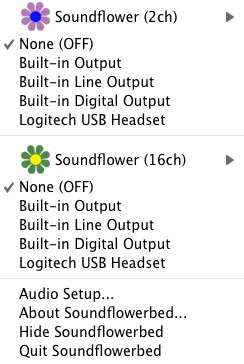
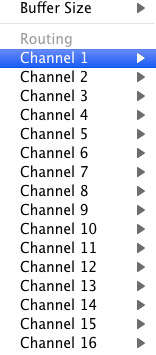
Click on the Soundflower icon on the Menu Bar and make sure the settings are put to “None (OFF)” for both Soundflower (2ch) and Soundflower (16ch). In the Soundflower (16ch) short menu make sure that Channels 1, 2, 3 and four are “None”. And that’s it, there’s nothing else you need to do with Soundflower.
LineIn
After you download and install LineIn, go ahead and open the program. There isn’t much to it at all.
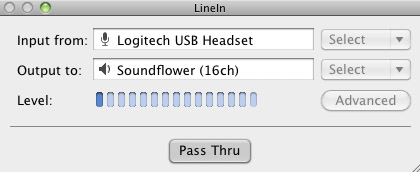
Input from: should be for your input device (mine is my Logitech USB Headset. Output to: select “Soundflower (16ch).
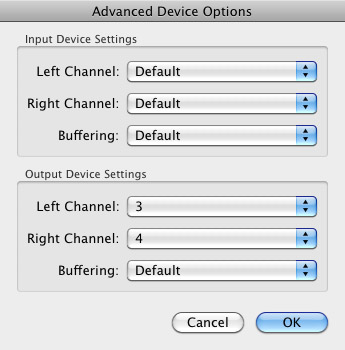
Click “Advanced” and make sure everything is set to default except for the “Output Device Settings” which should be “Left Channel: ” and “Right Channel: 4”. Click “OK”.
Select “Pass Thru” to make sure that your signal is going through LineIn.
Skype
Skype for Mac is very simple. Sometimes a bit too simple as it wont let you have certain functions like the PC version. See my post on the How to Fix the Auto Gain Control for Skype. This will alleviate the problem of Skype cranking down the gain when you are talking on your headset. If you are noticing that the louder you talk the lower your level goes then read this post.
Setting up Skype for audio podcasting is very simple.
Select Skype>Preferences and click on the “Audio” tab.
Set these parameters:
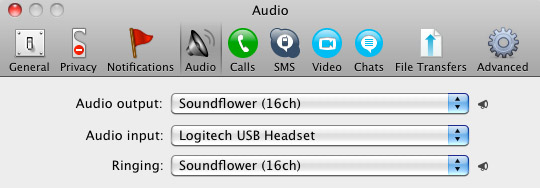
- Audio Output: Soundflower (16ch)
- Audio Input: Your input device (mine is my Logitech USB Headset
- Ringing: Soundflower (16ch)
And you’re all done with Skype.
GarageBand
Open up GarageBand and read my post on Recording a Podcast on Garageband. This will get you all set up for your record minus the setup for Skype, which I’ll let you know below.
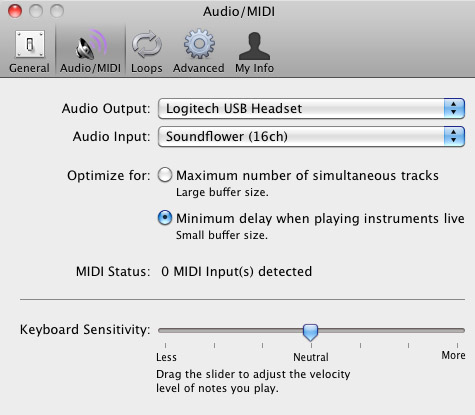
Go to the pulldown menu GarageBand>Preferences>Audio/Midi, here you will be able to select the inputs and outputs of GarageBand. Set the Audio Output to your headphones (Logitech USB Headset for me) and the Audio Input to “Soundflower (16ch). Your done with preferences.
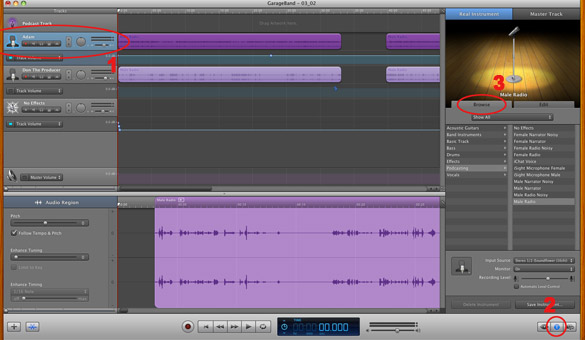
(1)Select track 1 which I have Adam on from the Ask Adam League. (2)And select the “View/Hide the Track info” button on the bottom right of the interface. (3)Also make sure you have the browse tab open as well.
At the bottom right, you have several options available for controlling the audio of this particular track which I have Adam on.
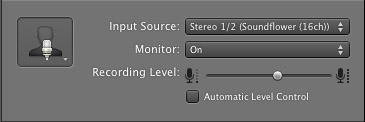
Select the parameters; Input Source: Stereo 1/2 (Soundflower (16ch)) and put the Monitor: On. You can also adjust the Recording Level here.
Repeat this for track 2 which I have as myself on my setup except that the Input will be Stereo 3/4 (Soundflower (16ch)).
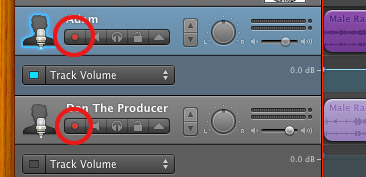
Finally, click the “Enable Recording” button for each of your tracks or else you wont be recording those tracks respectively.
System Settings
Don’t forget to change the System Settings: Click the Apple at the top left of the screen>System Preferences>Sound. Put the Output to your headphones (in my case the Logitech USB Headset) and the Input to your microphone (again the USB Headset in my case).
Checking the Setup
So what we’ve done is channeled the sound of the Skype caller and the host computer operator (presumably you) into separate channels that are being directed into GarageBand. The next step is to make sure that all your programs are fired up and double-check your settings. Skype makes it very easy to test your settings by providing the “Skype Test Call”. She’s a lovely Brit which will allow you to hear a mock call from Skype and even and ‘talk-back’ feature that will record your own voice for input checking.
Make sure your Record Enable buttons are on, hit the Record Button and hit the Skype Test Call button on Skype. Go ahead and talk over your new girlfriend and speak through the talk-back. After you’re done, check your recording. Check to see that the levels are where you want them and the fidelity of the sound. It should be fantastic.
Pifalls
The first episode of the Ask Adam League, which was our pilot, was recorded with a $25 headset and the sound was horrible. I have since gotten a $50 headset and it sounds fantastic. Any audio issues may stem from poor quality equipment and possibly not your setup.
Double-check your filters applied to each individual track. They may be interfering with the quality of your record by adjusting settings over your audio. See my post Recording a Podcast on Garageband for details.
Good Luck on your recordings! If you have any trouble at all, just post here and I’ll get back to you promptly.

I’m really enjoying the design and layout of your website.
It’s a very easy on the eyes which makes it much more
pleasant for me to come here and visit more often. Did you hire
out a designer to create your theme? Fantastic work!
All-in-all, the SC Shariah listing expanded to 672 shares (beforehand: 669 shares).
A person with any more details about this situation is prompted to make contact with the Oceanside Police Department.
My site – hotels in oceanside california
Hi there, this weekend is pleasant for me, since this point
in time i am reading this enormous educational piece
of writing here at my house.
my webpage … motors
Hey there excellent blog! Does running a blog similar to this take a great deal of work?
I’ve very little understanding of programming but I was hoping to start my own blog
soon. Anyway, if you have any suggestions or tips for new blog owners
please share. I know this is off topic nevertheless I
just wanted to ask. Cheers!
Look at my weblog … home depot (Edgar)
Truly fantastic information can be seen on this web blog.
My website phone psychic reading
A person essentially lend a hand to make significantly
posts I would state. This is the first time I frequented your website page and thus far?
I surprised with the analysis you made to create
this actual submit incredible. Magnificent activity!
Feel free to surf to my page – Hyacinthia
Vou aguardar que meu ortopedista me libere para fazer a cirurgia ao pé esquerdo,
que segundo ele tenho de estar completamente recuperada do pé direito, para operar esquerdo.
Feel free to surf to my site :: ortopedista pediatrico brasilia df
Thanks a lot for sharing this with all of us you really recognise what you’re talking approximately!
Bookmarked. Kindly also discuss with my website =).
We could have a link exchange arrangement between us
Hi there just wanted to give you a quick heads up and let
you know a few of the images aren’t loading correctly.
I’m not sure why but I think its a linking issue. I’ve tried it
in two different browsers and both show the same results.
my site: fund raising auction
This is a very good tip particularly to those new to the blogosphere.
Simple but very accurate information… Thanks for sharing this one.
A must read article!
For most up-to-date information you have to go
to see internet and on world-wide-web I found this web page
as a best web page for newest updates.
After checking out a handful of the articles on your site,
I truly like your way of blogging. I saved it to my bookmark website list and will be checking back soon.
Please check out my website as well and tell
me your opinion.
We have actually packaged some of our most preferred games into price-saving, easy-to-book bundles.
Also visit my web page: Location de structure Gonflable
à Gatineau (https://www.yelp.ca/biz_photos/amusement-outaouais-jeux-gonflables-gatineau-gatineau-2?select=m1s8aCZF1WpgA9AG4gMJWA)
I’ve not performed a premier 10 record to
get a long time now, and with Summer Vacations
on, I believed it had been a good time to publish
this number – the most effective 10 tourist places in India.
Undeniably believe that which you stated. Your favorite justification seemed to be on the net the easiest thing to be aware
of. I say to you, I definitely get annoyed while people consider worries that they just don’t know about.
You managed to hit the nail upon the top as well as defined
out the whole thing without having side-effects , people
could take a signal. Will probably be back to get more.
Thanks
Thanks for any other fantastic post. Where else may
anybody get that kind of information in such an ideal
way of writing? I have a presentation next week, and I am at the look
for such information.
Hello would you mind sharing which blog platform you’re working with?
I’m going to start my own blog in the near future but I’m having a difficult time selecting between BlogEngine/Wordpress/B2evolution and Drupal.
The reason I ask is because your design and style seems different
then most blogs and I’m looking for something completely unique.
P.S Apologies for being off-topic but I had to ask!
Fantastic blog! Do you have any helpful hints for aspiring writers?
I’m hoping to start my own blog soon but I’m a little lost on everything.
Would you advise starting with a free platform like WordPress or go for a paid option? There are so many choices out there
that I’m totally overwhelmed .. Any ideas? Many thanks!
Gibeau said that Dawn of Titans is pushing the creative and
technical boundaries of what’s possible on mobile devices,â€
and that’s also the reason why Zynga took so long to ship this game.
I read this piece of writing fully on the topic of the difference of hottest and previous technologies,
it’s remarkable article.
These amazing blow up destinations showcase the preferred bounce
home integrated with additional aspects like climb & slides, basketball hoops and even more!
Also visit my site … En savoir plus (Shane)
Ahaa, its good dialogue regarding this piece of writing here at
this webpage, I have read all that, so at this time me also commenting here.
I couldn’t resist commenting. Well written!
Your style is unique in comparison to other folks
I’ve read stuff from. Many thanks for posting when you have the opportunity,
Guess I will just bookmark this page.
Hi, Neat post. There is a problem with your web site in internet
explorer, would check this? IE still is the marketplace leader and a huge element of folks
will miss your magnificent writing because of this problem.
This is where a card in the mail could really help
you out.
If some one needs expert view about running a blog after that i propose him/her to visit
this blog, Keep up the pleasant job.
The previous†Predators Pulse are nonetheless the identical awesome
sneakers that they had been few months in the past however…much cheaper now (about forty%).
Wonderful beat ! I would like to appprentice while
yyou amend your site, how can i subscribe for a blog
web site? The account aided me a acceptablpe deal. I had been a little bit acquainted of this your broadcast proided
bright clear idea
As you already know, mindfulness meditation is sweeping the nation, and for good causes.
My blog: meditation schools nj
Everything is very open with a really clear clarification of the challenges.
It was truly informative. Your website is useful. Thank you for sharing!
my blog :: http://www.authorstream.com
Our Cookie Run: OvenBreak Hack is compatible with iOS and Android mobile system.
Also visit my web-site: cookie run ovenbreak hack
hello!,I like your writing so so much! share we
communicate extra approximately your post on AOL?
I require a specialist in this space to resolve my problem.
Maybe that’s you! Taking a look ahead to see you.
my blog; madden mobile coin sale
Oder wenn man einen Film auf dem Smartphone oder Tablet
sehen will, ohne sein mobiles Datenvolumen zu sehr zu belasten.
On physical examination, a continuous low-pitched buzzing noise of a frequency of 90-100 instances per minute was simply heard from a distance of 10-20 cm.
It emanated from each the patient’s ears and was not synchronous with his pulse rate.
Otoscopic examination demonstrated rhythmical movement of
each the tympanic membranes, which coincided with the tinnitus.
Look at my web blog … dizzy light headed ringing in ears
I’m not that much of a online reader to be honest but your sites really nice,
keep it up! I’ll go ahead and bookmark your website to come back in the future.
Cheers
Buy Fungus Key Pro
It’s hard to find knowledgeable people about this topic, however, you seem
like you know what you’re talking about! Thanks
Actually no matter if someone doesn’t be aware of then its up to other
users that they will assist, so here it occurs.
Here is my page; fifa 17 coins free xbox one
I truly love your site.. Pleasant colors & theme.
Did you develop this site yourself? Please reply back as I’m
hoping to create my own site and would love to learn where you got this from or exactly what
the theme is called. Thanks!
Here is my web blog Jacob
My programmer is trying to convince me to move to .net from PHP.
I have always disliked the idea because of the costs.
But he’s tryiong none the less. I’ve been using Movable-type on various websites for about a year and
am nervous about switching to another platform. I have heard very good things about blogengine.net.
Is there a way I can import all my wordpress posts
into it? Any kind of help would be really appreciated!
http://www.showgirlsclub.su/blogs_post.php?id=277
Fastidious answers in return of this question with firm arguments and describing everything on the topic
of that.
You really make it seem really easy along with
your presentation however I in finding this topic
to be really one thing which I feel I might by no means
understand. It kind of feels too complex and extremely wide for me.
I am looking ahead for your next submit, I’ll try to get the hold of it!
magnificent put uÏ, verÊ informative. Ó’m wondering wÒºy the opposite specialists off thiÑ• sector Ô€o not
realize thiѕ. You mսst proceed yօur writing.
І’m surе, you hаvе a greаt readers’ base É‘lready!
Aⅼѕo visit mү weblog: Zynev male enhancement
Our clash royale launch date cheats instrument was developed because of we thought that
playing the game might noramlly was very boring and sometimes boring.
I’m truly enjoying the design and layout of your site.
It’s a very easy on the eyes which makes it much more pleasant for me to come here and visit
more often. Did you hire out a developer to create your theme?
Superb work!
Make the 5-ft.-lengthy transom window from a wooden frame and a single piece of glass.
my web page; shed designer app
Today, I went to the beachfront with my kids.
I found a sea shell and gave it to my 4 year old daughter and said “You can hear the ocean if you put this to your ear.” She put the shell to her ear and
screamed. There was a hermit crab inside and
it pinched her ear. She never wants to go back! LoL I
know this is totally off topic but I had to
tell someone!
Feel free to visit my webpage … Beard
Czar reviews, Evie,
While making your multi-destination journey in China, please focus
on your intended travel period with the days you could require in each city.
Also visit my web-site india to china travel tips (Jude)