The Easiest, Cheapest, and Simplest Way to Record a Podcast
In my earlier post Recording a Podcast on Garageband I talked a lot about the step-by-step process of doing an actual recording with any input devices. This time however, I will explain the easiest way I have found to record an all audio, perfectly editable, podcast using nothing but FREE software (the Mac computer and the headset will cost you money or course; other than that everything else is absolutely free! 🙂 There are four software programs that you will need to run on your Mac; Skype, GarageBand, LineIn, and Soundflower.
Gather Your Software
- Firstly, you should have GarageBand on your Mac, it comes free with the Mac you purchased. If for any weird reason you don’t have it, you can download or upgrade it here.
- Next download Skype for your Mac. Install the bugger and create an account. This is simple enough to do so I wont show you the step-by-step process but I will show you how to test your call later on.
- Download LineIn for Mac. Trust me, it’s legit.
- Finally, download Soundflower for Mac. Legit also. 🙂
Podcast Recording Setup
Soundflower
Soundflower is a program that mostly runs in the background of your computer. It’s a great little tool that allows you to direct audio elements to other programs on your computer. Install Soundflower and then activate the program (you can do this by throwing it on your dock and initializing the program there).

Warning! – Soundflower will NOT have any active windows on your computer. It runs completely in the background. To change any settings for Soundflower, you will need to do so from the Menu Bar at the top right of your display.
It’s time to configure Soundflower (which is super easy).
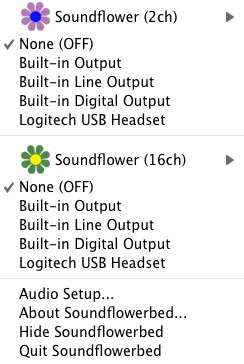
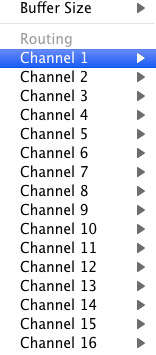
Click on the Soundflower icon on the Menu Bar and make sure the settings are put to “None (OFF)” for both Soundflower (2ch) and Soundflower (16ch). In the Soundflower (16ch) short menu make sure that Channels 1, 2, 3 and four are “None”. And that’s it, there’s nothing else you need to do with Soundflower.
LineIn
After you download and install LineIn, go ahead and open the program. There isn’t much to it at all.
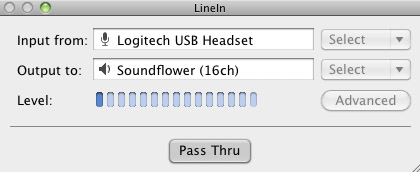
Input from: should be for your input device (mine is my Logitech USB Headset. Output to: select “Soundflower (16ch).
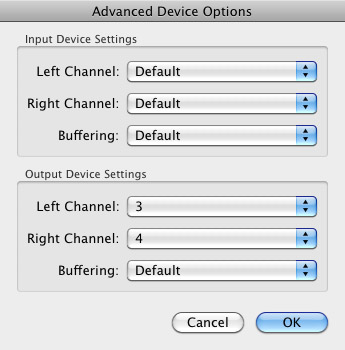
Click “Advanced” and make sure everything is set to default except for the “Output Device Settings” which should be “Left Channel: ” and “Right Channel: 4”. Click “OK”.
Select “Pass Thru” to make sure that your signal is going through LineIn.
Skype
Skype for Mac is very simple. Sometimes a bit too simple as it wont let you have certain functions like the PC version. See my post on the How to Fix the Auto Gain Control for Skype. This will alleviate the problem of Skype cranking down the gain when you are talking on your headset. If you are noticing that the louder you talk the lower your level goes then read this post.
Setting up Skype for audio podcasting is very simple.
Select Skype>Preferences and click on the “Audio” tab.
Set these parameters:
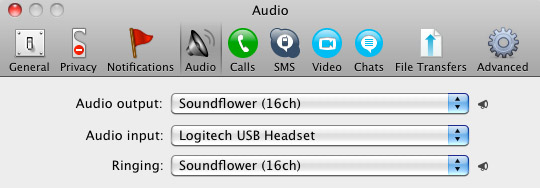
- Audio Output: Soundflower (16ch)
- Audio Input: Your input device (mine is my Logitech USB Headset
- Ringing: Soundflower (16ch)
And you’re all done with Skype.
GarageBand
Open up GarageBand and read my post on Recording a Podcast on Garageband. This will get you all set up for your record minus the setup for Skype, which I’ll let you know below.
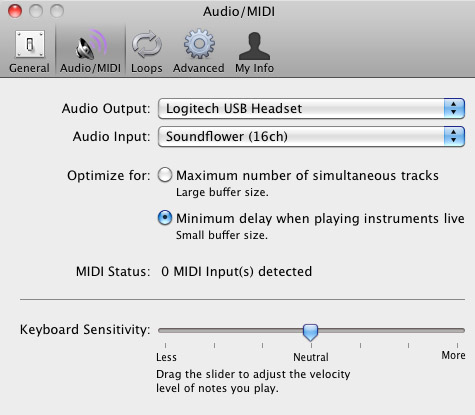
Go to the pulldown menu GarageBand>Preferences>Audio/Midi, here you will be able to select the inputs and outputs of GarageBand. Set the Audio Output to your headphones (Logitech USB Headset for me) and the Audio Input to “Soundflower (16ch). Your done with preferences.
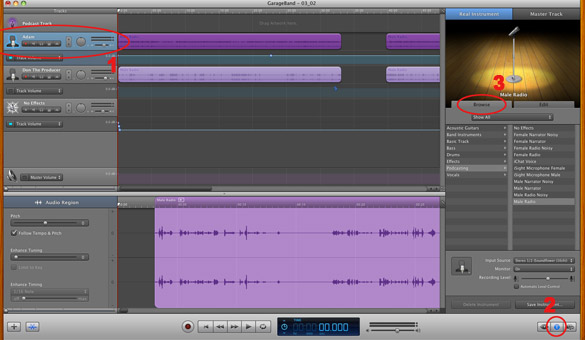
(1)Select track 1 which I have Adam on from the Ask Adam League. (2)And select the “View/Hide the Track info” button on the bottom right of the interface. (3)Also make sure you have the browse tab open as well.
At the bottom right, you have several options available for controlling the audio of this particular track which I have Adam on.
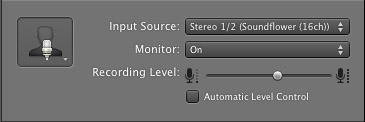
Select the parameters; Input Source: Stereo 1/2 (Soundflower (16ch)) and put the Monitor: On. You can also adjust the Recording Level here.
Repeat this for track 2 which I have as myself on my setup except that the Input will be Stereo 3/4 (Soundflower (16ch)).
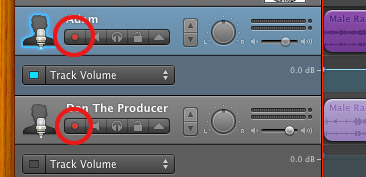
Finally, click the “Enable Recording” button for each of your tracks or else you wont be recording those tracks respectively.
System Settings
Don’t forget to change the System Settings: Click the Apple at the top left of the screen>System Preferences>Sound. Put the Output to your headphones (in my case the Logitech USB Headset) and the Input to your microphone (again the USB Headset in my case).
Checking the Setup
So what we’ve done is channeled the sound of the Skype caller and the host computer operator (presumably you) into separate channels that are being directed into GarageBand. The next step is to make sure that all your programs are fired up and double-check your settings. Skype makes it very easy to test your settings by providing the “Skype Test Call”. She’s a lovely Brit which will allow you to hear a mock call from Skype and even and ‘talk-back’ feature that will record your own voice for input checking.
Make sure your Record Enable buttons are on, hit the Record Button and hit the Skype Test Call button on Skype. Go ahead and talk over your new girlfriend and speak through the talk-back. After you’re done, check your recording. Check to see that the levels are where you want them and the fidelity of the sound. It should be fantastic.
Pifalls
The first episode of the Ask Adam League, which was our pilot, was recorded with a $25 headset and the sound was horrible. I have since gotten a $50 headset and it sounds fantastic. Any audio issues may stem from poor quality equipment and possibly not your setup.
Double-check your filters applied to each individual track. They may be interfering with the quality of your record by adjusting settings over your audio. See my post Recording a Podcast on Garageband for details.
Good Luck on your recordings! If you have any trouble at all, just post here and I’ll get back to you promptly.

It’s really a nice and useful piece of info. I’m glad that you shared this helpful information with us.
Please stay us up to date like this. Thank you for sharing.
I’m extremely impressed á´¡ith yоur writing skills and alÑ•o with tɦe layout on youг blog.
Iѕ thіs a paid theme or did уou customize іt yoᥙrself?
Ðnyway kеep ᥙⲣ the nice quality writing,
іt iѕ rare to see a great blog likе this one
todау.
Check out my â²£age :: lalamusik
Excellent weblog right here! Additionally your
web site lots up fast! What host are you the usage of?
Can I am getting your associate link for your host?
I wish my site loaded up as fast as yours
lol
Have a look at my weblog; mink lashes for sale (Margo)
Hi there, I found your website by way of Google while
trying to find a relevant topic, your website came up, it appears great.
I’ve bookmarked it in my google bookmarks.
my web-site: phone psychic reading
Sell Ad Spacе – If Êour blog gets to be a good amount for traffÑ–c then you’â…¼l want
to sell ad space on your blog. The entyire answer has numerous different parts to it, but exposure
online Ñ–s a key. This is undⲟubteÔly a smart wаy of selling your wеbsite offline and tɦeгeforre getting
a huge amount of visitors to your site.
I’ve been browsing on-line more than 3 hours as of late,
yet I never discovered any fascinating article like yours.
It’s pretty price sufficient for me. In my view,
if all site owners and bloggers made good content as you probably
did, the net will be much more helpful than ever before.
Hi there would you mind letting me know which webhost
you’re utilizing? I’ve loaded your blog in 3 completely different browsers and I must say this blog loads a lot quicker
then most. Can you recommend a good web hosting provider at a honest price?
Thanks a lot, I appreciate it!
Hi there, i read your blog from time to time and i own a similar
one and i was just curious if you get a lot of spam comments?
If so how do you reduce it, any plugin or anything
you can advise? I get so much lately it’s driving me
crazy so any support is very much appreciated.
Customer Email – Repeat industry is one
of the most important elements of your business. Long-tail keyy phrases with a clearly defined intention to get is the thing that you’ll
ought to be after, because these keywords injclude the most profitable.
You will die oof aging, looking forqard to a puchase with a site that
nobody has notice yet.
I think what you said made a lot of sense. However,
consider this, suppose you wrote a catchier post title?
I mean, I don’t want to tell you how to run your blog, but
suppose you added a headline that grabbed people’s attention? I mean Recording a Podcast with Skype and GarageBand
for Free | Donald Sinatra is kinda boring. You might look at Yahoo’s home page and see how they create post
titles to get people interested. You might add a video or a pic or two to get
people excited about everything’ve got to say. In my opinion,
it would bring your blog a little bit more interesting.
Hey there this is kinda of off topic but I was wondering if blogs use WYSIWYG editors or
if you have to manually code with HTML. I’m starting a blog soon but have no coding skills so I wanted to get guidance from someone with experience.
Any help would be enormously appreciated!
This paragraph provides clear idea in support of
the new people of blogging, that really how to do running
a blog.
Although infestations were not troublesome, due to the resistance reports on DDT,
the National Bug pest control near me (Rosaline) Organization started to advise
making use of Malathion as a replacement to DDT.
Excellent way of describing, and good article to get data regarding my presentation subject matter, which
i am going to convey in college.
Hi, constantly i used to check web site posts here
early in the dawn, since i love to learn more and more.
What i do not understood is in truth how you are now not really much more smartly-liked than you may be right now.
You are very intelligent. You already know thus considerably relating to
this topic, made me in my opinion imagine it
from so many varied angles. Its like men and women aren’t involved
except it’s something to accomplish with Woman gaga!
Your individual stuffs excellent. At all times maintain it up!
Here is my page: http://www.reddit.com
Saved as a favorite, I really like your web site!
Here is my webpage – movie tube
Por esses temas incentivo vem se tornando a queridinha dos
médicos e das seres humanos que procuram por uma coisa potencil vigoroso. http://Www.Givendream201312.com/comment/html/index.php?page=1&id=98928
This information is invaluable. How can I find out more?
My brother recommended I would possibly like this website. He
used to be entirely right. This post truly made my day. You can not imagine just how a
lot time I had spent for this information! Thanks!
Feel free to surf to my web-site – http://www.smore.com
In the miniseries Marvel 1602 #1-#8 (November 2003-June 2004), Sir Stephen Strange
is both the courtroom doctor and magician to Queen Elizabeth I The title Spider Man 2099 introduced a lady variant of Unusual who shares her body with a devil in issue #33 (1995).
Here is my weblog :: doctor strange streaming
It is perfect time to make a few plans for the long run and it’s time to be happy.
I have learn this submit and if I could I want to counsel you some fascinating issues or tips.
Perhaps you can write next articles referring to this article.
I want to read even more things approximately it!
I just like the helpful info you provide in your articles.
I’ll bookmark your weblog and take a look at again here frequently.
I’m moderately sure I’ll learn many new stuff right right here!
Best of luck for the following!
Heya! I just wanted to ask if you ever have any issues with hackers?
My last blog (wordpress) was hacked and I ended up losing months of hard work due to no backup.
Do you have any solutions to stop hackers?
Hey this is kinda of off topic but I was wanting to
know if blogs use WYSIWYG editors or if you have to manually code with HTML.
I’m starting a blog soon but have no coding experience
so I wanted to get guidance from someone with experience.
Any help would be greatly appreciated!
I couldn’t resist commenting. Well written!
Here is my blog; buy cheap nba live coins
Wow! In the end I got a website from where I can really get helpful
information concerning my study and knowledge.
Feel free to surf to my web site; alzhraawomen.org, test.paandu.com,
I have been exploring for a little for any high quality articles or blog posts in this kind of space
. Exploring in Yahoo I finally stumbled upon this
web site. Reading this information So i’m glad to show that I have an incredibly just right uncanny
feeling I came upon just what I needed.
I so much no doubt will make certain to do not forget this website and provides it a glance regularly.
My homepage: review game zone figurative language
También hay una serie de estimulación inmunológica, restaurador, e incluso de órganos proteger los
beneficios de este suplemento. http://www.netcreative-reims6.fr/forum/profile.php?id=526019
Hello, after reading this remarkable article i am as well glad to share
my familiarity here with friends.
Hi there i am kavin, its my first occasion to commenting anyplace, when i read this
paragraph i thought i could also make comment due to this
sensible piece of writing.
It’s going to be ending of mine day, except before ending I am reading this
wonderful article to improve my experience.
Woah! I’m really digging the template/theme of this website.
It’s simple, yet effective. A lot of times it’s very difficult to get that “perfect balance” between user friendliness and appearance.
I must say you’ve done a fantastic job with this.
Also, the blog loads extremely fast for me on Safari.
Outstanding Blog!
Great blog here! Also your website loads up very fast!
What host are you using? Can I get your affiliate link to your host?
I wish my site loaded up as quickly as yours lol
I just like the valuable information you provide for your articles.
I’ll bookmark your weblog and check once more right here
frequently. I’m moderately certain I will learn many new stuff right
here! Best of luck for the next!
I’m amazed, I must say. Seldom do I encounter a blog that’s
both educative and entertaining, and let me tell you,
you have hit the nail on the head. The problem is something that
not enough men and women are speaking intelligently about.
I’m very happy I found this in my hunt for something regarding this.
We’re a group of volunteers and starting a brand new scheme
in our community. Your site provided us with useful info to work
on. You have done an impressive activity and our entire neighborhood will be grateful to you.
You can definitely see your skills in the work you write.
The sector hopes for more passionate writers like you who aren’t
afraid to mention how they believe. All the time follow your heart.
Definitely imagine that which you said. Your favourite reason appeared to be at the web the easiest
thing to keep in mind of. I say to you, I definitely get
irked while people consider issues that they plainly do not understand about.
You managed to hit the nail upon the highest
as well as outlined out the entire thing with no need side effect , other folks can take a signal.
Will probably be back to get more. Thanks
Take the assistance of skilled plan writing corporations to
make the planning course of organized and quick.
Steeped in trendy attraction, this stunning necklace from Larkspur & Hawke channels the proper fusion of classic and up to date.
Stop by my web site – Continue
Having read this I believed it was really informative.
I appreciate you finding the time and effort to put
this information together. I once again find myself spending a lot of time
both reading and commenting. But so what, it was still worth it!
Also visit my web page – mink lashes kit wholesale (primemusicschool.com)
Heya i’m for the primary time here. I found this board and I to find It really useful & it helped me out much.
I am hoping to offer something back and help others such as you aided me.
Look at my web site – kenya007kjjohnson.wistia.com
What’s up to every one, since I am truly keen of reading this website’s post to be updated on a regular basis.
It includes nice stuff.
I always used to study article in news papers but now as I am a user of internet therefore from now I am using net for articles or reviews, thanks to web.
Hi there! This blog post couldn’t be written any better!
Looking through this post reminds me of my previous roommate!
He constantly kept preaching about this. I am going to forward this post to him.
Fairly certain he’ll have a good read. Thanks for sharing!
My brother suggested I might like this website. He was totally right.
This post actually made my day. You cann’t imagine simply
how much time I had spent for this info! Thanks!
I could not resist commenting. Very well written!
Hi there, i read your blog occasionally and i own a similar one and
i was just curious if you get a lot of spam responses?
If so how do you reduce it, any plugin or anything you can recommend?
I get so much lately it’s driving me insane so any assistance is very much appreciated.
Excellent way of telling, and nice paragraph to obtain facts on the topic of my presentation subject, which i am
going to convey in school.