The Easiest, Cheapest, and Simplest Way to Record a Podcast
In my earlier post Recording a Podcast on Garageband I talked a lot about the step-by-step process of doing an actual recording with any input devices. This time however, I will explain the easiest way I have found to record an all audio, perfectly editable, podcast using nothing but FREE software (the Mac computer and the headset will cost you money or course; other than that everything else is absolutely free! 🙂 There are four software programs that you will need to run on your Mac; Skype, GarageBand, LineIn, and Soundflower.
Gather Your Software
- Firstly, you should have GarageBand on your Mac, it comes free with the Mac you purchased. If for any weird reason you don’t have it, you can download or upgrade it here.
- Next download Skype for your Mac. Install the bugger and create an account. This is simple enough to do so I wont show you the step-by-step process but I will show you how to test your call later on.
- Download LineIn for Mac. Trust me, it’s legit.
- Finally, download Soundflower for Mac. Legit also. 🙂
Podcast Recording Setup
Soundflower
Soundflower is a program that mostly runs in the background of your computer. It’s a great little tool that allows you to direct audio elements to other programs on your computer. Install Soundflower and then activate the program (you can do this by throwing it on your dock and initializing the program there).

Warning! – Soundflower will NOT have any active windows on your computer. It runs completely in the background. To change any settings for Soundflower, you will need to do so from the Menu Bar at the top right of your display.
It’s time to configure Soundflower (which is super easy).
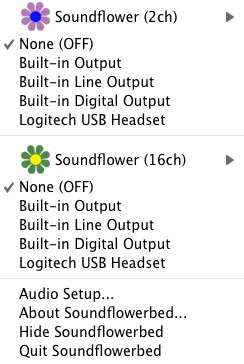
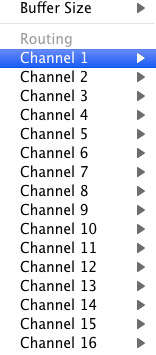
Click on the Soundflower icon on the Menu Bar and make sure the settings are put to “None (OFF)” for both Soundflower (2ch) and Soundflower (16ch). In the Soundflower (16ch) short menu make sure that Channels 1, 2, 3 and four are “None”. And that’s it, there’s nothing else you need to do with Soundflower.
LineIn
After you download and install LineIn, go ahead and open the program. There isn’t much to it at all.
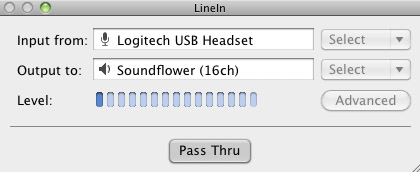
Input from: should be for your input device (mine is my Logitech USB Headset. Output to: select “Soundflower (16ch).
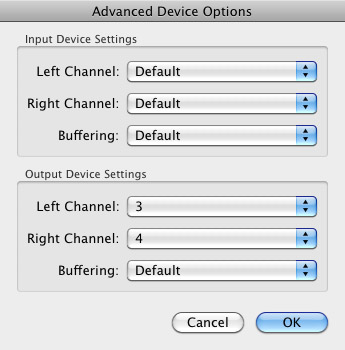
Click “Advanced” and make sure everything is set to default except for the “Output Device Settings” which should be “Left Channel: ” and “Right Channel: 4”. Click “OK”.
Select “Pass Thru” to make sure that your signal is going through LineIn.
Skype
Skype for Mac is very simple. Sometimes a bit too simple as it wont let you have certain functions like the PC version. See my post on the How to Fix the Auto Gain Control for Skype. This will alleviate the problem of Skype cranking down the gain when you are talking on your headset. If you are noticing that the louder you talk the lower your level goes then read this post.
Setting up Skype for audio podcasting is very simple.
Select Skype>Preferences and click on the “Audio” tab.
Set these parameters:
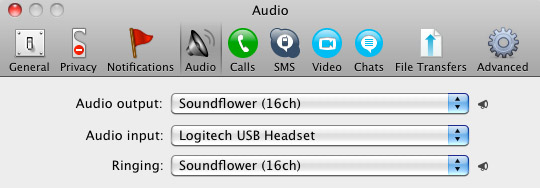
- Audio Output: Soundflower (16ch)
- Audio Input: Your input device (mine is my Logitech USB Headset
- Ringing: Soundflower (16ch)
And you’re all done with Skype.
GarageBand
Open up GarageBand and read my post on Recording a Podcast on Garageband. This will get you all set up for your record minus the setup for Skype, which I’ll let you know below.
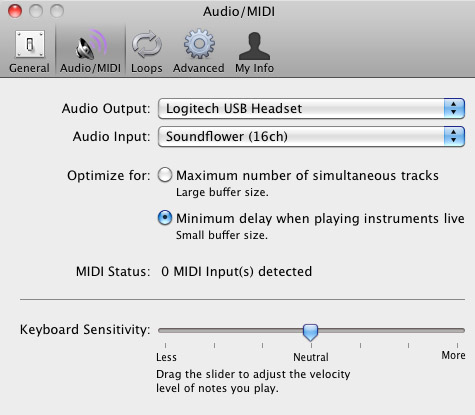
Go to the pulldown menu GarageBand>Preferences>Audio/Midi, here you will be able to select the inputs and outputs of GarageBand. Set the Audio Output to your headphones (Logitech USB Headset for me) and the Audio Input to “Soundflower (16ch). Your done with preferences.
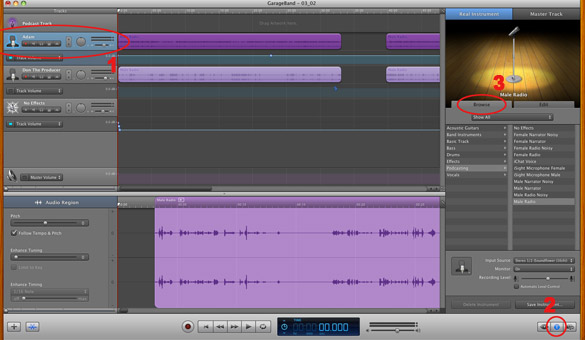
(1)Select track 1 which I have Adam on from the Ask Adam League. (2)And select the “View/Hide the Track info” button on the bottom right of the interface. (3)Also make sure you have the browse tab open as well.
At the bottom right, you have several options available for controlling the audio of this particular track which I have Adam on.
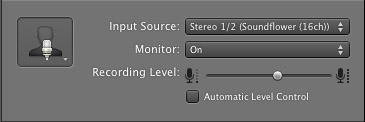
Select the parameters; Input Source: Stereo 1/2 (Soundflower (16ch)) and put the Monitor: On. You can also adjust the Recording Level here.
Repeat this for track 2 which I have as myself on my setup except that the Input will be Stereo 3/4 (Soundflower (16ch)).
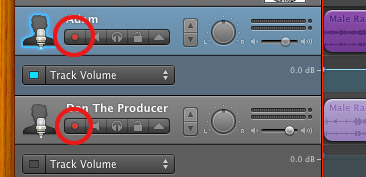
Finally, click the “Enable Recording” button for each of your tracks or else you wont be recording those tracks respectively.
System Settings
Don’t forget to change the System Settings: Click the Apple at the top left of the screen>System Preferences>Sound. Put the Output to your headphones (in my case the Logitech USB Headset) and the Input to your microphone (again the USB Headset in my case).
Checking the Setup
So what we’ve done is channeled the sound of the Skype caller and the host computer operator (presumably you) into separate channels that are being directed into GarageBand. The next step is to make sure that all your programs are fired up and double-check your settings. Skype makes it very easy to test your settings by providing the “Skype Test Call”. She’s a lovely Brit which will allow you to hear a mock call from Skype and even and ‘talk-back’ feature that will record your own voice for input checking.
Make sure your Record Enable buttons are on, hit the Record Button and hit the Skype Test Call button on Skype. Go ahead and talk over your new girlfriend and speak through the talk-back. After you’re done, check your recording. Check to see that the levels are where you want them and the fidelity of the sound. It should be fantastic.
Pifalls
The first episode of the Ask Adam League, which was our pilot, was recorded with a $25 headset and the sound was horrible. I have since gotten a $50 headset and it sounds fantastic. Any audio issues may stem from poor quality equipment and possibly not your setup.
Double-check your filters applied to each individual track. They may be interfering with the quality of your record by adjusting settings over your audio. See my post Recording a Podcast on Garageband for details.
Good Luck on your recordings! If you have any trouble at all, just post here and I’ll get back to you promptly.

I for all time emailed this weblog post page to all my friends, as if like to read it
after that my contacts will too.
Se for muito difÃcil usar a imaginação para
relembrar bons momentos sexuais com seu parceiro ou meditar
em possÃveis fantasias, então você é possÃvel que deixar que a literatura erótica faça trabalho por você. http://nairavillage.com/net/?ad_listing=minha-libido-sumiu
Leathers are regarded as the essential material for
the Nike Zoom Lebron v manufacturing.
You never actually need both of the increases to become huge…but if
you have some energy as well as the different is just within the
background currently helping to split up the main swell you may get some insane a frames spread around the beach.
Here is my blog post – oceanside homes for sale
Hey this is kinda of off topic but I was wondering if blogs use WYSIWYG editors or if you have to manually code with HTML.
I’m starting a blog soon but have no coding expertise so I wanted to get guidance from someone with
experience. Any help would be greatly appreciated!
This article is in fact a fastidious one it assists new the
web people, who are wishing for blogging.
This paragraph will help the internet people for setting up new web site or
even a weblog from start to end.
What’s up Dear, are you in fact visiting this website on a regular basis, if so afterward you will without doubt take
nice know-how.
Hello my family member! I wish to say that this article is awesome, nice written and include almost
all significant infos. I would like to see extra posts like this .
Thanks a lot for sharing this with all people you really understand what you’re speaking about!
Bookmarked. Please also consult with my website =).
We could have a hyperlink trade agreement among us
Look at my site http://trianswer.com
Cerca de metade das mulheres acreditam que intimidade emocional insuficiente é um factor relevante para seu baixo libido. http://africacoding.com/members/kurtgonzales12/activity/6858/
I loved as much as you’ll receive carried out right here.
The sketch is tasteful, your authored subject matter stylish.
nonetheless, you command get got an shakiness
over that you wish be delivering the following. unwell unquestionably come further formerly again as exactly the
same nearly very often inside case you shield
this increase.
Hi there, I enjoy reading all of your article
post. I wanted to write a little comment to support you.
Hi there, after reading this awesome piece of writing i am too glad to share my knowledge here with mates.
Hi there colleagues, how is everything, and what you wish for to say concerning this article, in my
view its really awesome for me.
I’m really enjoying the design and layout of your site.
It’s a very easy on the eyes which makes it much more pleasant for
me to come here and visit more often. Did you hire out a developer to create your theme?
Great work!
I’m not sure where you are getting your information, but great topic.
I needs to spend some time learning much more or understanding more.
Thanks for wonderful information I was looking for this info for my mission.
Ahaa, its pleasant discussion about this post at this place
at this website, I have read all that, so now me also commenting here.
Hello There. I found your blog using msn. This is a really
well written article. I will make sure to bookmark it and return to read more of your useful information. Thanks for the post.
I will certainly return.
They could have already got a number of on show or of their explanation portfolio from which you’ll choose.
However, if you wish to discover a genuine antique diamond ring,
you can usually discover them at estate sales and auctions.
You actually make it seem so easy together with your presentation but I in finding this matter to be really
one thing that I feel I would by no means understand.
It sort of feels too complicated and extremely vast for
me. I’m looking ahead for your subsequent submit, I’ll attempt to get the
cling of it!
Hi, i think that i saw you visited my blog so i got here to return the choose?.I’m trying to to find things to
enhance my website!I assume its ok to use a few of your
concepts!!
Does your blog have a contact page? I’m having trouble locating it but, I’d like to send you an e-mail.
I’ve got some recommendations for your blog you might
be interested in hearing. Either way, great website and I
look forward to seeing it improve over time.
Here is my web-site Kiersten
If Marijuana Is Medicine, Why Cannot We Invest in It
In Pharmacies?
It’s an amazing article in support of all the online users; they will take benefit
from it I am sure.
I want to to thank you for this wonderful read!! I certainly loved every little bit of it.
I’ve got you saved as a favorite to check out new
things you post…
Loving the information on this web site, you
have done great job on the posts.
Also visit my homepage – trusted psychics
Thanks , I’ve just been searching for information approximately this topic for ages and yours is the best
I have discovered till now. However, what about the bottom
line? Are you positive concerning the source?
An impressive share! I have just forwarded this onto a co-worker who has
been doing a little research on this. And he in fact ordered me lunch
because I discovered it for him… lol. So let me reword this….
Thank YOU for the meal!! But yeah, thanks for
spending time to talk about this subject here on your internet
site.
Hey there just wanted to give you a quick heads
up. The text in your content seem to be running off the screen in Firefox.
I’m not sure if this is a format issue or something to do with internet browser compatibility
but I thought I’d post to let you know. The design look great though!
Hope you get the problem resolved soon. Kudos
I am really enjoying the theme/design of your site. Do you ever run into
any internet browser compatibility problems? A small number
of my blog visitors have complained about my site not working correctly in Explorer but looks great in Safari.
Do you have any solutions to help fix this problem?
If some one wants to be updated with most recent technologies afterward he must be pay a quick visit
this site and be up to date every day.
Greetings, I do believe your site could be having browser
compatibility issues. When I take a look at your site
in Safari, it looks fine but when opening in I.E.,
it’s got some overlapping issues. I simply wanted to provide you with a quick
heads up! Other than that, excellent site!
All of these hotels possess a tiny mother-and-place, feel that is particular in their mind and are close to the beach.
Review my web blog: oceanside restaurants
It’s very simple to find out any matter on net
as compared to books, as I found this paragraph at this
site.
If you would like to get much from this article then you have to apply such methods to your
won web site.
Hi there everybody, here every person is sharing these experience, so it’s good to read this webpage, and
I used to pay a visit this website daily.
This site was… how do you say it? Relevant!!
Finally I’ve found something which helped me. Thanks a lot!
Hey I know this is off topic but I was wondering if you knew of
any widgets I could add to my blog that automatically tweet my
newest twitter updates. I’ve been looking for a plug-in like this for quite some time
and was hoping maybe you would have some experience with something like this.
Please let me know if you run into anything. I truly enjoy reading your blog and
I look forward to your new updates.
Thank you for any other fantastic post. The place else could anyone get that type of info in such a perfect manner of writing?
I’ve a presentation next week, and I’m on the search for
such info.
Also visit my homepage … seo
Hey I know this is off topic but I was wondering if you knew of any widgets I could
add to my blog that automatically tweet my newest twitter updates.
I’ve been looking for a plug-in like this for quite some time and was hoping maybe you would have some experience with something like this.
Please let me know if you run into anything. I truly enjoy reading your blog and I look forward to
your new updates.
It was fantastic discovering your website last night. I arrived here nowadays hunting new things.
I was not frustrated. Your suggestions after new
approaches on this thing have been useful plus a
fantastic help to me personally. We appreciate you having time to write out these items and
then for sharing your ideas.
My blog post: pyschic reading
Simply wish to say your article is as surprising. The
clearness in your post is simply cool and i could assume you are an expert on this subject.
Well with your permission let me to grab your feed to keep updated with forthcoming post.
Thanks a million and please carry on the rewarding work.
Thanks a lot for sharing all of the great information! I’m looking forward to going
over more posts!
Feel free to visit my web page – phone psychic reading
you’re really a excellent webmaster. The web site loading
velocity is amazing. It seems that you are doing any distinctive trick.
Furthermore, The contents are masterpiece. you have done a excellent activity
on this matter!
My web site: musik Klasik endless love
What’s up, after reading this remarkable paragraph
i am also happy to share my experience here
with colleagues.
Hello colleagues, good piece of writing and
nice arguments commented at this place, I am genuinely enjoying by
these.
You actually make it seem so easy with your presentation but I find this topic
to be really something which I think I would never understand.
It seems too complicated and very broad for me.
I am looking forward for your next post, I will try to get
the hang of it!
Neste sentido, a desculpa de tão baixo libido sexual não é hormonal, mas sim emocional e da terapia anti-depressiva. http://wikiesceptica.com/index.php?title=Afrodis%C3%ADacos_Para_Aumentar_O_Libido
A true depiction of limits, buttons are a preferred
females tattoo style and highlight reserved and introvert
natures.
Feel free to surf to my page; cat tattoos tumblr