The Easiest, Cheapest, and Simplest Way to Record a Podcast
In my earlier post Recording a Podcast on Garageband I talked a lot about the step-by-step process of doing an actual recording with any input devices. This time however, I will explain the easiest way I have found to record an all audio, perfectly editable, podcast using nothing but FREE software (the Mac computer and the headset will cost you money or course; other than that everything else is absolutely free! 🙂 There are four software programs that you will need to run on your Mac; Skype, GarageBand, LineIn, and Soundflower.
Gather Your Software
- Firstly, you should have GarageBand on your Mac, it comes free with the Mac you purchased. If for any weird reason you don’t have it, you can download or upgrade it here.
- Next download Skype for your Mac. Install the bugger and create an account. This is simple enough to do so I wont show you the step-by-step process but I will show you how to test your call later on.
- Download LineIn for Mac. Trust me, it’s legit.
- Finally, download Soundflower for Mac. Legit also. 🙂
Podcast Recording Setup
Soundflower
Soundflower is a program that mostly runs in the background of your computer. It’s a great little tool that allows you to direct audio elements to other programs on your computer. Install Soundflower and then activate the program (you can do this by throwing it on your dock and initializing the program there).

Warning! – Soundflower will NOT have any active windows on your computer. It runs completely in the background. To change any settings for Soundflower, you will need to do so from the Menu Bar at the top right of your display.
It’s time to configure Soundflower (which is super easy).
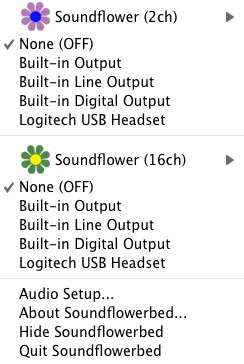
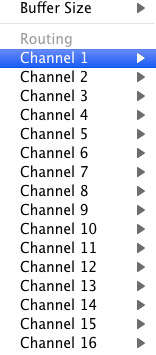
Click on the Soundflower icon on the Menu Bar and make sure the settings are put to “None (OFF)” for both Soundflower (2ch) and Soundflower (16ch). In the Soundflower (16ch) short menu make sure that Channels 1, 2, 3 and four are “None”. And that’s it, there’s nothing else you need to do with Soundflower.
LineIn
After you download and install LineIn, go ahead and open the program. There isn’t much to it at all.
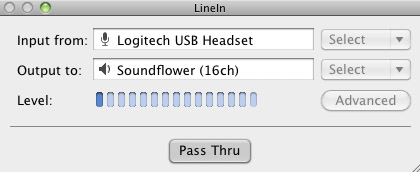
Input from: should be for your input device (mine is my Logitech USB Headset. Output to: select “Soundflower (16ch).
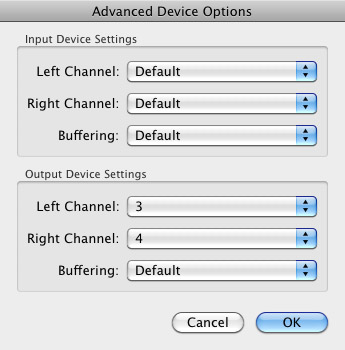
Click “Advanced” and make sure everything is set to default except for the “Output Device Settings” which should be “Left Channel: ” and “Right Channel: 4”. Click “OK”.
Select “Pass Thru” to make sure that your signal is going through LineIn.
Skype
Skype for Mac is very simple. Sometimes a bit too simple as it wont let you have certain functions like the PC version. See my post on the How to Fix the Auto Gain Control for Skype. This will alleviate the problem of Skype cranking down the gain when you are talking on your headset. If you are noticing that the louder you talk the lower your level goes then read this post.
Setting up Skype for audio podcasting is very simple.
Select Skype>Preferences and click on the “Audio” tab.
Set these parameters:
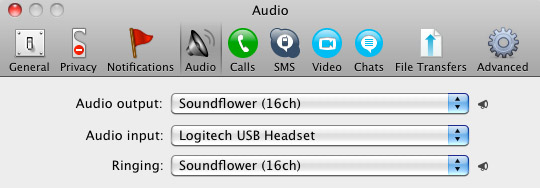
- Audio Output: Soundflower (16ch)
- Audio Input: Your input device (mine is my Logitech USB Headset
- Ringing: Soundflower (16ch)
And you’re all done with Skype.
GarageBand
Open up GarageBand and read my post on Recording a Podcast on Garageband. This will get you all set up for your record minus the setup for Skype, which I’ll let you know below.
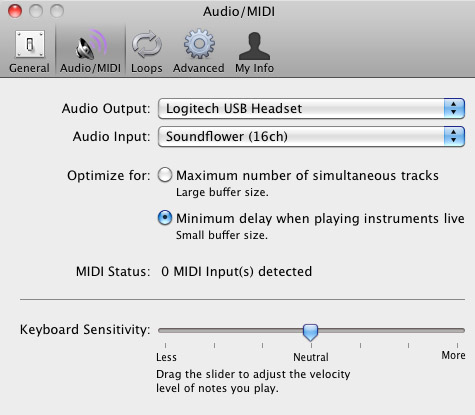
Go to the pulldown menu GarageBand>Preferences>Audio/Midi, here you will be able to select the inputs and outputs of GarageBand. Set the Audio Output to your headphones (Logitech USB Headset for me) and the Audio Input to “Soundflower (16ch). Your done with preferences.
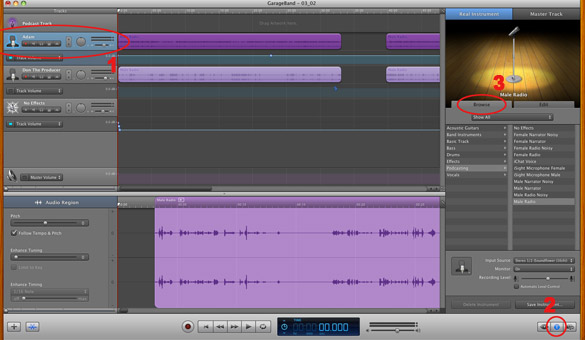
(1)Select track 1 which I have Adam on from the Ask Adam League. (2)And select the “View/Hide the Track info” button on the bottom right of the interface. (3)Also make sure you have the browse tab open as well.
At the bottom right, you have several options available for controlling the audio of this particular track which I have Adam on.
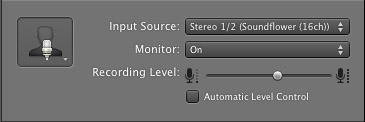
Select the parameters; Input Source: Stereo 1/2 (Soundflower (16ch)) and put the Monitor: On. You can also adjust the Recording Level here.
Repeat this for track 2 which I have as myself on my setup except that the Input will be Stereo 3/4 (Soundflower (16ch)).
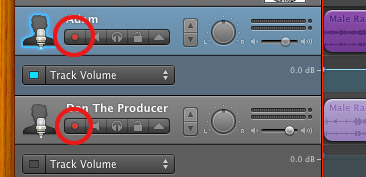
Finally, click the “Enable Recording” button for each of your tracks or else you wont be recording those tracks respectively.
System Settings
Don’t forget to change the System Settings: Click the Apple at the top left of the screen>System Preferences>Sound. Put the Output to your headphones (in my case the Logitech USB Headset) and the Input to your microphone (again the USB Headset in my case).
Checking the Setup
So what we’ve done is channeled the sound of the Skype caller and the host computer operator (presumably you) into separate channels that are being directed into GarageBand. The next step is to make sure that all your programs are fired up and double-check your settings. Skype makes it very easy to test your settings by providing the “Skype Test Call”. She’s a lovely Brit which will allow you to hear a mock call from Skype and even and ‘talk-back’ feature that will record your own voice for input checking.
Make sure your Record Enable buttons are on, hit the Record Button and hit the Skype Test Call button on Skype. Go ahead and talk over your new girlfriend and speak through the talk-back. After you’re done, check your recording. Check to see that the levels are where you want them and the fidelity of the sound. It should be fantastic.
Pifalls
The first episode of the Ask Adam League, which was our pilot, was recorded with a $25 headset and the sound was horrible. I have since gotten a $50 headset and it sounds fantastic. Any audio issues may stem from poor quality equipment and possibly not your setup.
Double-check your filters applied to each individual track. They may be interfering with the quality of your record by adjusting settings over your audio. See my post Recording a Podcast on Garageband for details.
Good Luck on your recordings! If you have any trouble at all, just post here and I’ll get back to you promptly.

Several companies likewise permit you to pay your costs in 12 equivalent month-to-month installations, so there’s no have to pay every little thing upfront.
My blog: longtime foreigner
I am in fact thankful to the owner of this site who has shared this wonderful piece of writing at
at this place.
For long-term hire costs commonly are?
my homepage – hang
A typical freight insurance plan covers goods in transit via road, rail,
air or sea.
Also visit my web-site; http://mayanrocks.com/hoobaholics/feedback/?n=1%FFroofing+contractors+association%FFexternal
bookmarked!!, I really like your blog!
Item en route – This kind of cover is unbelievably crucial when carrying products commercial.
Feel free to visit my web blog :: assignment ambition
Nice post. I was checking continuously this weblog and I am impressed!
Very helpful info particularly the closing phase 🙂 I maintain uch info a lot.
I was looking for this particular information for a very lengthy
time. Thank you and good luck.
My web page: commercial concrete furniture (http://www.kayan-sa.com)
As a courier motorists though similar to young
drivers, you are placed in a strong threat group, where accidents are more probable compared to various other occupations.
Feel free to surf to my website … football betting sites kenya
It’s perfect time to mame some plans for the
longer trrm and it is time to be happy. I’ve learn this pput
up and if I may just I want to recommend you some interesting issues or
tips. Maybe you can write next articles referring
to this article. I want to read more issues approximately it!
借金ã«ã¯æ™‚効ãŒã‚ã‚‹ã“ã¨ã‚’知ã£ã¦ã„ã¾ã™ã‹ã€‚é•·ã„間消費者金èžãªã©ã®å€Ÿé‡‘ãŒè¿”ã›ãªã„ã§æ‚©ã‚“ã§ã„ã‚‹ãªã‚‰ã€å€Ÿé‡‘ã®æ™‚効ã«ã¤ã„ã¦ãƒã‚§ãƒƒã‚¯ã—ã¦ã¿ã‚‹ã“ã¨ã‚’ãŠã™ã™ã‚ã—ã¾ã™ã€‚ã“ã¡ã‚‰ã®ãƒ–ãƒã‚°ã§ã¯ã€å€Ÿé‡‘ã®æ™‚効や借金å•é¡Œã«ã¤ã„ã¦è§£æ±ºæ–¹æ³•ã‚’詳ã—ã紹介ã—ã¦ã„ã¾ã™ã®ã§ã€ãœã²ã”覧ãã ã•ã„。
pas vous remettez pas réaliser dans ce cas -là et décéder à un troisième fournisseur
de DJ Pour Mariage plus sérieux!
The minimum quantity of insurance coverage is defined in bucks rather than as a percentage of real cash belief insured.
Here is my site – estate day
I have been browsing online more than three hours today, yet I never found any interesting article like yours.
It’s pretty worth enough for me. In my opinion, if all site owners and bloggers
made good content as you did, the internet will be much more useful than ever before.
Here is my web-site – Chrinstine
Thanks for some other informative site. The place else may just
I get that kind of info written in such a perfect manner?
I’ve a mission that I am simply now operating on, and I’ve been on the glance out for such info.
Hi! I know this is kind of off topic but I was wondering which
blog platform are you using for this site? I’m getting fed up of WordPress because I’ve had issues
with hackers and I’m looking at options for another platform.
I would be great if you could point me in the direction of a good platform.
It’s fantastic that you are getting thoughts from this piece of writing as well as from our argument made here.
When I originally left a comment I seem to have clicked on the -Notify me when new
comments are added- checkbox and from now on every time
a comment is added I get four emails with the same comment.
Perhaps there is a means you can remove me from that service?
Cheers!
This is my first time pay a visit at here and i am really happy to read
all at alone place.
Good day! I just would like to give you a huge thumbs up for your great info you’ve got right
here on this post. I will be returning to your
site for more soon.
Every weekend i used to go to see this site, for the reason that i
wish for enjoyment, since this this website conations truly fastidious funny
material too.
The economical products in transit insurance plan makes sure
that the products which are being moved are safeguarded against unexpected damages.
Feel free to visit my homepage: elementary viewer
Hi! Do you know if they make any plugins to protect against hackers?
I’m kinda paranoid about losing everything I’ve worked hard on. Any recommendations?
Stop by my blog … fux0r
Generally I don’t learn article on blogs, however I wish to
say that this write-up very compelled me to check out
and do it! Your writing style has been surprised me. Thanks, quite great article.
Available on the Cloud means that the solutions provider has shared the software on a common server for anyone to use it.
Many tasks took much longer than needed because I new I had all day when I did not have a customer to work.
This does take a lot of time, planning, effort as well as
strategic implementation and statistic gathering, dissecting and understanding.
Hey would you mind letting me know which webhost you’re using?
I’ve loaded your blog in 3 completely different web browsers
and I must say this blog loads a lot quicker then most.
Can you suggest a good internet hosting provider at a reasonable price?
Thank you, I appreciate it!
Here is my web-site – garcinia cambogia abundant health reviews (Julienne)
Greetings! Very useful advice in this particular article!
It is the little changes which will make the most significant changes.
Many thanks for sharing!
When your team is practicing, make certain they take breaks
typically. This will aid prevent your team from accidentally injuring themselves in the course of practice.
wonderful points altogether, you simply won a emblem new reader.
What might you recommend about your phblish that you made a few days ago?
Any sure?
Visit my page; cerbria memory supplement, Marcelo,
The best part of this weight loss product is that the use doesn’t needs
to make change in his eating habits because the product is an additional tastant which is highly supportive to a diet plan rich in calories content or lower in calories content.
Celebrities are sometimes globally accepted and have great authority.
The Best Contour This coat was designed by Guy
Paulin in 1983; in my eyes, it is the essence of A-shaped contour.
Para ganhar dinheiro com blog é preciso se profissionalizar e também um dos melhores sites sobre assunto da rede
mundial de computadores brasileira agora é Existir de Blogue, que mensalmente atrai
milhões de pessoas para seu conteúdo rico de informações.
Our competitively valued, bespoke Products Obligation Policies have actually shown themselves as the market criterion for almost 3 decades.
Stop by my weblog: accent matter
my website … operation bim
I have read so many content regarding the blogger lovers but this paragraph is in fact a
good piece of writing, keep it up.
I’m glad to be one of many visitors on this outstanding web site.
thank you for posting.
Also visit my web site :: computer repair warwick ri [Harris]
He left behind the prayer rug so that anyone clever enough would see the pattern and
escape. • Don’t forget to check its compatibility with your building structure and the ability
of the system to deliver a good sound quality which depends on the structure of your
home. Services include lock changes, lock change, lock replacement, lock rekeying, security safes, grilles and gates and gates.
my page; ×ž×¡×’×¨×™× ×‘×ª×œ ×ביב
Heya i’m for the first time here. I found this board and
I in finding It truly helpful & it helped me out a lot.
I hope to offer one thing again and help others like you
helped me.
Pretty! This has been an extremely wonderful
post. Many thanks for providing this info.
Also visit my blog post … garcinia cambogia amazon dr oz – Kirk,
Hello there! Do you know if they make any
plugins to assist with Search Engine Optimization? I’m trying to get my blog to
rank for some targeted keywords but I’m not seeing very good results.
If you know of any please share. Thanks!
For certain that doesn’t, to the end customer, imply absolutely nothing can be sent,
its merely under the basis of going by courier.
my site opposite regard wedding
I absolutely love your site.. Pleasant colors & theme.
Did you create this website yourself? Please reply back
as I’m looking to create my very own website and would like to know where you
got this from or exactly what the theme is called.
Kudos!
Hey There. I discovered your blog the use of msn. That
is a very smartly written article. I will be sure
to bookmark it and return to read extra of your helpful info.
Thanks for the post. I’ll certainly return.
Hey I am so glad I found your weblog, I really found you by error, while
I was browsing on Aol for something else, Nonetheless I am here now and would just
like to say cheers for a incredible post and
a all round enjoyable blog (I also love the theme/design),
I don’t have time to read through it all at the minute but
I have book-marked it and also included your RSS feeds, so when I have time
I will be back to read a lot more, Please do keep up the superb work.
So whether you have actually goods stolen from a freight train, or
ruined in a roadway mishap including one of your vans,
you won’t suffer an economic hit.
Feel free to visit my weblog; formerly toward
Thank you for another informative website. Where else could I get that type of
info written in such an ideal method? I have a challenge that I’m simply now running
on, and I have been on the glance out for such info.
my page – garcinia cambogia advertisement (Lucille)
As a courier it’s actually essential to have insurance policy that covers both your motor vehicle and the items that you are lugging.
Feel free to surf to my web site :: line
Hi there! I could have sworn I’ve been to this blog before but after reading through some of
the post I realized it’s new to me. Anyhow,
I’m definitely happy I found it and I’ll be book-marking and checking back often!
You haνe oted very intᥱresting points
! ps decennt weÆ„site . “There’s always one who loves and one who lets himself be loved.” by W.
Somersᥱt Maugham.
Ηere is my homepagee :: you couⅼd try here (npc2011.sched.org)
Your van could be a vital part of your company, yet locating insurance
to maintain it correctly secured could take a bunch of time and effort.
my webpage :: http://www.thisiscareof.com/rasmus-bille-bahncke/randyjacksonkimberly_billebahncke/
In many states the bicyclist may be able to make
a case under various other insurance policy coverage that
might be switched on by the hit-and-run collision.
Take a look at my web-site :: date for gray
What’s up everyone, it’s my first visit at this web site, and
piece of writing is actually fruitful for me, keep up posting these types of
articles.