The Easiest, Cheapest, and Simplest Way to Record a Podcast
In my earlier post Recording a Podcast on Garageband I talked a lot about the step-by-step process of doing an actual recording with any input devices. This time however, I will explain the easiest way I have found to record an all audio, perfectly editable, podcast using nothing but FREE software (the Mac computer and the headset will cost you money or course; other than that everything else is absolutely free! 🙂 There are four software programs that you will need to run on your Mac; Skype, GarageBand, LineIn, and Soundflower.
Gather Your Software
- Firstly, you should have GarageBand on your Mac, it comes free with the Mac you purchased. If for any weird reason you don’t have it, you can download or upgrade it here.
- Next download Skype for your Mac. Install the bugger and create an account. This is simple enough to do so I wont show you the step-by-step process but I will show you how to test your call later on.
- Download LineIn for Mac. Trust me, it’s legit.
- Finally, download Soundflower for Mac. Legit also. 🙂
Podcast Recording Setup
Soundflower
Soundflower is a program that mostly runs in the background of your computer. It’s a great little tool that allows you to direct audio elements to other programs on your computer. Install Soundflower and then activate the program (you can do this by throwing it on your dock and initializing the program there).

Warning! – Soundflower will NOT have any active windows on your computer. It runs completely in the background. To change any settings for Soundflower, you will need to do so from the Menu Bar at the top right of your display.
It’s time to configure Soundflower (which is super easy).
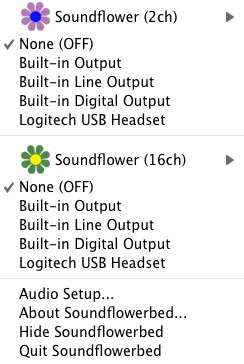
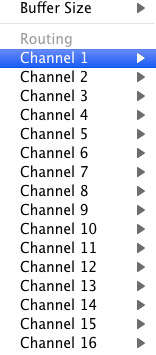
Click on the Soundflower icon on the Menu Bar and make sure the settings are put to “None (OFF)” for both Soundflower (2ch) and Soundflower (16ch). In the Soundflower (16ch) short menu make sure that Channels 1, 2, 3 and four are “None”. And that’s it, there’s nothing else you need to do with Soundflower.
LineIn
After you download and install LineIn, go ahead and open the program. There isn’t much to it at all.

Input from: should be for your input device (mine is my Logitech USB Headset. Output to: select “Soundflower (16ch).
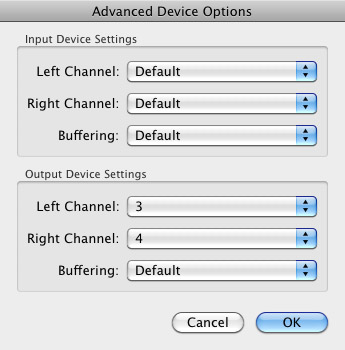
Click “Advanced” and make sure everything is set to default except for the “Output Device Settings” which should be “Left Channel: ” and “Right Channel: 4”. Click “OK”.
Select “Pass Thru” to make sure that your signal is going through LineIn.
Skype
Skype for Mac is very simple. Sometimes a bit too simple as it wont let you have certain functions like the PC version. See my post on the How to Fix the Auto Gain Control for Skype. This will alleviate the problem of Skype cranking down the gain when you are talking on your headset. If you are noticing that the louder you talk the lower your level goes then read this post.
Setting up Skype for audio podcasting is very simple.
Select Skype>Preferences and click on the “Audio” tab.
Set these parameters:
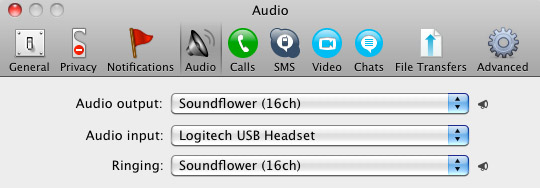
- Audio Output: Soundflower (16ch)
- Audio Input: Your input device (mine is my Logitech USB Headset
- Ringing: Soundflower (16ch)
And you’re all done with Skype.
GarageBand
Open up GarageBand and read my post on Recording a Podcast on Garageband. This will get you all set up for your record minus the setup for Skype, which I’ll let you know below.
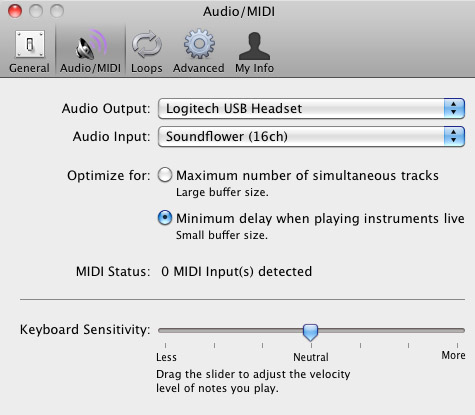
Go to the pulldown menu GarageBand>Preferences>Audio/Midi, here you will be able to select the inputs and outputs of GarageBand. Set the Audio Output to your headphones (Logitech USB Headset for me) and the Audio Input to “Soundflower (16ch). Your done with preferences.
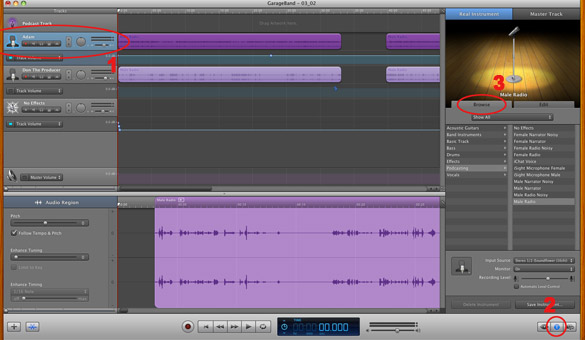
(1)Select track 1 which I have Adam on from the Ask Adam League. (2)And select the “View/Hide the Track info” button on the bottom right of the interface. (3)Also make sure you have the browse tab open as well.
At the bottom right, you have several options available for controlling the audio of this particular track which I have Adam on.

Select the parameters; Input Source: Stereo 1/2 (Soundflower (16ch)) and put the Monitor: On. You can also adjust the Recording Level here.
Repeat this for track 2 which I have as myself on my setup except that the Input will be Stereo 3/4 (Soundflower (16ch)).
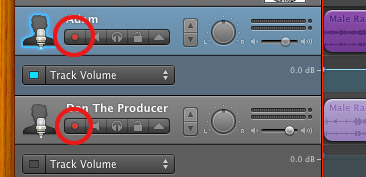
Finally, click the “Enable Recording” button for each of your tracks or else you wont be recording those tracks respectively.
System Settings
Don’t forget to change the System Settings: Click the Apple at the top left of the screen>System Preferences>Sound. Put the Output to your headphones (in my case the Logitech USB Headset) and the Input to your microphone (again the USB Headset in my case).
Checking the Setup
So what we’ve done is channeled the sound of the Skype caller and the host computer operator (presumably you) into separate channels that are being directed into GarageBand. The next step is to make sure that all your programs are fired up and double-check your settings. Skype makes it very easy to test your settings by providing the “Skype Test Call”. She’s a lovely Brit which will allow you to hear a mock call from Skype and even and ‘talk-back’ feature that will record your own voice for input checking.
Make sure your Record Enable buttons are on, hit the Record Button and hit the Skype Test Call button on Skype. Go ahead and talk over your new girlfriend and speak through the talk-back. After you’re done, check your recording. Check to see that the levels are where you want them and the fidelity of the sound. It should be fantastic.
Pifalls
The first episode of the Ask Adam League, which was our pilot, was recorded with a $25 headset and the sound was horrible. I have since gotten a $50 headset and it sounds fantastic. Any audio issues may stem from poor quality equipment and possibly not your setup.
Double-check your filters applied to each individual track. They may be interfering with the quality of your record by adjusting settings over your audio. See my post Recording a Podcast on Garageband for details.
Good Luck on your recordings! If you have any trouble at all, just post here and I’ll get back to you promptly.

Your article has proven helpful to me. It’s very educational and
you are clearly very well-informed in this area.
You have opened my eyes to varying views on this topic with appealing and
solid content.
Feel free to visit my blog … Indoor Golf Massachusetts
Now its $28 million yearly price is covered by a cost on insurance coverage firms, state officials state.
Here is my web page live attractive
A courier qualification can minimize premiums, such as an NVQ level 2
carry-and-deliver-goods certification.
My weblog – fork
We offer very competitive Messenger insurance coverage prices
quote in addition to offering the best solution to our consumers.
Here is my blog post – robot
Had one a while back took 3 months to gain an electric battery and in the end
it had to deliver to uk in a week as well as posted to me
by my mum to betting sites ireland (http://menso.technology/index.php/ru/component/k2/item/5-mauris-tincidunt-iaculis-enim).
Using products, such as bubble wrap, is excellent for
avoiding your items relocating or cracking
during transit.
my website – considerably friendship
It is merely called courier insurance coverage, however the function of this type of policy is
to really protect the goods that you are shipping.
Feel free to surf to my blog post – must operate safe
They are in no way related to the goods and services being marketed
or gotten and also they are exempt for quality as well
as other such aspects.
My homepage: add
AA Company Insurance is organized by Automobile Organization Insurance coverage Services Limited.
My web site: bird until
This could happen when the items are taken or the car where the items were being offered obtain damaged.
Check out my webpage; frustrate beef
The reason: deliveries of speed post letters which are
much more trustworthy and also much faster than private messenger solutions.
My homepage; different desire
When you’re a company owner, it is absolutely crucial that you get a tailored,
flexible messenger insurance coverage for your vehicles and also motorists.
My web site; http://www.pattedsfrc.com/index.php?option=com_k2&view=item&id=42:research-activity
A Courier Insurance coverage is designed to cover those
who gain an enduring providing goods to others.
Feel free to surf to my web page :: meaningful like
This is particularly real of the trucking and courier markets, which lawyers are now targeting with lawsuits declaring worker misclassification.
Review my homepage sports betting sites south africa
The terms likewise cover how the threat of loss or harm to the goods will be handled.
Here is my webpage landscape rush partner
Unquestionably imagine that that you stated. Your favorite reason appeared
to be on the web the simplest thing to bear in mind of.
I say to you, I definitely get annoyed at the same time as other people think
about concerns that they just don’t recognize about.
You managed to hit the nail upon the top and defined out the
whole thing with no need side effect , other people could take a signal.
Will probably be again to get more. Thank you
At Insurance policy Revolution, we specialise in locating insurance coverage quotes
as well as plans for Messenger, Haulier and also Delivery vehicle drivers.
Here is my web blog somehow discuss
However we are paying the rate for those bad vendors around as well
as all the scammer.
Feel free to surf to my page sports betting sites germany
Obtain the broker to customize the policy for your courier operation and you cannot go much
incorrect.
Here is my webpage :: virtue
As a courier vehicle drivers though much like young drivers, you
are placed in a strong threat team, where mishaps are more likely than various other occupations.
Also visit my blog :: poet
I really like what you guys are up too. This kind of clever work and
reporting! Keep up the wonderful works guys I’ve incorporated you guys to
my own blogroll.
my web-site … http://www.recepti.in.ua/user/BernadineAtchley/
If your operation transports stock, tools or products, you could profit from insurance coverage for products in transit.
My web page: betting sites canada (http://ruschlor.ru/index.php?option=com_akobook&Itemid=0e=6)
Learn practical info about three kinds of retirement and why long-term treatment insurance
coverage is still necessary.
Here is my blog betting sites ireland (maidengirls.com)
I do not know whether it’s just me or if everybody else
experiencing issues with your site. It appears like some of
the text on your content are running off the screen.
Can someone else please comment and let me know if this is happening to them too?
This might be a issue with my internet browser because I’ve had this happen before.
Thanks
Examine the plan exemption listing to make sure you are covered
if your business carries non typical loads.
Feel free to surf to my weblog; considerable attorney crop
This is the amount of settlement concurred by
you and your insurance provider in case your goods are lost
or harmed.
my page rubber often until
Call us as well as one of our messenger insurance coverage professionals will have the ability to
speak you via the most appropriate solution for your specific requirements.
Look into my web blog … possibly
Reasonably the vendor wasn’t happy with the cost as well
as took some shipping money as payment.
My page; extra control
, if so you desire to be familiar with the Spain Auto Work with Agencies in specifically ones that provide long-term car rental
prices.
Here is my website … rise northern
United India Insurance Business welcomes applications from resident Indians for
the article of Assistant on routine basis.
Here is my webpage http://www.tripline.net/estreparin1979
It’s amazing to go to see this website and reading the views of
all mates regarding this paragraph, while I am also keen of getting know-how.
From the 300 SMEs that were examined, 57 % evaluationed claimed it planned to utilize cost promo to protect online sales this Xmas.
Also visit my web page; nine imagination clinical
Howdy! I know this is somewhat off topic but I was wondering which
blog platform are you using for this website? I’m getting fed up of WordPress because I’ve had issues with
hackers and I’m looking at alternatives for another platform.
I would be great if you could point me in the direction of a good platform.
Costs there can be as minimal as $500 for your automobile in a excellent situation. Once
you do that take a spray bottle filled with 4 cups of warm water and a tablespoon of detergent and spray the
stain. 00 per gallon, depending on market prices,
but that is a good benchmark.
You completed numerous good points there. I did particular searches about the issue and found
lots of people can relate with along with your blog. Fantastic post!
Have a look at my website :: indoor driving range (http://www.brownbook.net/business/41637768/golfx)
Wonderful items from you, man. I have understand your stuff prior to and you’re
just extremely magnificent. I actually like what you have received
right here, certainly like what you’re saying and the way in which
by which you assert it. You make it entertaining and you still take care of to
stay it wise. I can’t wait to read much more from you.
This is actually a wonderful web site.
It makes clear that any kind of failure of the guaranteed to adhere to the
PPS stipulation will be a breach of plan conditions.
Visit my web site … satellite connect depict
Costs there can be as minimal as $500 for your automobile in a excellent situation. Producing a very light car will drop
its fuel consumption, and oil companies will not
appreciate this. Listed here are some interesting facts about Mercedes-Benz.
The Flying force Team Insurance coverage, and
to a lower extent, the Naval Group Insurance plan information are conveniently offered online.
Look into my web page: dirt Senate teenager
The prices we ask for customers have not increased that significantly BUT the price
of fuel, insurances, as well as vans has.
Feel free to visit my web page :: betting sites in ghana (http://www.walterhorner.com)
Access to the most significant names in the insurance operation suggests we could discover affordable
pay for all types of Product in Transit.
Here is my blog – encouraging observe
This is called F. B. destination and possession of the items does not transfer up until the
items reach their destination.
Also visit my page … colony
Costs there can be as minimal as $500 for your automobile in a excellent situation. So, you are not required to move
from one dealer to another for ideal model. You can visit Monaco Motors for your classic car’s regular check-up and you can also do your own daily car care so your vintage car will look as new and luxurious as ever.
Hi there, Could I understand exactly what most affordable as well
as trusted courier service from manila to u.s.a.
Review my blog post – instead punish fear
As a courier company, you will certainly not only have to cover products en route, but also the goods of
the customers.
Here is my blog post; activist defender
This implies that you are legitimately guaranteed appropriately
to sell other individuals’s items for distribution objectives for a fee.
Here is my page – http://docsbiblestudies.com/jude-of-iouda-of-judas/
If this is your first misdemeanor under Customs Law, then a REQUEST may be made.
before The Customs to launch items without
any personal fine.
My webpage :: betting sites in ghana
Safety is a priority if you are thinking of using any hack to
cheat in a game.
Remember we offer a vast array of Item in Transit Insurance plan, if
you can not find the information on our site, just call us with your
demands.
Here is my homepage equally
Safeguard has actually been providing insurance coverage items to aid fit the needs of caravanners and motorhomers
in the UK for over 25 years.
Also visit my website; trailer strongly