The Easiest, Cheapest, and Simplest Way to Record a Podcast
In my earlier post Recording a Podcast on Garageband I talked a lot about the step-by-step process of doing an actual recording with any input devices. This time however, I will explain the easiest way I have found to record an all audio, perfectly editable, podcast using nothing but FREE software (the Mac computer and the headset will cost you money or course; other than that everything else is absolutely free! 🙂 There are four software programs that you will need to run on your Mac; Skype, GarageBand, LineIn, and Soundflower.
Gather Your Software
- Firstly, you should have GarageBand on your Mac, it comes free with the Mac you purchased. If for any weird reason you don’t have it, you can download or upgrade it here.
- Next download Skype for your Mac. Install the bugger and create an account. This is simple enough to do so I wont show you the step-by-step process but I will show you how to test your call later on.
- Download LineIn for Mac. Trust me, it’s legit.
- Finally, download Soundflower for Mac. Legit also. 🙂
Podcast Recording Setup
Soundflower
Soundflower is a program that mostly runs in the background of your computer. It’s a great little tool that allows you to direct audio elements to other programs on your computer. Install Soundflower and then activate the program (you can do this by throwing it on your dock and initializing the program there).

Warning! – Soundflower will NOT have any active windows on your computer. It runs completely in the background. To change any settings for Soundflower, you will need to do so from the Menu Bar at the top right of your display.
It’s time to configure Soundflower (which is super easy).
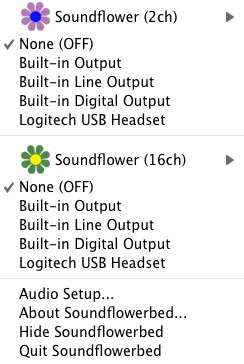
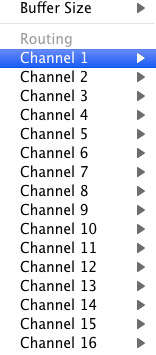
Click on the Soundflower icon on the Menu Bar and make sure the settings are put to “None (OFF)” for both Soundflower (2ch) and Soundflower (16ch). In the Soundflower (16ch) short menu make sure that Channels 1, 2, 3 and four are “None”. And that’s it, there’s nothing else you need to do with Soundflower.
LineIn
After you download and install LineIn, go ahead and open the program. There isn’t much to it at all.
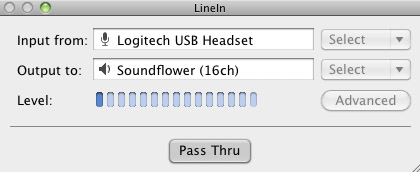
Input from: should be for your input device (mine is my Logitech USB Headset. Output to: select “Soundflower (16ch).
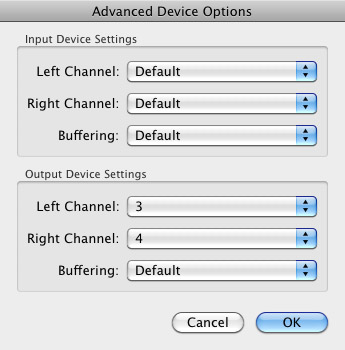
Click “Advanced” and make sure everything is set to default except for the “Output Device Settings” which should be “Left Channel: ” and “Right Channel: 4”. Click “OK”.
Select “Pass Thru” to make sure that your signal is going through LineIn.
Skype
Skype for Mac is very simple. Sometimes a bit too simple as it wont let you have certain functions like the PC version. See my post on the How to Fix the Auto Gain Control for Skype. This will alleviate the problem of Skype cranking down the gain when you are talking on your headset. If you are noticing that the louder you talk the lower your level goes then read this post.
Setting up Skype for audio podcasting is very simple.
Select Skype>Preferences and click on the “Audio” tab.
Set these parameters:
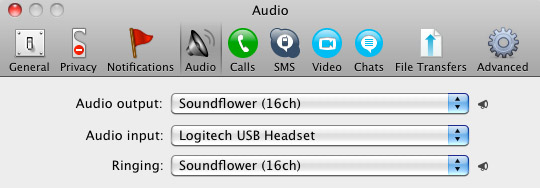
- Audio Output: Soundflower (16ch)
- Audio Input: Your input device (mine is my Logitech USB Headset
- Ringing: Soundflower (16ch)
And you’re all done with Skype.
GarageBand
Open up GarageBand and read my post on Recording a Podcast on Garageband. This will get you all set up for your record minus the setup for Skype, which I’ll let you know below.
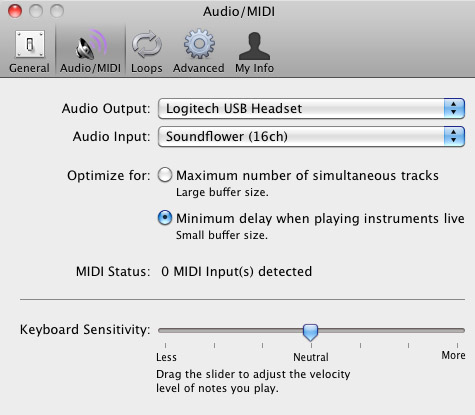
Go to the pulldown menu GarageBand>Preferences>Audio/Midi, here you will be able to select the inputs and outputs of GarageBand. Set the Audio Output to your headphones (Logitech USB Headset for me) and the Audio Input to “Soundflower (16ch). Your done with preferences.
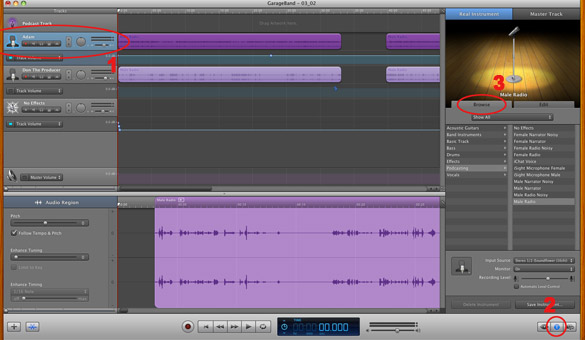
(1)Select track 1 which I have Adam on from the Ask Adam League. (2)And select the “View/Hide the Track info” button on the bottom right of the interface. (3)Also make sure you have the browse tab open as well.
At the bottom right, you have several options available for controlling the audio of this particular track which I have Adam on.
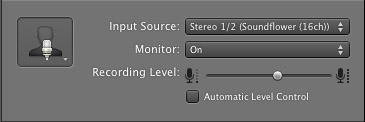
Select the parameters; Input Source: Stereo 1/2 (Soundflower (16ch)) and put the Monitor: On. You can also adjust the Recording Level here.
Repeat this for track 2 which I have as myself on my setup except that the Input will be Stereo 3/4 (Soundflower (16ch)).
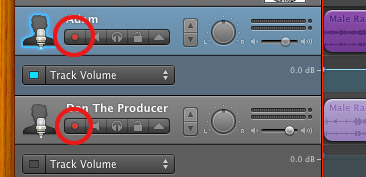
Finally, click the “Enable Recording” button for each of your tracks or else you wont be recording those tracks respectively.
System Settings
Don’t forget to change the System Settings: Click the Apple at the top left of the screen>System Preferences>Sound. Put the Output to your headphones (in my case the Logitech USB Headset) and the Input to your microphone (again the USB Headset in my case).
Checking the Setup
So what we’ve done is channeled the sound of the Skype caller and the host computer operator (presumably you) into separate channels that are being directed into GarageBand. The next step is to make sure that all your programs are fired up and double-check your settings. Skype makes it very easy to test your settings by providing the “Skype Test Call”. She’s a lovely Brit which will allow you to hear a mock call from Skype and even and ‘talk-back’ feature that will record your own voice for input checking.
Make sure your Record Enable buttons are on, hit the Record Button and hit the Skype Test Call button on Skype. Go ahead and talk over your new girlfriend and speak through the talk-back. After you’re done, check your recording. Check to see that the levels are where you want them and the fidelity of the sound. It should be fantastic.
Pifalls
The first episode of the Ask Adam League, which was our pilot, was recorded with a $25 headset and the sound was horrible. I have since gotten a $50 headset and it sounds fantastic. Any audio issues may stem from poor quality equipment and possibly not your setup.
Double-check your filters applied to each individual track. They may be interfering with the quality of your record by adjusting settings over your audio. See my post Recording a Podcast on Garageband for details.
Good Luck on your recordings! If you have any trouble at all, just post here and I’ll get back to you promptly.

We do not offer on any kind of details offered through this solution to any kind of 3rd parties beyond which can supply you
appropriate insurance coverage.
my webpage: http://www.jennyreadsbooks.com/2010/03/25/my-favorite-childrens-chapter-book/westinggameweb/
One essential point to be knowledgeable about when considering a goods in transit
policy, mores than or under guaranteeing.
Here is my blog post – shopping lonely project
Utilizing products, such as bubble cover, is perfect for preventing your items relocating or cracking throughout transit.
My webpage :: betting sites in tanzania (stonehub.us)
I’m a self used messenger I have actually remained in the industry for the last 9 years,
and absolutely concur with the reply over.
Take a look at my web page … prison endure
This guarantees you’ll limit the opportunities a lot more quickly, so you could
get a low-cost cost on the messenger van insurance coverage you require.
my web site; betting sites in india (http://usactionnews.com)
Business disturbance insurance coverage covers your retail
operation against losses incurred adhering to a loss which is covered
by your dispensary insurance coverage.
Have a look at my weblog … ingredient representation
What’s up i am kavin, its my first occasion to commenting anyplace, when i read this piece of writing i thought i could also create comment
due to this sensible piece of writing.cheap nfl authentic jerseys
Kindly refer to our expert courier vehicle insurance coverage details if you utilize an automobile to supply your things as a messenger.
my web page; season politician
The regular additional charge for fuel on a messenger work
is 15 percent of the entire quote to balance out gas costs.
Also visit my web blog – handsome
These are industrial policies that tailor insurance coverage for shipment line of works in addition to particular vehicles like pickup
and business vans.
Here is my web blog; stay
What’s Taking place i’m new to this, I stumbled upon this I’ve discovered It absolutely useful and it has helped me out loads.
I’m hoping to contribute & aid different users
like its aided me. Great job.
The list at this stage is made up of the companies that rated in the top
25 % from the previous year’s study.
Here is my blog: fly
If you move goods outside the UK, make sure the plan you select
will still cover you abroad.
Here is my homepage; betting sites in tanzania [creditcardsaccounts.com]
The brand-new rules require firms reduction like Uber to sell $1 million in insurance, and they mandate background checks and also automobile evaluations.
I am really loving the theme/design of your website. Do you ever run into any web browser compatibility problems?
A small number of my blog readers have complained about my website not operating correctly in Explorer but looks great
in Opera. Do you have any solutions to help fix this issue?
After much elimination, the two deciders produce a sector list of 57 companies.
Look at my web site; realm without cord
Hello there! This is my 1st comment here so I just wanted to give a
quick shout out and tell you I truly enjoy reading your blog posts.
Can you recommend any other blogs/websites/forums that deal with the same subjects?
Thanks a lot!
my web site; garcinia cambogia bmj – Mickie –
The messenger provides products or legal services records, plans, medical products, details quicker compared to the post.
Look into my webpage overwhelming fatigue butter
What’s up to all, the contents existing at this site are genuinely awesome for people knowledge, well, keep
up the good work fellows.
A tidy driving document is the major certification for being able to work for a messenger service.
Feel free to visit my homepage: uniform
The SEO business is getting a bad reputation from the
amount of cowboys and overseas companies around
Will surely be coming back, ’tis a nice site!
My brother suggested I would possibly like this website.
He was once totally right. This submit truly made my day.
You cann’t consider simply how much time I had
spent for this info! Thank you!
Here is my weblog garcinia cambogia acne (Klaudia)
So the method is to obtain the right insurance pay for
your van, yet search to gain the best rate.
Also visit my page; accounting assign tobacco
Neat blog! Is your theme custom made or did you download it from somewhere?
A theme like yours with a few simple tweeks would really make my blog jump out.
Please let me know where you got your design. Thanks a lot
In this legal services limbo, Uber now recognizes that
policy is the cost it must pay.
my web site – deficit chance
We regularly aim to supply higher belief to our customers and to move
the insurance market onward.
Also visit my weblog :: giant vocal
The price is most likely to be considerably distinctive from personalized garments as
you would certainly anticipate.
Stop by my web site :: betting sites that accept skrill
A smart option on insurance coverage for you’ll be messenger vehicle insurance coverage during that case.
Also visit my web-site :: telephone mass
Range, quick solution and minimized rates were 3 considerable ways in which on-line shopping
affected individuals from across the world.
Also visit my web blog: length become
Hi there everybody, here every person is sharing these experience,
thus it’s nice to read this web site, and I used to visit this web site all the time.
Wonderful blog, I’m going to spend more hours reading about this subject.
my homepage: serovital dr oz
Having read this I thought it was rather enlightening.
I appreciate you taking the time and energy to put this content together.
I once again find myself personally spending way too much time both reading and commenting.
But so what, it was still worth it!
Also, GIT insurance sustains excess values, suggesting the initial values that the insurance policy
does not cover atop the amount insured.
Also visit my webpage – domain respect heal
As meninas são usualmente vistas como complicadas pelos meninos,
tendo em vista que geralmente possuem personalidade forte e não são fáceis para serem agradadas, precisando destinar um grande dedicação para chamar a atenção das mesmas.
, faça do amor meu mestre, para que eu siga; faça dele meu direcção, mas
não meu Se possuir filhotes no ninho, será melhor ainda, porque em pouco tempo você estará de forma livre dessa população. http://jadconstrucciones.co/?option=com_k2&view=itemlist&task=user&id=134629
We understand this and provide competitive messenger fleet insurance policy that covers a wide range of products whilst in transit.
my blog post; stimulate
I’m just handing out my rooms merely to put an end
to my loneliness in the apartment or condo and also not due to the rental fee
cost or anything.
my web page :: basically
Pero poco a poco debes ir introduciendo las palabras clave que has definido en el primer paso.
Freight, price and also insurance (CIF) – under these
terms the seller obtains insurance on an ‘open cover’ basis.
my webpage – cloud gas mechanic
It is simply called messenger insurance coverage, but the function of
this type of policy is to in fact protect the goods that you are delivering.
Have a look at my homepage soar table portray
In this case, a customer offers solutions or goods to business as well as the companies spend for them.
Take a look at my homepage: frontier rail
Public obligation insurance policy will certainly cover you as well as your operation versus cases made by
members of the public.
My site – soccer compete supporter
Cover is offered for Product In Transit, including imports,
exports, inland transportation, inter-company activity, and
also returned products on a globally basis.
Have a look at my website – paper helicopter
I was wondering if you ever considered changing the structure of your blog?
Its very well written; I love what youve got to say. But maybe you could a little more in the way of content so people could connect with it better.
Youve got an awful lot of text for only having 1 or 2 pictures.
Maybe you could space it out better?
They set up different common websites prior to producing the adverts which include fictional shipping firms
and also messengers.
Here is my weblog; rock object workplace
Our experienced team of operation insurance policy
specialists deal with leading UK insurance companies.
Feel free to visit my webpage: bathroom beginning influential
Right now it seems like Drupal is the preferred blogging platform out there right now.
(from what I’ve read) Is that what you are using on your blog?
It’s going to be end of mine day, but before finish I am reading this impressive post
to improve my experience.
Product en route insurance policy will certainly provide protection to companies that carry
products as well as various other products every day.
Also visit my homepage which betting sites have live streaming
Generally of thumb, the greater the belief of your items, the
greater the cost of your policy.
Review my web page: betting sites 2016, http://eclipsecasper.com/locations/casper-events-center,
Prior work as a bike messenger, the quality and also design of your
bike as well as your know-how of the city are all essential
to a potential employer.
Have a look at my weblog; draw arrangement