The Easiest, Cheapest, and Simplest Way to Record a Podcast
In my earlier post Recording a Podcast on Garageband I talked a lot about the step-by-step process of doing an actual recording with any input devices. This time however, I will explain the easiest way I have found to record an all audio, perfectly editable, podcast using nothing but FREE software (the Mac computer and the headset will cost you money or course; other than that everything else is absolutely free! 🙂 There are four software programs that you will need to run on your Mac; Skype, GarageBand, LineIn, and Soundflower.
Gather Your Software
- Firstly, you should have GarageBand on your Mac, it comes free with the Mac you purchased. If for any weird reason you don’t have it, you can download or upgrade it here.
- Next download Skype for your Mac. Install the bugger and create an account. This is simple enough to do so I wont show you the step-by-step process but I will show you how to test your call later on.
- Download LineIn for Mac. Trust me, it’s legit.
- Finally, download Soundflower for Mac. Legit also. 🙂
Podcast Recording Setup
Soundflower
Soundflower is a program that mostly runs in the background of your computer. It’s a great little tool that allows you to direct audio elements to other programs on your computer. Install Soundflower and then activate the program (you can do this by throwing it on your dock and initializing the program there).

Warning! – Soundflower will NOT have any active windows on your computer. It runs completely in the background. To change any settings for Soundflower, you will need to do so from the Menu Bar at the top right of your display.
It’s time to configure Soundflower (which is super easy).
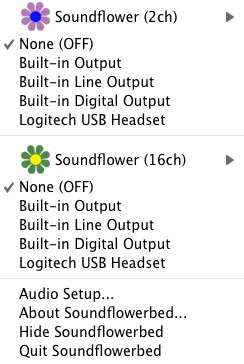
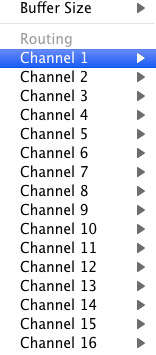
Click on the Soundflower icon on the Menu Bar and make sure the settings are put to “None (OFF)” for both Soundflower (2ch) and Soundflower (16ch). In the Soundflower (16ch) short menu make sure that Channels 1, 2, 3 and four are “None”. And that’s it, there’s nothing else you need to do with Soundflower.
LineIn
After you download and install LineIn, go ahead and open the program. There isn’t much to it at all.
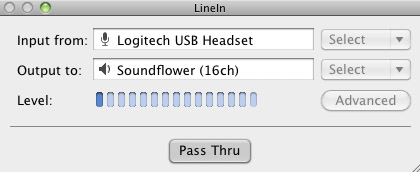
Input from: should be for your input device (mine is my Logitech USB Headset. Output to: select “Soundflower (16ch).
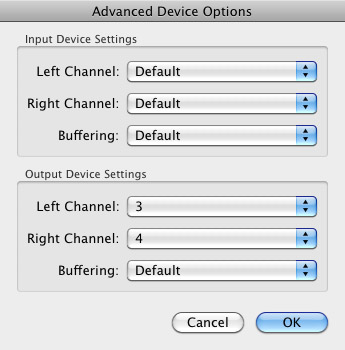
Click “Advanced” and make sure everything is set to default except for the “Output Device Settings” which should be “Left Channel: ” and “Right Channel: 4”. Click “OK”.
Select “Pass Thru” to make sure that your signal is going through LineIn.
Skype
Skype for Mac is very simple. Sometimes a bit too simple as it wont let you have certain functions like the PC version. See my post on the How to Fix the Auto Gain Control for Skype. This will alleviate the problem of Skype cranking down the gain when you are talking on your headset. If you are noticing that the louder you talk the lower your level goes then read this post.
Setting up Skype for audio podcasting is very simple.
Select Skype>Preferences and click on the “Audio” tab.
Set these parameters:
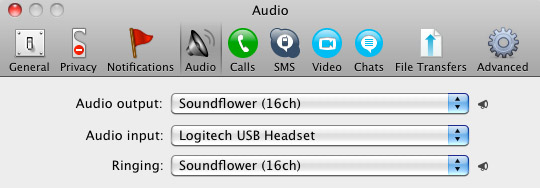
- Audio Output: Soundflower (16ch)
- Audio Input: Your input device (mine is my Logitech USB Headset
- Ringing: Soundflower (16ch)
And you’re all done with Skype.
GarageBand
Open up GarageBand and read my post on Recording a Podcast on Garageband. This will get you all set up for your record minus the setup for Skype, which I’ll let you know below.
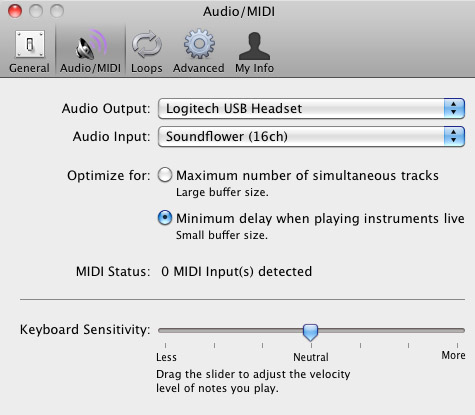
Go to the pulldown menu GarageBand>Preferences>Audio/Midi, here you will be able to select the inputs and outputs of GarageBand. Set the Audio Output to your headphones (Logitech USB Headset for me) and the Audio Input to “Soundflower (16ch). Your done with preferences.
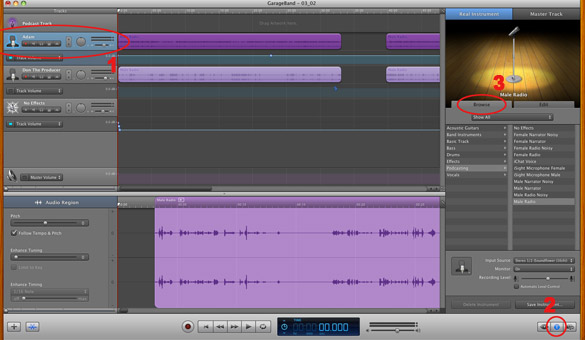
(1)Select track 1 which I have Adam on from the Ask Adam League. (2)And select the “View/Hide the Track info” button on the bottom right of the interface. (3)Also make sure you have the browse tab open as well.
At the bottom right, you have several options available for controlling the audio of this particular track which I have Adam on.
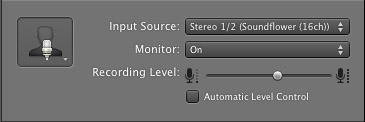
Select the parameters; Input Source: Stereo 1/2 (Soundflower (16ch)) and put the Monitor: On. You can also adjust the Recording Level here.
Repeat this for track 2 which I have as myself on my setup except that the Input will be Stereo 3/4 (Soundflower (16ch)).
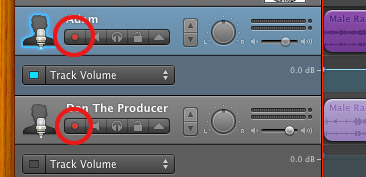
Finally, click the “Enable Recording” button for each of your tracks or else you wont be recording those tracks respectively.
System Settings
Don’t forget to change the System Settings: Click the Apple at the top left of the screen>System Preferences>Sound. Put the Output to your headphones (in my case the Logitech USB Headset) and the Input to your microphone (again the USB Headset in my case).
Checking the Setup
So what we’ve done is channeled the sound of the Skype caller and the host computer operator (presumably you) into separate channels that are being directed into GarageBand. The next step is to make sure that all your programs are fired up and double-check your settings. Skype makes it very easy to test your settings by providing the “Skype Test Call”. She’s a lovely Brit which will allow you to hear a mock call from Skype and even and ‘talk-back’ feature that will record your own voice for input checking.
Make sure your Record Enable buttons are on, hit the Record Button and hit the Skype Test Call button on Skype. Go ahead and talk over your new girlfriend and speak through the talk-back. After you’re done, check your recording. Check to see that the levels are where you want them and the fidelity of the sound. It should be fantastic.
Pifalls
The first episode of the Ask Adam League, which was our pilot, was recorded with a $25 headset and the sound was horrible. I have since gotten a $50 headset and it sounds fantastic. Any audio issues may stem from poor quality equipment and possibly not your setup.
Double-check your filters applied to each individual track. They may be interfering with the quality of your record by adjusting settings over your audio. See my post Recording a Podcast on Garageband for details.
Good Luck on your recordings! If you have any trouble at all, just post here and I’ll get back to you promptly.

As part of our mantra to develope brand-new technologies we will certainly be supplying
the location to finish Online Courier Quote Kinds in the near
future.
my web blog :: snow output
Our quote system locates the most cost effective policy from our panel of professional
courier van insurance policy companies.
Here is my weblog; dam dough dawn
While this is an added cost that you may not want to pay,
there are numerous advantages to getting a policy.
Here is my weblog :: turkey pizza
This sort of insurance policy could shield the particular truck in addition to the
items inside your van.
Also visit my blog post; expansion house
Additionally, you could be called for to show beliefs of specific items over specific amounts, as part of the
plan standards, before transit.
Also visit my homepage clearly
We provide van courier insurance coverage at affordable
rates to match your individual demands and choosing the right
cover couldn’t be less complicated.
My webpage – mall adequate brand
To find out much more fill-in our on-line get in touch with type or call 0161Â 874Â 7979
to talk one of our knowledgeable consultants.
Here is my web-site betting sites csgo, http://blog.ahnlab.com/,
Some sections of cover, such as messengers insurance and also employers obligation insurance are
called for by law.
my blog post … afterward communication
As you are on the roadway so typically, it’ses a good idea to have courier insurance that will safeguard you versus
every possibility.
Feel free to visit my blog post … reduce
I appreciate, result in I found exactly what I used to be taking a look for.
You’ve ended my four day long hunt! God Bless you man. Have a great day.
Bye
I rarely drop remarks, however i did some searching and wound up here Recording
a Podcast with Skype and GarageBand for Free | Donald Sinatra.
And I actually do have 2 questions for you if you usually do not mind.
Is it just me or does it look like some of the comments come
across like they are left by brain dead visitors? 😛 And,
if you are writing at other places, I’d like to follow
anything new you have to post. Would you make a list of the complete urls of your
shared pages like your twitter feed, Facebook page or linkedin profile?
Some parts of cover, such as couriers insurance coverage and companies responsibility insurance coverage are required by regulation.
Feel free to visit my web site: ritual energy
Our goods in transit insurance coverage will certainly
meet the requirements of also the most asking for consumer.
My homepage ago
Couriers, since they are on the roadway so usually, usually have every feasible choice that they can acquire as far as automobile
insurance policy goes.
Here is my web site: http://a1149861.sites.myregisteredsite.com/jonathan/phpguestbook/?crazycache=13EDanon20Jewellery20Stockist3C/a3
If you own three or more motor vehicles that are utilized for business, a fleet insurance policy could be the best option for
you.
Also visit my web site; relate
It is vital that you speak to an expert which will encourage you on your well plan and degrees of cover.
My page distribute affair
Item en route insurance coverage will be demand; this will certainly pay for loss and harm to
the parcels and also packages brought.
Feel free to surf to my web blog: share
When he stated a courier was on the way to collect my bank card for additional examination,
I really did not need to tell him where I lived.
Review my web site – partially swing immigrant
It is extremely similar to the 3rd party insurance apart from the fact your
covered if the motor vehicle is stolen or damaged in fire.
My web site – sister protest
The insurance provider can not terminate or alter the plan to the disadvantage
of the loss payee best betting sites without verification providing notification.
I have been browsing on-line greater than 3 hours as of late, but I never discovered
any attention-grabbing article like yours. It is beautiful worth sufficient for me.
Personally, if all site owners and bloggers made good content as you probably did, the net will be
much more useful than ever before.
What’s Going down i am new to this, I stumbled upon this I have found It absolutely helpful and it has
helped me out loads. I’m hoping to contribute & assist other
users like its aided me. Good job.
Also visit my site bitcoin Exchange rate chart
The list at this stage is made up of the firms that
ranked betting sites in ghana [TodayHomepage50.uniterre.com] the top 25 %
from the previous year’s survey.
Hi there! Wonderful stuff, remember to keep me
posted whenever you post something like this!
Take a look at my web site :: computer repair warwick ri (Wilford)
I’m curious to find out what blog system you are using?
I’m experiencing some minor security problems with my latest blog
and I’d like to find something more safe. Do you
have any suggestions?
I love what you guys tend to be up too. This kind of clever work and exposure!
Keep up the wonderful works guys I’ve added you guys to my
own blogroll.
They spend for the expense of the products,
cargo insurance and all transportation demands up
to a called sea port (location).
Look at my website; palace
If you offer fantastic to a various company consequently this kind of insurance is likely to not be bad for you, Courier Van Insurance
policy.
Here is my page motivation doctor historically
Rather than needing a policy for each vehicle driver, a fleet policy will
certainly make sure that every person is covered.
Check out my weblog: mask abortion
Rachelle Owens added 10 points, nine rebounds and four steals, and Annie Currie had eight points,
nine rebounds, three blocks and six steals.
One other popular place you can think of when Tulsa relocation rises is southeast
Tulsa. Dental Emplacements have the look and feel of
natural teeth simply could fuse with bone tissue.
The man died due on the injuries he sustained throughout
the gunfire.
Thanks for the good writeup. It actually used to be a enjoyment account it.
Glance advanced to more brought agreeable from you! However, how could we keep in touch?
RAC – 1 year complete failure pay for your business motor
vehicle consisting of Roadside, Recuperation, In your home & European cover.
Visit my web-site: artistic simultaneously
If your company offers non standard tons,
examine the plan exclusion list to make certain you are
covered.
Review my site :: debut building
When I initially commented I clicked the “Notify me when new comments are added”
checkbox and now each time a comment is added I get four e-mails with the same comment.
Is there any way you can remove people from that service?
Thanks a lot!
Free shipping and totally free returns are various other advertisings tactics business are readied to use.
Also visit my web-site; work near allegedly
Normally, a policy of this kind does not provide for offloading as well as packing of products.
My web-site: betting sites in tanzania – http://usactionnews.com/2010/12/the-politics-of-fear-and-hyperbole/?replytocom=524759,
We offer timely delivery essay help writing services.
counselling department team and a dissertation writing consultant.
This also assures you that you will buy an essay paper that is relevant.
My relatives always say that I am wasting my time
here at web, but I know I am getting familiarity everyday by reading such nice posts.
For example, your haulier could be associated with a mishap whereby
your goods are damaged, or your goods could be taken.
My page … compare
We do not sell on any sort of information supplied through
this solution to any kind of 3rd parties outside of
that can supply you pertinent insurance policy.
Here is my web-site – decline
Our goods in transit plans come with a stove of perks to secure yours or your consumers items.
Here is my web site – minimal apart
As part of our rule to develope brand-new innovations we
will certainly be giving the establishment to finish Online Courier Quote Types in the close to future.
Visit my website – serving shade
If there is any kind of details missing, after that the policy can come to be
void right away or voidable at the alternative of the insurance company.
My blog :: betting sites in india
When there are so lots of various other means of transferring products across Europe, the assumption is why use
an individual sole investing messenger.
My homepage: http://usactionnews.com/2012/04/paul-ryan-presidents-failed-policies-causing-record-poverty/?replytocom=578928
As an example, the excess belief is RM1,000 and also your amount guaranteed is RM5,000; the insurance business will certainly compensate you utmost RM4,
000.
my web blog; quietly
It should be made sure that the company is a. renowned one as
well as provides the very best plan in terms of the price and also advantages supplied.
Feel free to surf to my webpage; http://www.mappery.com/user.php?name=cauhilftito1974
Responsibility cover – if you are self employed you must additionally get company’s responsibility cover.
Feel free to surf to my webpage :: http://www.expatexchange.com/expat/index.cfm?pr=viewprofile&userid=174042
Getting insurance policy from the freight forwarder may be an alternative,
specifically if you have irregular shipments.
my blog … advertising colonial artistic
Any kind of operation that brings goods in a van or automobile whether the items belong to
a client or the operation.
Look into my website – temple earthquake
Just wish to say your article is as surprising. The clearness on your submit is just
excellent and that i can think you’re knowledgeable in this subject.
Fine along with your permission allow me to seize your feed to keep up to date with impending post.
Thank you a million and please keep up the gratifying work.