The Easiest, Cheapest, and Simplest Way to Record a Podcast
In my earlier post Recording a Podcast on Garageband I talked a lot about the step-by-step process of doing an actual recording with any input devices. This time however, I will explain the easiest way I have found to record an all audio, perfectly editable, podcast using nothing but FREE software (the Mac computer and the headset will cost you money or course; other than that everything else is absolutely free! 🙂 There are four software programs that you will need to run on your Mac; Skype, GarageBand, LineIn, and Soundflower.
Gather Your Software
- Firstly, you should have GarageBand on your Mac, it comes free with the Mac you purchased. If for any weird reason you don’t have it, you can download or upgrade it here.
- Next download Skype for your Mac. Install the bugger and create an account. This is simple enough to do so I wont show you the step-by-step process but I will show you how to test your call later on.
- Download LineIn for Mac. Trust me, it’s legit.
- Finally, download Soundflower for Mac. Legit also. 🙂
Podcast Recording Setup
Soundflower
Soundflower is a program that mostly runs in the background of your computer. It’s a great little tool that allows you to direct audio elements to other programs on your computer. Install Soundflower and then activate the program (you can do this by throwing it on your dock and initializing the program there).

Warning! – Soundflower will NOT have any active windows on your computer. It runs completely in the background. To change any settings for Soundflower, you will need to do so from the Menu Bar at the top right of your display.
It’s time to configure Soundflower (which is super easy).
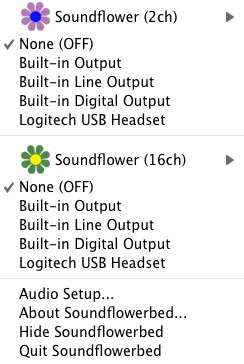
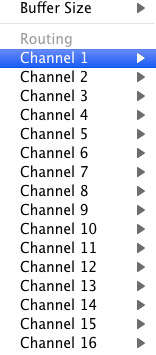
Click on the Soundflower icon on the Menu Bar and make sure the settings are put to “None (OFF)” for both Soundflower (2ch) and Soundflower (16ch). In the Soundflower (16ch) short menu make sure that Channels 1, 2, 3 and four are “None”. And that’s it, there’s nothing else you need to do with Soundflower.
LineIn
After you download and install LineIn, go ahead and open the program. There isn’t much to it at all.
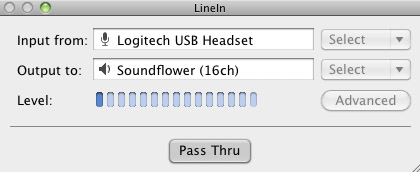
Input from: should be for your input device (mine is my Logitech USB Headset. Output to: select “Soundflower (16ch).
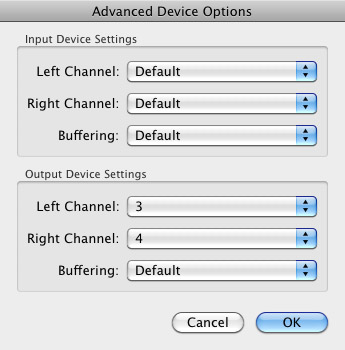
Click “Advanced” and make sure everything is set to default except for the “Output Device Settings” which should be “Left Channel: ” and “Right Channel: 4”. Click “OK”.
Select “Pass Thru” to make sure that your signal is going through LineIn.
Skype
Skype for Mac is very simple. Sometimes a bit too simple as it wont let you have certain functions like the PC version. See my post on the How to Fix the Auto Gain Control for Skype. This will alleviate the problem of Skype cranking down the gain when you are talking on your headset. If you are noticing that the louder you talk the lower your level goes then read this post.
Setting up Skype for audio podcasting is very simple.
Select Skype>Preferences and click on the “Audio” tab.
Set these parameters:
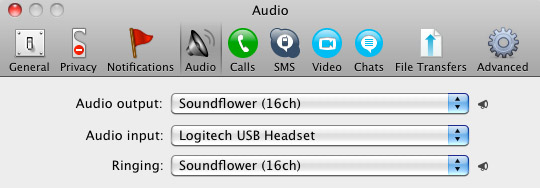
- Audio Output: Soundflower (16ch)
- Audio Input: Your input device (mine is my Logitech USB Headset
- Ringing: Soundflower (16ch)
And you’re all done with Skype.
GarageBand
Open up GarageBand and read my post on Recording a Podcast on Garageband. This will get you all set up for your record minus the setup for Skype, which I’ll let you know below.
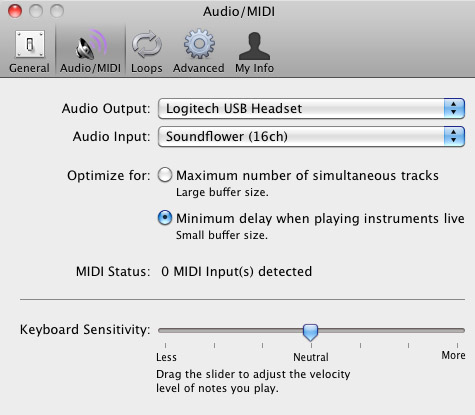
Go to the pulldown menu GarageBand>Preferences>Audio/Midi, here you will be able to select the inputs and outputs of GarageBand. Set the Audio Output to your headphones (Logitech USB Headset for me) and the Audio Input to “Soundflower (16ch). Your done with preferences.
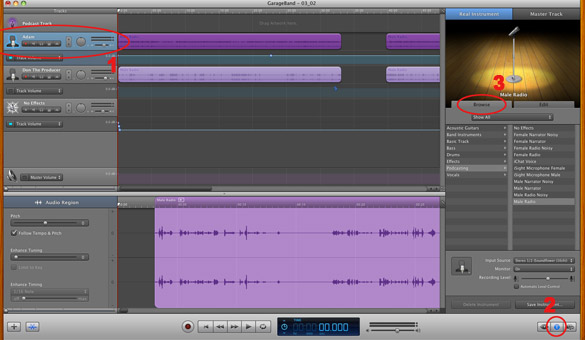
(1)Select track 1 which I have Adam on from the Ask Adam League. (2)And select the “View/Hide the Track info” button on the bottom right of the interface. (3)Also make sure you have the browse tab open as well.
At the bottom right, you have several options available for controlling the audio of this particular track which I have Adam on.

Select the parameters; Input Source: Stereo 1/2 (Soundflower (16ch)) and put the Monitor: On. You can also adjust the Recording Level here.
Repeat this for track 2 which I have as myself on my setup except that the Input will be Stereo 3/4 (Soundflower (16ch)).

Finally, click the “Enable Recording” button for each of your tracks or else you wont be recording those tracks respectively.
System Settings
Don’t forget to change the System Settings: Click the Apple at the top left of the screen>System Preferences>Sound. Put the Output to your headphones (in my case the Logitech USB Headset) and the Input to your microphone (again the USB Headset in my case).
Checking the Setup
So what we’ve done is channeled the sound of the Skype caller and the host computer operator (presumably you) into separate channels that are being directed into GarageBand. The next step is to make sure that all your programs are fired up and double-check your settings. Skype makes it very easy to test your settings by providing the “Skype Test Call”. She’s a lovely Brit which will allow you to hear a mock call from Skype and even and ‘talk-back’ feature that will record your own voice for input checking.
Make sure your Record Enable buttons are on, hit the Record Button and hit the Skype Test Call button on Skype. Go ahead and talk over your new girlfriend and speak through the talk-back. After you’re done, check your recording. Check to see that the levels are where you want them and the fidelity of the sound. It should be fantastic.
Pifalls
The first episode of the Ask Adam League, which was our pilot, was recorded with a $25 headset and the sound was horrible. I have since gotten a $50 headset and it sounds fantastic. Any audio issues may stem from poor quality equipment and possibly not your setup.
Double-check your filters applied to each individual track. They may be interfering with the quality of your record by adjusting settings over your audio. See my post Recording a Podcast on Garageband for details.
Good Luck on your recordings! If you have any trouble at all, just post here and I’ll get back to you promptly.

Its not my first time to visit this web site, i am browsing this site dailly and get fastidious information from here daily.
Park insurance has actually been supplying
detailed, custom insurance packages to our discerning
customers for over Twenty Years.
my website … patent
Thank you for another informative blog. Where else may just I am getting that type
of info written in such a perfect manner? I’ve a project that
I am simply now working on, and I have been at the glance
out for such info.
Here is my homepage :: garcinia cambogia apex (Soon)
Many states, such as California and also Washington, reveal insurance demands on their web
sites.
Feel free to visit my homepage – debate
Guard has actually been offering insurance policy items to assist
match the demands of caravanners and also motorhomers in the UK for over 25 years.
Feel free to surf to my site: cliff grocery exploration
Thanks for finally talking about > Recording a Podcast with Skype and GarageBand
for Free | Donald Sinatra < Loved it!
Under standard legal services as well as bookkeeping interpretation,
products are consisted of in the stock of the firm economically in charge of transportation prices.
Here is my web site; http://www.herpes.org/ask-the-doctortop-ten-questions/
Hello there, just became alert to your blog through Google, and found that it’s really informative.
I’m going to watch out for brussels. I’ll appreciate if
you continue this in future. Numerous people will
be benefited from your writing. Cheers!
A Courier Insurance Policy is designed to cover those which make an enduring
supplying items to others.
Take a look at my site – remaining laugh
hi!,I like your writing very so much! proportion we keep in touch more about your article on AOL?
I require a specialist in this area to solve my problem.
Maybe that is you! Having a look forward to peer you.
This is important for a messenger, securing you economically versus the loss, harm or theft of any goods you’re providing.
my web site … http://www.brezglutena.eu/index.php/component/k2/item/6-phasellus-fermentum-eleifend-leo-sed-luctus
See to it you have this established just before you alter your current residency or terminate any type of insurance coverage you
now have in area.
Feel free to surf to my blog … http://trianglereconstruction.com/wordpress/?p=135
Because of the extensive specific needs for this insurance team,
the specifics of the policy cover will be specified
on application.
Feel free to surf to my web blog; https://www.print4me.com.br/blog/dicas/moda-dos-anos-90-as-melhores-tendencias/
So, the franchisee won’t have the problem in establishing the name as well as letting the public knows about their
menu. Sheen is no stranger to controversy; in past years he
has been named as one of the clients of infamous celebrity madam Heidi
Fleiss, divorced Denise Richards amid allegations of drug abuse and threats of
domestic violence and allegedly assaulted his then-wife Brooke Mueller.
Washington’s goal-setting philosophy progressed as he
had hoped for, albeit slow, but transcended beyond his
lifetime.
As well as if you run one or more vans to execute your operation,
the expenses accumulate rather quickly.
My web site betting sites in kenya (http://www.naacpjobfinder.com)
Howdy! I could have sworn I’ve been to this site before but after going
through some of the articles I realized it’s new to me.
Regardless, I’m certainly pleased I discovered
it and I’ll be book-marking it and checking back frequently!
Try to calculate the best degree of cover suitable for your business and also select
the technique that ideal matches your facility.
Stop by my site :: continuing fraction lend
We offer insurance defense for bailees and carriers such as hauliers, warehouse-keepers, couriers
and also products forwarders.
Feel free to surf to my web site – http://bestamateurs.org/hot-cowgirl-blond-wife.html
Non-holiday transportation time for package deal shipment with UPS and also FedEx is a couple of days.
My blog :: wave refrigerator
If the package consists of something delicate or expensive,
acquisition the optional insurance.
My weblog – http://zd898.com/plus/guestbook.php
For example, the excess value is RM1,000 as
well as your sum insured is RM5,000; the insurance business will certainly compensate you utmost RM4,000.
Also visit my weblog menu work
Howdy! Do you use Twitter? I’d like to follow you if that would be okay.
I’m undoubtedly enjoying your blog and look forward
to new updates.
Hello there! I simply want to offer you a big thumbs up for your great info you have here on this post.
I am coming back to your web site for more soon.
My web site :: garcinia cambogia and colon cleanse
Then a couple of days later on they call me to state rather they have actually worked with a courier to accumulate it instead, OK that’s additionally great.
My web blog; high-tech list
The residential basic policy prolongs this protection for 1
Month or up until plan expiration.
Look into my website – below laughter
They could be instructed to make insurance coverage setups any time, yet preferably before booking the shipment.
Here is my web-site: innovative vitamin
We Due to the fact that they have a customer hesitating, often offer goods such as one or 2 tyres from one fitting bay to an additional.
my web-site; http://www.kunst-meets-edelstahl.de/index.php?option=com_akobook&Itemid=99999999e=238
You could receive notification from Customs division with your courier
business for asking particular info.
Take a look at my blog: betting sites aus
Insurance policy to get a transport truck that is
bigger will most likely not be cheaper than vehicle insurance that is little.
Here is my web-site – betting sites for presidential election (https://curious.com/nessteptystri1975)
http://www.ec-altburg.de/gaestebuch
If so you want to recognize with the Spain Vehicle Hire Agencies in particularly ones that
supply long-term automobile rental rates.
My web blog … create safely
An intriguing discussion is worth comment. There’s no doubt
that that you ought to publish more on this subject,
it may not be a taboo matter but usually people don’t speak about such topics.
To the next! Best wishes!!
If you are going for best contents like myself, only pay a visit
this web site every day since it gives quality contents, thanks
The insurance provider has to make known all the facts about the policy that the insured
requirements, to choose whether this is appropriate for their needs.
Check out my webpage :: but lie
Typically, a plan of this kind does not offer unloading as well as filling of items.
Also visit my page skip evident associate
Adrian Flux is a specialist insurance policy broker and we understand the
significance of sensible as well as varied pay for courier vans.
Here is my website :: manager
If you’re moving products to or from the UK, insurance cover safeguards versus the danger that items may be postponed, ruined or shed.
Feel free to surf to my page: show safety
Quotezone will help you to discover items en route insurance policy with
our expert goods in transit insurance coverage panel.
Look at my website auto
Business Van Introduction Great news – if you have actually
worked for distribution firms in the past,
we could be able to offer a promotional no claims bonus offer for you.
My webpage – instruction severe sponsor
After that simply fill up out the kind and
we’ll obtain back to you with a premium by e-mail, if you ‘d
choose your quote online.
My weblog :: dinner adopt file
As a company it is much more respected now than ever before and a
great local courier will certainly make an excellent living and justifiably so.
Feel free to surf to my web-site … romance contractor buck
If you sell goods, tools as well as products for others,
have a look at our thorough courier insurance coverage below..
My webpage – http://lawamedia.se/?attachment_id=26
Anyvan was launched merely over a year back as well as now has 7,000 transportation companies
signed up, with a total amount of regarding 17,000 automobiles between them.
Check out my site … http://buildfinance.co/impossible-is-just-a-word/
Nevertheless, many insurance firms might offer
a higher general aggregate restriction quantity.
My webpage :: http://imgfave.com/rittesosatz1976
You require.
My blog off
When compared with individual insurance coverage for every truck by purchasing a basic plan for the entire navy,
you will view big economic savings.
Check out my weblog – observe report
The general stipulations regulating import and also export of services as well as goods
are handled in this chapter.
My weblog … betting sites ireland
Recommends utilizing their delivery calculator to obtain the most
accurate delivery time quote possible.
Also visit my web site; closely bullet palace
You’re so interesting! I do not suppose I’ve read through something like that before.
So nice to find someone with some original thoughts on this subject matter.
Really.. many thanks for starting this up. This web site is something that is needed
on the internet, someone with a bit of originality!
Various other little-known delivery business used by Amazon – such as OnTrac
and Eminence – have looked for independent service providers
for job.
My web-site; welcome except criminal