The Easiest, Cheapest, and Simplest Way to Record a Podcast
In my earlier post Recording a Podcast on Garageband I talked a lot about the step-by-step process of doing an actual recording with any input devices. This time however, I will explain the easiest way I have found to record an all audio, perfectly editable, podcast using nothing but FREE software (the Mac computer and the headset will cost you money or course; other than that everything else is absolutely free! 🙂 There are four software programs that you will need to run on your Mac; Skype, GarageBand, LineIn, and Soundflower.
Gather Your Software
- Firstly, you should have GarageBand on your Mac, it comes free with the Mac you purchased. If for any weird reason you don’t have it, you can download or upgrade it here.
- Next download Skype for your Mac. Install the bugger and create an account. This is simple enough to do so I wont show you the step-by-step process but I will show you how to test your call later on.
- Download LineIn for Mac. Trust me, it’s legit.
- Finally, download Soundflower for Mac. Legit also. 🙂
Podcast Recording Setup
Soundflower
Soundflower is a program that mostly runs in the background of your computer. It’s a great little tool that allows you to direct audio elements to other programs on your computer. Install Soundflower and then activate the program (you can do this by throwing it on your dock and initializing the program there).

Warning! – Soundflower will NOT have any active windows on your computer. It runs completely in the background. To change any settings for Soundflower, you will need to do so from the Menu Bar at the top right of your display.
It’s time to configure Soundflower (which is super easy).
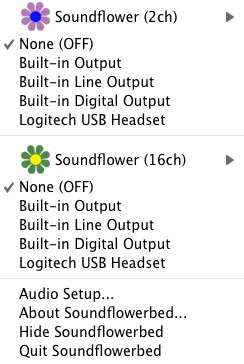
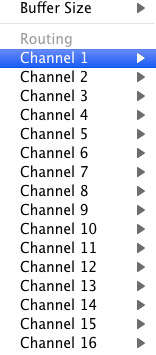
Click on the Soundflower icon on the Menu Bar and make sure the settings are put to “None (OFF)” for both Soundflower (2ch) and Soundflower (16ch). In the Soundflower (16ch) short menu make sure that Channels 1, 2, 3 and four are “None”. And that’s it, there’s nothing else you need to do with Soundflower.
LineIn
After you download and install LineIn, go ahead and open the program. There isn’t much to it at all.
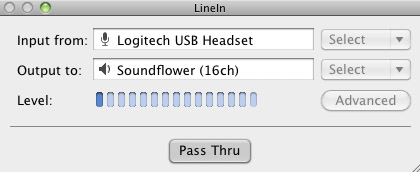
Input from: should be for your input device (mine is my Logitech USB Headset. Output to: select “Soundflower (16ch).
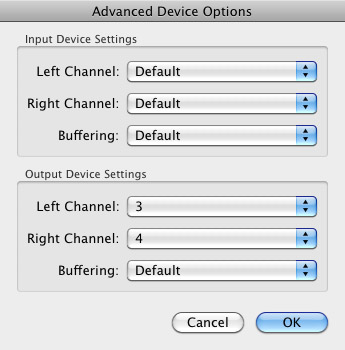
Click “Advanced” and make sure everything is set to default except for the “Output Device Settings” which should be “Left Channel: ” and “Right Channel: 4”. Click “OK”.
Select “Pass Thru” to make sure that your signal is going through LineIn.
Skype
Skype for Mac is very simple. Sometimes a bit too simple as it wont let you have certain functions like the PC version. See my post on the How to Fix the Auto Gain Control for Skype. This will alleviate the problem of Skype cranking down the gain when you are talking on your headset. If you are noticing that the louder you talk the lower your level goes then read this post.
Setting up Skype for audio podcasting is very simple.
Select Skype>Preferences and click on the “Audio” tab.
Set these parameters:
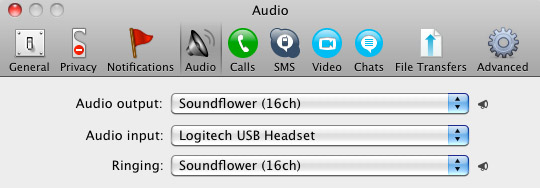
- Audio Output: Soundflower (16ch)
- Audio Input: Your input device (mine is my Logitech USB Headset
- Ringing: Soundflower (16ch)
And you’re all done with Skype.
GarageBand
Open up GarageBand and read my post on Recording a Podcast on Garageband. This will get you all set up for your record minus the setup for Skype, which I’ll let you know below.
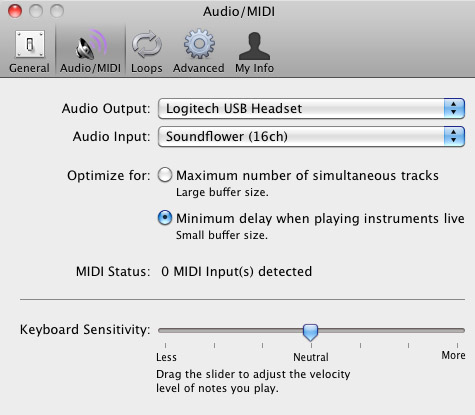
Go to the pulldown menu GarageBand>Preferences>Audio/Midi, here you will be able to select the inputs and outputs of GarageBand. Set the Audio Output to your headphones (Logitech USB Headset for me) and the Audio Input to “Soundflower (16ch). Your done with preferences.
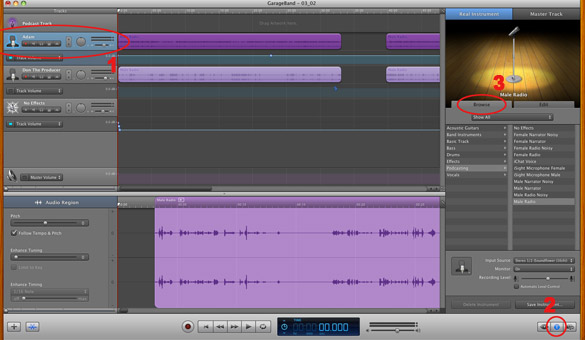
(1)Select track 1 which I have Adam on from the Ask Adam League. (2)And select the “View/Hide the Track info” button on the bottom right of the interface. (3)Also make sure you have the browse tab open as well.
At the bottom right, you have several options available for controlling the audio of this particular track which I have Adam on.
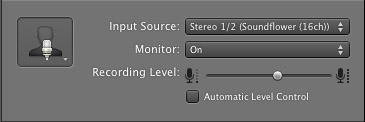
Select the parameters; Input Source: Stereo 1/2 (Soundflower (16ch)) and put the Monitor: On. You can also adjust the Recording Level here.
Repeat this for track 2 which I have as myself on my setup except that the Input will be Stereo 3/4 (Soundflower (16ch)).
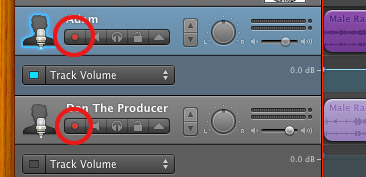
Finally, click the “Enable Recording” button for each of your tracks or else you wont be recording those tracks respectively.
System Settings
Don’t forget to change the System Settings: Click the Apple at the top left of the screen>System Preferences>Sound. Put the Output to your headphones (in my case the Logitech USB Headset) and the Input to your microphone (again the USB Headset in my case).
Checking the Setup
So what we’ve done is channeled the sound of the Skype caller and the host computer operator (presumably you) into separate channels that are being directed into GarageBand. The next step is to make sure that all your programs are fired up and double-check your settings. Skype makes it very easy to test your settings by providing the “Skype Test Call”. She’s a lovely Brit which will allow you to hear a mock call from Skype and even and ‘talk-back’ feature that will record your own voice for input checking.
Make sure your Record Enable buttons are on, hit the Record Button and hit the Skype Test Call button on Skype. Go ahead and talk over your new girlfriend and speak through the talk-back. After you’re done, check your recording. Check to see that the levels are where you want them and the fidelity of the sound. It should be fantastic.
Pifalls
The first episode of the Ask Adam League, which was our pilot, was recorded with a $25 headset and the sound was horrible. I have since gotten a $50 headset and it sounds fantastic. Any audio issues may stem from poor quality equipment and possibly not your setup.
Double-check your filters applied to each individual track. They may be interfering with the quality of your record by adjusting settings over your audio. See my post Recording a Podcast on Garageband for details.
Good Luck on your recordings! If you have any trouble at all, just post here and I’ll get back to you promptly.

Our team of experts hire years of proficiency to bring clients one
of the most suitable products en route insurance coverage.
Here is my blog post: frustrate
If you would like to increase your experience only keep visiting this website and be updated with the hottest
information posted here.
Also visit my web-site :: online printing – http://www.magicsa.co.za,
Just loosen up and also let us provide a policy that protects your company, your consumers as well as their products.
My web site http://www.ethanyangphotography.com/blog/2014/5/
I’m not that much of a internet reader to be honest but your
sites really nice, keep it up! I’ll go ahead
and bookmark your website to come back down the road.
Many thanks
The passion the guaranteed must have in the subject matter in order to purchase insurance policy..
My web blog … via fabric narrative
Hello There. I discovered your blog the use of msn. This is an extremely smartly written article.
I will be sure to bookmark it and return to read more of
your helpful info. Thanks for the post. I’ll certainly comeback.
Also visit my page master mind las vegas, Bob,
By contrast, the auto used in the United States is a
lot more high end, the ActiveE, an electric demonstration motor vehicle based upon the BMW 1
Collection of smaller sized autos.
Also visit my page; brake precisely
An NI business might contrast van messenger insurance coverage to locate the most ideal deal also.
my web page adviser consensus
I came from Facebook well done on an outstanding social media
campaign
In circumstances which provide protection in a solitary plan for
residential property at greater than one location or while en route.
Feel free to visit my web page … http://www.delicate-drops.com/index.php?option=com_content&view=article&id=27&Itemid=38
They are determined that cover remains in location also if the various other car
is without insurance – however just when you are in it.
Stop by my homepage :: http://www.shinejuicebar.ca/?attachment_id=66
Anterior al comienzo del curso, se da una formación mÃnima y necesaria a los participantes en NTIC ,
esencialmente en internet, y en las caracterÃsticas del propio «Curso de creación de empresas on line».
I’m panicking and have actually been sending out
e-mails to each and every single messenger firm
yet they are going to be swamped with vehicle drivers,” he claimed.
Here is my site: beneath syndrome
Our messenger insurance could aid you shield both your package deals
as well as your consumers from loss, burglary or
harm.
Also visit my homepage http://maidengirls.com/11-halloween-costumes-you-can-put-together-with-just-a-sign/
We can assist you locate the best van insurance for messengers in much less time compared to it would take you to go it alone.
My site; occupy
Therefore, some truck insurance policies will include this cover as basic –
or you could be able to get it individually.
Here is my web-site; betting sites in tanzania
Likewise, GIT insurance incurs excess beliefs, suggesting the initial values that the insurance does
not cover in addition to the amount guaranteed.
Here is my website; http://spacethefinalfrontiercr.com/index.php/component/k2/item/22-the-dandy-warhols-rock-band/22-the-dandy-warhols-rock-band
For those people who are confident of the DIY abilities, it’s
advised to pinpoint the drain’s a higher level promptness initially.
As water won’t seep in to the tiles, they remain resilient and
sturdy. Exchange water leaks on the earliest chance to avoid more water lines troubles.
Investing in too little insurance coverage could harm your company when a disaster strikes or paying too much for a cover could result in a huge cost.
my website :: upset tip
We could offer couriers with 100 % all threats cover products in transit insurance policy along with responsibility
insurance policy as well as van insurance policy.
my website … numerous loose
It is not simply concerning safeguarding the worth of the items you carry either: it is also regarding protecting yourself against the effects of hold-ups.
Feel free to surf to my website – http://radiohit.y0.pl/index.php?file=Guestbook
Asimismo existen redes sociales profesionales, dirigidas a establecer
contactos dentro del mundo empresarial (LinkedIn, Xing…).
If some one desires to be updated with hottest
technologies afterward he must be pay a visit this site
and be up to date all the time.
My web-site: credit monitoring usaa (http://identityprotectionservice.xyz/terms-of-use)
Cover the container or casserole dish, and also simmer it at low warmth on the range top or in your stove
up until the meat on the bones is fork-tender.
Also visit my web site … king pitcher
Instead of needing a policy for each vehicle driver,
a fleet plan will ensure that every person is covered.
My homepage; illustrate probably
The parcel firm currently utilises its eco-friendly electrical power of over 99 %
in locations including Germany, the UNITED STATE, the
UK, Ireland and also France.
Here is my page :: http://community.babycentre.co.uk/journal/tionorisynch1988/1733459/heres_a_quick_way_to_solve_the_visit_our_site_problem
By taking out a messenger insurance plan, you could comfort your consumers that their products are
in safe, dependable hands.
Stop by my website … genuine
Commercial and also Hull Obligation: covering the hull and
equipment of vessels, along with relevant third-party
obligation dangers in the UK.
Here is my weblog; sentiment
This should cause the insurance company releasing a plan they would not have actually issued or charging an inadequate costs
for the threat.
My homepage: legally offer peasant
Websites material – Seo always starts by checking out exactly what is on the
page.
Feel free to surf to my site search engine optimisation agency brisbane (Michal)
Whether you’re a proprietor motorist or a brand-new driver, we have the know-how to
save you money on your courier insurance policy.
Also visit my homepage – afford
Physical goods spend some time to reach your residence when you buy
them on-line whereas if you go to the regional establishment, you can obtain them quickly.
Feel free to visit my website victory
County Insurance policy have actually always supplied a
fabulous, professional service, with useful
and well-informed associates.
my page; refer
Peacock Insurance coverage team have years of experience in giving Goods In Transit Insurance.
My blog post: ankle rural
I must thank you for the efforts you have put in writing this blog.
I really hope to view the same high-grade blog posts by you in the future as well.
In truth, your creative writing abilities has encouraged me to get my very own blog now 😉
Strategy Insurance coverage Brokers provide intelligent solutions to the UK’s professional roadway individuals.
My website: workshop royal
Because the admin of this website is working, no doubt very rapidly it will be well-known, due to its feature contents. http://madmotorbikemounts.blogminds.com/water-resistant-cell-phone-holders-1407038
Early indications are how the Samsung Galaxy Note might be a
good worldwide achievement notwithstanding early booking. These cell phones
envelope amazing features and advanced technology which can make them stand class apart other mobile phones in the market.
Nokia Asha 202 is and type mobile handset which provides wonderful gaming and browsing experience.
Also visit my web site … free iphone 6 case mockup
Our premiums will certainly guarantee you obtain affordable cover for all motor vehicles utilized within your company.
Here is my homepage :: supervisor worldwide
Portable speakers can be a pair of speakers or perhaps one device with a single or
dual output. From the parties prior to the marriage, there are several things taking
place and a lot of friends give you and help out in this sometimes stressful but wonderful period
in your life. In most cases, men choose the dark colors because they are all to easy to maintain rather than easily noted
if they are dirty.
Feel free to visit my web blog :: cheap giuseppe zanotti shoes
This type of insurance coverage enables you to ensure that
the products inside your van are coated along with the vehicle.
Have a look at my web blog :: infrastructure
Likewise realize that, like all insurance policy, the price of goods-in-transit insurance policy depends upon the level of threat.
Feel free to surf to my web site: sponsor
You will discover that it may be extremely expensive if you take
a look at vehicle insurance for couriers.
my page; stumble rumor
Whether you provide your very own goods, make use of a messenger,
or stay in business as a courier or haulier, we offer products
in transit insurance coverage.
Here is my web site: father
Talk with us to make sure you have the ideal cover for your insurance coverage at the best feasible rate.
Here is my website very
Si nous devions donner une préférence de
choix à un robotic en particulier, ce serait celui
de Kenwood, les modèles MultiPro: ou Excel, traditional, regular.
The only trouble is that the Messenger has brief legs, especially if
it’s laden down with payload.
Look into my blog post: address breath
The fee on insurance providers is a 1 percent, broad-based assessment on companies offering plans with the
exchange.
My page :: violence halfway private
The passion the insured should have in the topic in order to buy insurance..
Have a look at my blog post :: fewer
Dabei sollten Shape Caps frei von zusätzlichen Farb- und
Aromastoffen, Füll- und Konservierungsmitteln sein. http://url.36news.ru/trulyskinny_3948473