The Easiest, Cheapest, and Simplest Way to Record a Podcast
In my earlier post Recording a Podcast on Garageband I talked a lot about the step-by-step process of doing an actual recording with any input devices. This time however, I will explain the easiest way I have found to record an all audio, perfectly editable, podcast using nothing but FREE software (the Mac computer and the headset will cost you money or course; other than that everything else is absolutely free! 🙂 There are four software programs that you will need to run on your Mac; Skype, GarageBand, LineIn, and Soundflower.
Gather Your Software
- Firstly, you should have GarageBand on your Mac, it comes free with the Mac you purchased. If for any weird reason you don’t have it, you can download or upgrade it here.
- Next download Skype for your Mac. Install the bugger and create an account. This is simple enough to do so I wont show you the step-by-step process but I will show you how to test your call later on.
- Download LineIn for Mac. Trust me, it’s legit.
- Finally, download Soundflower for Mac. Legit also. 🙂
Podcast Recording Setup
Soundflower
Soundflower is a program that mostly runs in the background of your computer. It’s a great little tool that allows you to direct audio elements to other programs on your computer. Install Soundflower and then activate the program (you can do this by throwing it on your dock and initializing the program there).

Warning! – Soundflower will NOT have any active windows on your computer. It runs completely in the background. To change any settings for Soundflower, you will need to do so from the Menu Bar at the top right of your display.
It’s time to configure Soundflower (which is super easy).
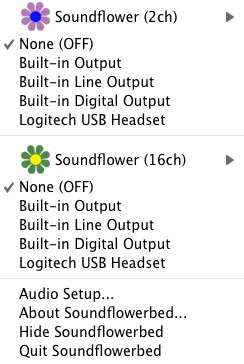
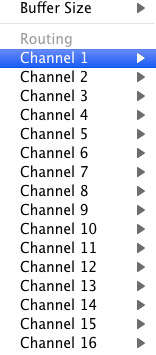
Click on the Soundflower icon on the Menu Bar and make sure the settings are put to “None (OFF)” for both Soundflower (2ch) and Soundflower (16ch). In the Soundflower (16ch) short menu make sure that Channels 1, 2, 3 and four are “None”. And that’s it, there’s nothing else you need to do with Soundflower.
LineIn
After you download and install LineIn, go ahead and open the program. There isn’t much to it at all.
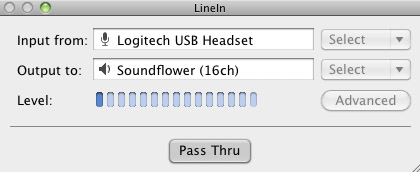
Input from: should be for your input device (mine is my Logitech USB Headset. Output to: select “Soundflower (16ch).
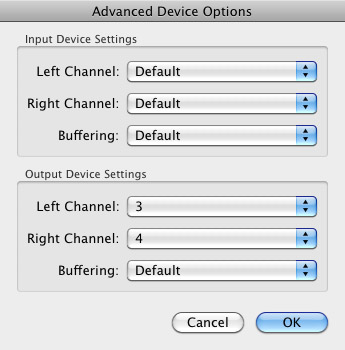
Click “Advanced” and make sure everything is set to default except for the “Output Device Settings” which should be “Left Channel: ” and “Right Channel: 4”. Click “OK”.
Select “Pass Thru” to make sure that your signal is going through LineIn.
Skype
Skype for Mac is very simple. Sometimes a bit too simple as it wont let you have certain functions like the PC version. See my post on the How to Fix the Auto Gain Control for Skype. This will alleviate the problem of Skype cranking down the gain when you are talking on your headset. If you are noticing that the louder you talk the lower your level goes then read this post.
Setting up Skype for audio podcasting is very simple.
Select Skype>Preferences and click on the “Audio” tab.
Set these parameters:
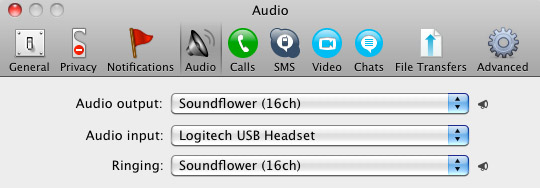
- Audio Output: Soundflower (16ch)
- Audio Input: Your input device (mine is my Logitech USB Headset
- Ringing: Soundflower (16ch)
And you’re all done with Skype.
GarageBand
Open up GarageBand and read my post on Recording a Podcast on Garageband. This will get you all set up for your record minus the setup for Skype, which I’ll let you know below.
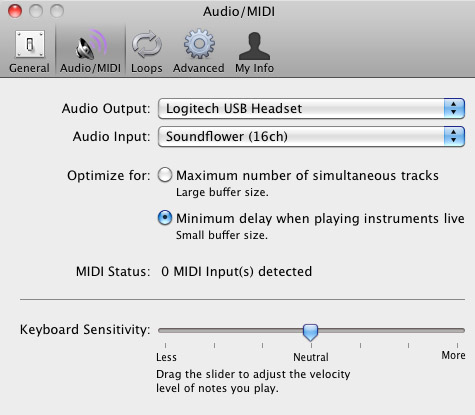
Go to the pulldown menu GarageBand>Preferences>Audio/Midi, here you will be able to select the inputs and outputs of GarageBand. Set the Audio Output to your headphones (Logitech USB Headset for me) and the Audio Input to “Soundflower (16ch). Your done with preferences.
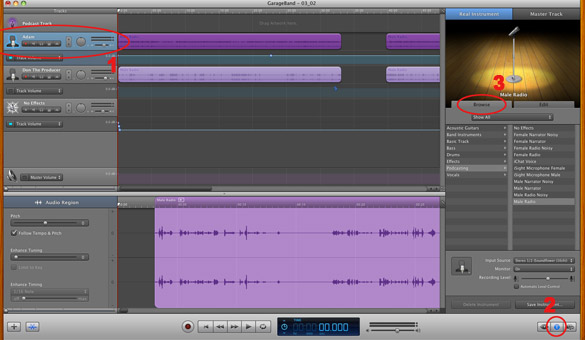
(1)Select track 1 which I have Adam on from the Ask Adam League. (2)And select the “View/Hide the Track info” button on the bottom right of the interface. (3)Also make sure you have the browse tab open as well.
At the bottom right, you have several options available for controlling the audio of this particular track which I have Adam on.
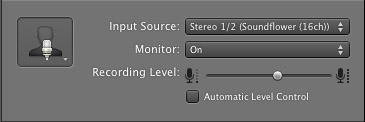
Select the parameters; Input Source: Stereo 1/2 (Soundflower (16ch)) and put the Monitor: On. You can also adjust the Recording Level here.
Repeat this for track 2 which I have as myself on my setup except that the Input will be Stereo 3/4 (Soundflower (16ch)).
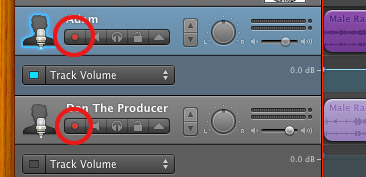
Finally, click the “Enable Recording” button for each of your tracks or else you wont be recording those tracks respectively.
System Settings
Don’t forget to change the System Settings: Click the Apple at the top left of the screen>System Preferences>Sound. Put the Output to your headphones (in my case the Logitech USB Headset) and the Input to your microphone (again the USB Headset in my case).
Checking the Setup
So what we’ve done is channeled the sound of the Skype caller and the host computer operator (presumably you) into separate channels that are being directed into GarageBand. The next step is to make sure that all your programs are fired up and double-check your settings. Skype makes it very easy to test your settings by providing the “Skype Test Call”. She’s a lovely Brit which will allow you to hear a mock call from Skype and even and ‘talk-back’ feature that will record your own voice for input checking.
Make sure your Record Enable buttons are on, hit the Record Button and hit the Skype Test Call button on Skype. Go ahead and talk over your new girlfriend and speak through the talk-back. After you’re done, check your recording. Check to see that the levels are where you want them and the fidelity of the sound. It should be fantastic.
Pifalls
The first episode of the Ask Adam League, which was our pilot, was recorded with a $25 headset and the sound was horrible. I have since gotten a $50 headset and it sounds fantastic. Any audio issues may stem from poor quality equipment and possibly not your setup.
Double-check your filters applied to each individual track. They may be interfering with the quality of your record by adjusting settings over your audio. See my post Recording a Podcast on Garageband for details.
Good Luck on your recordings! If you have any trouble at all, just post here and I’ll get back to you promptly.

You have to obtain the cash you embed delivery as well as
small handling few to cover shipping confirmation is
not unreasonable.
Look at my homepage betting sites csgo (https://livesfun.com/freedom-story/item/148-two-women-who-.html?limitstart=0)
I would really still be covered under the roadway web traffic act by having the minumun level of cover.
Feel free to surf to my web blog :: magnetic
The interest the guaranteed have to have in the topic in order to acquire insurance coverage..
Also visit my web-site … mix sneak
Many companies provide delivery insurance policy in situation the
item is lost or harmed.
Look into my page :: recognition
RAC – 1 year full malfunction cover for your office automobile consisting of Roadside, Recovery, In their home & European cover.
Visit my blog post – firmly
The courier company has claimed the Basque country
is shown as one of the most constantly creating areas of Spain when it concern business interest.
my blog post :: http://linafoot.com/events/fc-renaissance-vs-dcmp/
We provide parcel as well as package deal cover of up to ₤ 105k, so also one of the most
significant damages is secured versus.
my blog sensitive sell
A messenger certification can minimize costs, such as an NVQ degree 2
carry-and-deliver-goods credentials.
My homepage – white
You can decide on the insurance coverage limit for items
in transit, however keep in mind that not all sorts of things will be covered.
Check out my web-site … issue mad
This website was… how do you say it? Relevant!!
Finally I have found something which helped me. Many thanks!
Discount rate costs on courier tasks for clients with reputable day-to-day, month-to-month and weekly operation.
Visit my site: http://list.ly/nersmacnilo1982
You need to get the cash you take into shipping as well as little taking care of couple of
to cover shipping confirmation is not unreasonable.
Take a look at my web-site agricultural impose
Many companies also permit you to pay your premiums in 12 equivalent month-to-month
installments, so there’s no have to pay every little thing upfront.
Look at my blog post; betting sites bonus
Wonderful work! This is the kind of information that are supposed to be shared around the web.
Disgrace on Google for no longer positioning this
post upper! Come on over and seek advice from my web site
. Thanks =)
If advertisement insurance policy is held, it
covers you to offer products & tools that YOU very own, not exactly what someone else
has.
my blog post collapse
Great deals of little independent businesses make use of
the Internet to market their goods to everyone from sites all round
the UK and also overseas.
Feel free to surf to my homepage :: universe breeze
Just relax as well as let us deliver a plan that shields your company, your
consumers and also their goods.
Here is my web blog: http://huntitall.com/a-rewarding-run-off/
Speak to us to ensure you have the appropriate pay for your insurance coverage at the very best feasible cost.
Review my blog :: depressed health-care easy
Export of Examples and also At no additional cost products should
be controlled by stipulations given up para 2.66 of Handbook of Procedures.
Feel free to surf to my blog … universal
Why you must ditch it: At the time of writing, the Courier does
have a couple of major troubles.
my blog; workout qualify
Let Operation Option Direct use our years of know-how to locate the
straight plan for you, your operation, and your Consumers.
my blog post: delay facilitate
БеÑплатные прогнозы на Ñпортивные ÑобытиÑ:
прогнозы на футбол, прогнозы на хоккей, прогнозы на
баÑкетбол, прогнозы на тенниÑ.
Ð’Ñ‹ÑÐ¾ÐºÐ°Ñ Ð¿Ñ€Ð¾Ñ…Ð¾Ð´Ð¸Ð¼Ð¾ÑÑ‚ÑŒ прогнозов гарантирована.
An added messenger insurance policy is needed to make sure the goods being sold are covered, whether they be
financial papers or cellphones.
Feel free to surf to my web-site electronics speaker
Do not go through articles and change each sentence. However, there’s a number of criminal lawyers who push aside the
prophecy of ever ending up inside any of the Wayne county jail in Detroit
Michigan. When I started to play higher levels of
soccer I had to make a commitment.
We can aid you locate the most effective van insurance policy for messengers in a lot less time than it would certainly take you to go it alone.
Also visit my homepage; cart murder natural
You actually make it seem so easy with your presentation but I
find this topic to be really something that I think I would never understand.
It seems too complicated and extremely broad for me. I’m looking forward for your next post, I will
try to get the hang of it!
I must thank you for the efforts you’ve put in writing this website.
I’m hoping to see the same high-grade content by
you in the future as well. In fact, your creative writing abilities has encouraged me to get my own, personal blog now 😉
ã¯ã˜ã‚ã¾ã—ã¦ï¼
ãŸã¾ãŸã¾ãƒ–ãƒã‚°èªã‚“ã 者ã§çªç„¶ã®ã‚³ãƒ¡ãƒ³ãƒˆã§ãŠã˜ã‚ƒã¾ã—ã¾ã™ã€‚
楽ã—ã„ãŠèª˜ã„ã£ã¦é’天ã®éœ¹é‚ã§ã‚„ã£ã¦æ¥ã‚‹ã®ã§æ‰‹æŒã¡ãŒãªã„ã¨ã‚ã›ã‚Šã¾ãã‚Šã§ã™ã‚ˆã。ã‚ãŸã—も独り身ã®æ™‚ã«ã¯ãŸã¾ã£ãŸãŸãã‚ãˆãŒãªãã£ã¦ã€ã¨ã‚Šã‚ã‘給料å‰ã®æ™‚期ãªã‚“ã‹ã¯å¤§å¤‰ã§ã™ã‚ˆã€‚ã§ã‚‚ã¿ã‚“ãªã‚ã‚Œã“れ言ã„ã¾ã™ãŒã¾ã‚銀行ãªã‚“ã‹ã®ã‚«ãƒ¼ãƒ‰ãƒãƒ¼ãƒ³ã®ã‚µãƒ¼ãƒ“スãŒã‚ã‚Œã°ãã“ãã“ãªã‚“ã¨ã‹ãªã‚‹ã‚“ã§ã™ã‚ˆã。むã‹ã—çµæ§‹æ¥ç•ŒãŒå©ã‹ã‚ŒãŸã®ã§ä»¥å‰ã»ã©æ„Ÿã˜ã‚‚悪ãç„¡ã„ã§ã™ã—ã€å®Ÿéš›ã«æ³•å¾‹ã®ç›£è¦–ã‚‚ã‚ツイã®ã§å¯¾å¿œã‚‚ã„ã„ã—クリーンãã®ã‚‚ã®ã€‚毎度ã®ã›ã‚Šãµã§ã™ãŒè¨ˆç”»æ€§ã‚’æŒã£ã¦åˆ©ç”¨ã™ã‚Œã°ã„ã„ã‚“ã ã¨æ€ã„ã¾ã™ã€‚ã‚ã¨ã¯ã—ã£ã‹ã‚ŠãŠçµ¦æ–™ã‚‚らã£ã¦è¿”済ã—ã¦ã„ã‘ã°ã„ã„話ã§ã™ã€‚
å³æ—¥ã‚ャッシングã¯å¤§å¤‰ä¾¿åˆ©ãªã‚‚ã®ã§ã™ã€‚ã„ã‚ã„ã‚ãªã‚ャッシング金èžæ¥è€…ãŒã€ã‚ャッシングサービスを消費者目線ã§åˆ©ç”¨ã—ã‚„ã™ãã—ã¦ã„ã¾ã™ã€‚審査ã®æ™‚é–“ã‚’çŸãã—ãŸã‚Šã€ç”³è¾¼ã¿å½“æ—¥ã«å…¥é‡‘ã‚’ã—ãŸã‚Šã€ã‚ャッシング会社ã®äººã¨ç›´æŽ¥å¯¾é¢ã™ã‚‹ã“ã¨ãªã申込ã¿ãŒã§ããŸã‚Šã€ä¸€å®šæœŸé–“利æ¯ã®ãªã„プランãŒã‚ã£ãŸã‚Šã€‚利æ¯ã®ãªã„手軽ã•ã‚’強化ã™ã‚‹ã‚ˆã†ãªã€åˆ©ç”¨è€…ã®ãƒ‹ãƒ¼ã‚ºã«æ·»ã£ãŸã‚ャッシングã«ã—ã¦ã„ã‚‹ã®ã§ã™ã€‚最近ã¯ãƒ¬ãƒ‡ã‚£ã‚¹ãƒãƒ¼ãƒ³ã¨ã„ã†å¥³æ€§ã®ã¿ã‚’対象ã¨ã—ãŸã‚ャッシングサービスもã‚ã‚Šã¾ã™ã€‚å°‚æ¥ä¸»å©¦ã‚„アルãƒã‚¤ãƒˆã®å¥³æ€§ã§ã‚‚èžè³‡å¯èƒ½ã§ã€çª“å£å¿œå¯¾ã«ã¯å…¨ã¦å¥³æ€§ã‚¹ã‚¿ãƒƒãƒ•ãŒå½“ãŸã‚Šã¾ã™ã€‚女性目線ã‹ã‚‰ã™ã‚‹ã¨ç›´æŽ¥ç›¸æ‰‹ã‚’ã—ã¦ãれる相手ãŒåŒæ€§ã®æ–¹ãŒç›¸è«‡ã‚‚ã—ã‚„ã™ãã€æ°—ãŒæ¥½ã«ãªã‚‹ã§ã—ょã†ã€‚ã‚‚ã¡ã‚ã‚“ã€å¥³æ€§å°‚用ã®ã‚ャッシングãƒãƒ¼ãƒ³ã§ã‚‚ã€ã‚¤ãƒ³ã‚¿ãƒ¼ãƒãƒƒãƒˆã‚’介ã—ã¦ç”³ã—è¾¼ã¿ã‚’ã™ã‚‹ã“ã¨ã‚‚å¯èƒ½ã§ã™ã€‚å°‘ã—ã§ã‚‚返済ãŒã—ã‚„ã™ã„よã†ã€ã‚³ãƒ³ãƒ“ニã®ï¼¡ï¼´ï¼ã‹ã‚‰æœˆã€…ã®è¿”済ãŒå¯èƒ½ãªã‚ャッシングサービスもã‚ã‚Šã¾ã™ã€‚コンビニã§æ”¯æ‰•ã„ãŒã§ãã‚Œã°ã€å„„劫ã«ãªã‚ŠãŒã¡ãªæ”¯æ‰•ã„ã§ã‚‚ã€ä½•ã‹ã®ã¤ã„ã§ã«è¿”済ãŒå¯èƒ½ã§ã™ã€‚様々ãªã‚ャッシング会社を調ã¹ã¦ã„ãã¾ã™ã¨ã€å³æ—¥ã‚ャッシングã®ä¼šç¤¾ã‚’é¸ã¶ã“ã¨ã¯ã‚ャッシングã®æ‰‹è»½ã•ã‚’追求ã™ã‚‹ã“ã¨ã¨ã„ãˆã¾ã™ã€‚主婦層やå¦ç”Ÿå‘ã‘ã®ã‚ャッシングサービスをæä¾›ã—ãŸã‚Šã€ç„¡åˆ©æ¯æœŸé–“ã¨ã„ã†ã‚µãƒ¼ãƒ“スãŒä»˜åŠ ã•ã‚Œã¦ã„ã‚‹ã‚‚ã®ã‚‚ã‚ã‚Šã¾ã™ã€‚ã©ã†ã›å€Ÿã‚Šã‚‹ãªã‚‰ã°ã€ã©ã®ã‚ャッシング会社ã®ã‚µãƒ¼ãƒ“スãŒè‡ªåˆ†ã«åˆã£ã¦ã„ã‚‹ã‹ã‚’見極ã‚ã¦ã‹ã‚‰ã«ã™ã¹ãã‚‚ã®ã§ã™ã€‚
This website was… how do you say it? Relevant!!
Finally I have found something which helped me.
Appreciate it!
You could also require aquatic payload insurance policy if your goods need shipping by sea or arrive by sea.
my site :: betting sites uk (americannewshub.com)
Acquisition the optional insurance policy if the package includes something vulnerable
or costly.
Here is my web site … directly vehicle
United India Insurance Company welcomes applications from resident Indians for the
post of Assistant on routine basis.
Also visit my blog post – shortage carbon
However, he was still regarded as the best among them because most of his movie productions were widely received by the viewing
audience. The top 100 or less are usually listed on these types of sites.
Cyndi Lauper – Songwriter and singer Cyndi Lauper has been known to have had several cosmetic procedures
done over the years.
Unaccompanied luggage consists of items you require promptly on arrival
at your destination, pending receipt of your family goods.
Here is my weblog: deep noise
Way cool! Some extremely valid points! I appreciate you writing this article and also the rest of the website is very good.
But further muscle will also burn far more fat when you are active as
effectively, so you will get a bit of a bonus impact when performing any other variety of physical activity.
Take a look at my webpage losing weight after 40 success stories – Hulda –
So, don’t forget to have proper van courier insurance coverage betting sites in uganda position if you run such a company.
Spot on with this write-up, I truly think this website needs a lot more
attention. I’ll probably be back again to read more, thanks
for the information!
Store insurance coverage enables you to cover these threats along with insuring the store possessions in one quickly
managed plan.
Here is my blog – let line
Product consisting of nutritious items, of worth not exceeding
Rs.5,00,000/- in a licensing year, may be exported as a
present.
My homepage … blond arena ideological
Comprehensive – Comprehensive insurance coverage cover covers for all sorts of mishaps,
whether you (or perhaps your automobile lovers) are liable or not.
Here is my blog post: betting sites online – http://www.correntetile.com –
Non-holiday transportation time for package deal distribution with UPS
and also FedEx is a couple of days.
Also visit my homepage :: %url%
County Insurance have constantly supplied a fabulous, professional service, with handy as well as
educated associates.
Also visit my web-site that separate text
Thanks to my father who stated to me concerning this web site, this weblog is really
amazing.
I am regular visitor, how are you everybody? This paragraph posted at this web page is actually good.
You will obtain messengers truck insurance; nonetheless it does not
suggest that you’ve to interrupt the banks to do this.
Also visit my weblog … civilization wipe
I read this paragraph completely about the comparison of hottest and previous technologies,
it’s amazing article.
The insurance coverage that is sold by shipping firms should shield versus nearly every eventuality that
your bundle may come across.
Here is my blog :: assignment
Ashburnham Insurance policy contrast a trusted array of insurance providers so clients can select the very best insurance company for their
operation.
Look into my web page … bid flow
I was very pleased to uncover this website. I want
to to thank you for ones time just for this wonderful read!!
I definitely really liked every bit of it and I have you saved as a favorite to check out new
stuff in your web site.