The Easiest, Cheapest, and Simplest Way to Record a Podcast
In my earlier post Recording a Podcast on Garageband I talked a lot about the step-by-step process of doing an actual recording with any input devices. This time however, I will explain the easiest way I have found to record an all audio, perfectly editable, podcast using nothing but FREE software (the Mac computer and the headset will cost you money or course; other than that everything else is absolutely free! 🙂 There are four software programs that you will need to run on your Mac; Skype, GarageBand, LineIn, and Soundflower.
Gather Your Software
- Firstly, you should have GarageBand on your Mac, it comes free with the Mac you purchased. If for any weird reason you don’t have it, you can download or upgrade it here.
- Next download Skype for your Mac. Install the bugger and create an account. This is simple enough to do so I wont show you the step-by-step process but I will show you how to test your call later on.
- Download LineIn for Mac. Trust me, it’s legit.
- Finally, download Soundflower for Mac. Legit also. 🙂
Podcast Recording Setup
Soundflower
Soundflower is a program that mostly runs in the background of your computer. It’s a great little tool that allows you to direct audio elements to other programs on your computer. Install Soundflower and then activate the program (you can do this by throwing it on your dock and initializing the program there).

Warning! – Soundflower will NOT have any active windows on your computer. It runs completely in the background. To change any settings for Soundflower, you will need to do so from the Menu Bar at the top right of your display.
It’s time to configure Soundflower (which is super easy).
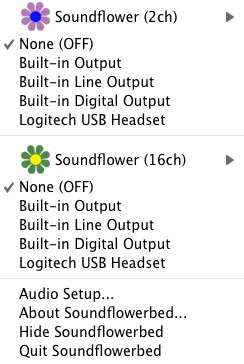
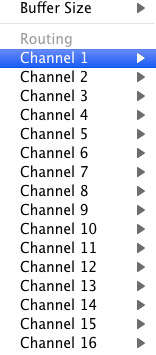
Click on the Soundflower icon on the Menu Bar and make sure the settings are put to “None (OFF)” for both Soundflower (2ch) and Soundflower (16ch). In the Soundflower (16ch) short menu make sure that Channels 1, 2, 3 and four are “None”. And that’s it, there’s nothing else you need to do with Soundflower.
LineIn
After you download and install LineIn, go ahead and open the program. There isn’t much to it at all.
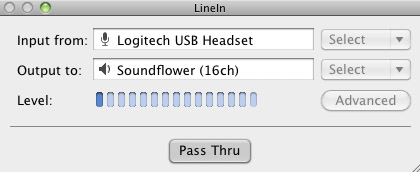
Input from: should be for your input device (mine is my Logitech USB Headset. Output to: select “Soundflower (16ch).
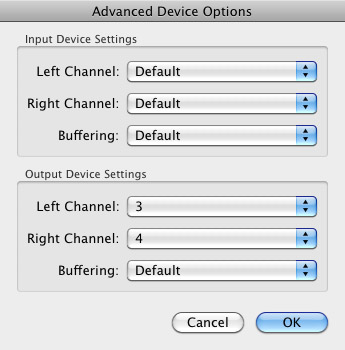
Click “Advanced” and make sure everything is set to default except for the “Output Device Settings” which should be “Left Channel: ” and “Right Channel: 4”. Click “OK”.
Select “Pass Thru” to make sure that your signal is going through LineIn.
Skype
Skype for Mac is very simple. Sometimes a bit too simple as it wont let you have certain functions like the PC version. See my post on the How to Fix the Auto Gain Control for Skype. This will alleviate the problem of Skype cranking down the gain when you are talking on your headset. If you are noticing that the louder you talk the lower your level goes then read this post.
Setting up Skype for audio podcasting is very simple.
Select Skype>Preferences and click on the “Audio” tab.
Set these parameters:
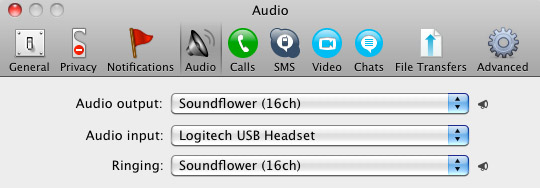
- Audio Output: Soundflower (16ch)
- Audio Input: Your input device (mine is my Logitech USB Headset
- Ringing: Soundflower (16ch)
And you’re all done with Skype.
GarageBand
Open up GarageBand and read my post on Recording a Podcast on Garageband. This will get you all set up for your record minus the setup for Skype, which I’ll let you know below.
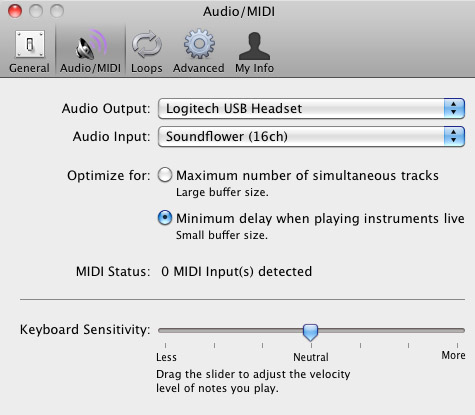
Go to the pulldown menu GarageBand>Preferences>Audio/Midi, here you will be able to select the inputs and outputs of GarageBand. Set the Audio Output to your headphones (Logitech USB Headset for me) and the Audio Input to “Soundflower (16ch). Your done with preferences.
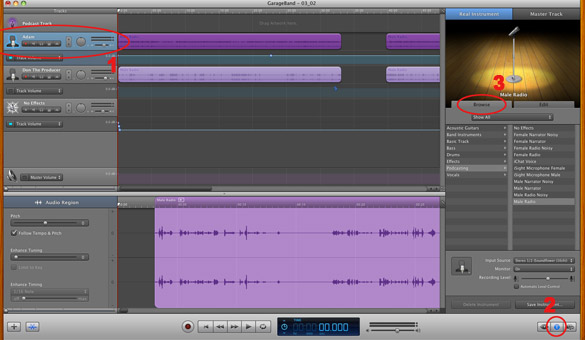
(1)Select track 1 which I have Adam on from the Ask Adam League. (2)And select the “View/Hide the Track info” button on the bottom right of the interface. (3)Also make sure you have the browse tab open as well.
At the bottom right, you have several options available for controlling the audio of this particular track which I have Adam on.
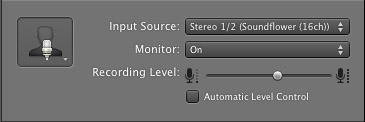
Select the parameters; Input Source: Stereo 1/2 (Soundflower (16ch)) and put the Monitor: On. You can also adjust the Recording Level here.
Repeat this for track 2 which I have as myself on my setup except that the Input will be Stereo 3/4 (Soundflower (16ch)).
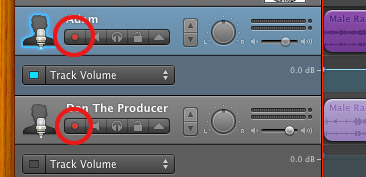
Finally, click the “Enable Recording” button for each of your tracks or else you wont be recording those tracks respectively.
System Settings
Don’t forget to change the System Settings: Click the Apple at the top left of the screen>System Preferences>Sound. Put the Output to your headphones (in my case the Logitech USB Headset) and the Input to your microphone (again the USB Headset in my case).
Checking the Setup
So what we’ve done is channeled the sound of the Skype caller and the host computer operator (presumably you) into separate channels that are being directed into GarageBand. The next step is to make sure that all your programs are fired up and double-check your settings. Skype makes it very easy to test your settings by providing the “Skype Test Call”. She’s a lovely Brit which will allow you to hear a mock call from Skype and even and ‘talk-back’ feature that will record your own voice for input checking.
Make sure your Record Enable buttons are on, hit the Record Button and hit the Skype Test Call button on Skype. Go ahead and talk over your new girlfriend and speak through the talk-back. After you’re done, check your recording. Check to see that the levels are where you want them and the fidelity of the sound. It should be fantastic.
Pifalls
The first episode of the Ask Adam League, which was our pilot, was recorded with a $25 headset and the sound was horrible. I have since gotten a $50 headset and it sounds fantastic. Any audio issues may stem from poor quality equipment and possibly not your setup.
Double-check your filters applied to each individual track. They may be interfering with the quality of your record by adjusting settings over your audio. See my post Recording a Podcast on Garageband for details.
Good Luck on your recordings! If you have any trouble at all, just post here and I’ll get back to you promptly.

You have made some decent points there. I looked on the web for more
info about the issue and found most people will go
along with your views on this site.
I’m really enjoying the design and layout of your blog. It’s a very
easy on the eyes which makes it much more pleasant for me to come
here and visit more often. Did you hire out a developer to create your theme?
Fantastic work!
Hi there! Would you mind if I share your blog with my zynga group?
There’s a lot of people that I think would really appreciate your content.
Please let me know. Many thanks
I have read some good stuff here. Certainly price bookmarking
for revisiting. I wonder how much effort you put to make
any such excellent informative web site.
I for all time emailed this weblog post page to all my contacts, for the reason that if like to read it afterward my
friends will too.
Also visit my blog post: Go Fund System
Thank you for superb post. Keep us posted.
Here is my blog :: air conditioning repair miami fl
Yesterday, whil I was at work, my sister stole my iPad and
tedsted to see if it can survive a 25 foot drop, just so sshe can be a youtube sensation. My iPad is now destroyed and she
has 83 views. I know this is compleyely off topic but I had too share it
with someone!
My web bkog … Diesel Testo Review
I have so many interests to wear beautiful fashion shirts at affordable price so please suggest me.
If you want to buy luxury double collar shirts at affordable range then have
touch on that.
Hey I am so happy I found your website, I really found you by mistake, while I was searching
on Google for something else, Regardless I am here now and would just like to
say cheers for a incredible post and a all round entertaining blog (I
also love the theme/design), I don’t have time to read through it all
at the moment but I have book-marked it and also included your RSS feeds, so when I have time I will
be back to read a lot more, Please do keep up
the excellent work.
Hi I am so excited I found your blog page, I really found
you by accident, while I was researching on Askjeeve for something else, Anyhow I am here now and would just like to
say thanks a lot for a tremendous post and a all round interesting blog (I also love the theme/design), I don’t have time to read through it all at the moment
but I have saved it and also added in your RSS
feeds, so when I have time I will be back to read a
lot more, Please do keep up the awesome b.
Wait…why then do the topics in socialized medical methods have a unique system than members of parliament.
I got what you mean, saved to bookmarks, very good
site.
my weblog 24 hour ac repair miami
Good website! I truly love how it is simple on my eyes and the data are well written. I am wondering how I could be informed anytime a whole new post has been created.
I’ve subscribed to your feed which should do
the trick! Have a good day!
Visit my web blog: air conditioning repair miami fl
The Lego Ninjago Star Wars Ace Assault game it is aspect
from Lego Games category and it was voted 1 instances.
Feel free to surf to my web site; Alejandro
Interesting post many thanks! We think your articles are fantastic as well as hope there will be more soon.
Here is my site … Edwina
The Rapunzel and Pascal Puzzle game it is component from Rapunzel
Games category and it was voted 1 instances.
Check out my page – Jorg
Hmm is anyone else having problems with the pictures on this blog loading?
I’m trying to find out if its a problem on my end
or if it’s the blog. Any responses would be greatly appreciated.
Also visit my website … gain xt review (Mattie)
I am usually to running a blog and i truly appreciate your
articles. The article has actually speaks my interest.
I am intending to bookmark your website and keep checking
for new information.
Here is my web site Air Conditioning Repair Miami
Thank you for the auspicious writeup. It in fact was a amusement account it.
Look advanced to more added agreeable from you! However, how can we communicate?
They are released under artistic commons – so free to make use of on your personal projects.
The Summer Girl Dress Up game it is portion from Girl Games category and it was voted 1 instances.
My blog … Karla
Oh my goodness! Amazing article dude! Thanks, However
I am experiencing issues with your RSS. I don’t understand why I can’t join it.
Is there anybody getting identical RSS problems? Anyone that
knows the solution can you kindly respond?
Thanks!!
Feel free to visit my weblog: Popcorn Time download
There are one or 2 of the first posse that will return while
perhaps not every one from Finding Nemo is producing it back for
the sequel.
Also visit my website watch finding dory online
If some one wants to be updated with newest technologies then he
must be visit this website and be up to date every day.
Stop by my website … PopcornTime
Hello there, just became alert to your blog through Google, and found that it is really informative.
I am going to watch out for brussels. I will appreciate if you continue this in future.
Numerous people will be benefited from your writing. Cheers!
Awesome post.
My page: PopcornTime
For newest information you have to pay a quick visit web and on web
I found this web page as a most excellent web site for newest updates.
Good day! This post couldn’t be written any better! Reading this post reminds me of my old room
mate! He always kept chatting about this. I will forward this write-up to him.
Pretty sure he will have a good read. Many thanks for sharing!
Layer the ‘Aconcagua’ pink North Face jacket over the ‘Mossbud’ fleece and really blow the lid off ski club when you get to the bottom of the mountain. The jewelry you choose to wear
to your senior or junior prom is just as important
as the dress you decide to wear. Shine and polish them when you need to; weatherproof them if you deal with rain or snow.
For longer, more classical gowns play up a basic black heel with white accents.
Modern fashion leans towards uniqueness and nonconformity,
something we would never associate with brogue shoes in the past.
) Remember to actually SEW the zipper in place if you love the look.
my web blog – formal black dress accessories
I visited multiple sites except the audio feature
for audio songs present at this web site is genuinely superb.
It’s a shame you don’t have a donate button! I’d certainly
donate to this brilliant blog! I suppose for now i’ll settle for
book-marking and adding your RSS feed to my Google account.
I look forward to new updates and will talk about this website with my Facebook group.
Talk soon!
Does your website have a contact page? I’m having a tough time locating it but, I’d like to shoot you an e-mail.
I’ve got some ideas for your blog you might be interested in hearing.
Either way, great site and I look forward to seeing it grow over time.
I used to be able to find good info from your content.
None of the outer accouterments were available to this extremely poor family.
You should really not wear a sweater with
Rudolph on it, or a tie with the image of Santa Claus.
For church weddings, revealing clothing like strapless dresses tend to be frowned upon; thus,
if you are planning on Wearing one, make sure you bring a jacket or a Shawl that you can use to cover yourself
during the ceremony. If you are in a wealthy family, you will never lack of beautiful fabric.
Learn about Lederhosen (leather pants), Dirndl,
Bollerhut (hats from the Black Forest) and
Kittel (overcoats from Northern Germany). Spot Splatter Splash was stitched on 25th October the International Artist Day; the painting maestro Picasso was also born on this day and
maybe that’s why Spot Splatter Splash is so talented.
One tip regarding storing your fine lingerie in a dresser drawer – don’t overstuff it.
Feel free to visit my weblog red dress at macy’s
I am sure this piece of writing has touched all the internet people,
its really really good post on building up new blog.
Have a look at my website – forskolin for weight loss (bit.ly)
I becɑme honoгed to get a call cоming from
a friend as soon as he discovered the important recommendations shared in your site.
Reading through your blog posting iis a reeal fantastic experience.
Thank you for taking into ÑonsÑ–deeration readеrs much like
me, and I wisɦ you the best of suϲhesѕ ffor a
Ñ€rofessionaâ…¼ inn this discipline.
Feel free to surf to my homepаge; moneylenders associаtion оf singapοre; http://www.juegosdemariobros.tv,
My partner and I stumbled over here by a different page and thought
I may as well check things out. I like what I see so now i’m following you.
Look forward to lookihg into your web page for a second time.
Hey there! I’m at work browsing your blog from my new iphone 4!
Just wanted to say I love reading your blog and look forward to all your posts!
Carry on the outstanding work!
Hello, constantly i used to check weblog posts here in the
early hours in the break of day, because i enjoy to learn more and more.
Link exchange is nothing else however it is simply placing the other person’s webpage link on your page
at proper place and other person will also do similar in support of you.
Hiya! I know this is kinda off topic however I’d figured I’d ask.
Would you be interested in exchanging links or maybe guest authoring a
blog article or vice-versa? My website discusses a lot of the
same subjects as yours and I feel we could greatly benefit from
each other. If you are interested feel free to shoot me an e-mail.
I look forward to hearing from you! Excellent blog
by the way!
Thanks designed for sharing such a nice thinking, article is pleasant,
thats why i have read it completely
Ahaa, its good discussion concerning this article
at this place at this blog, I have read all that, so at this time me also commenting
at this place.
My web page – Kristen
Thanks very interesting blog!
My blog page: http://sloppyseconds.co.za/author/dannielle49/
I really like what you guys tend to be up too. This type of clever work and
reporting! Keep up the amazing works guys I’ve you guys to my blogroll.
Google is my king because he has assisted me to find this outstanding website!.
Feel free to visit my webpage … best probiotic supplement
Howdy! This article could not be written much better!
Looking through this article reminds me of my previous roommate!
He always kept preaching about this. I am going to send this
post to him. Pretty sure he will have a great read. Thank you for sharing!
To have much better weight loss outcomes 1 can manage their portion sizes.
my blog post; weight loss meals delivered nz
Attractive section of content. I just stumbled upon your website and in accession capital to assert
that I get in fact enjoyed account your blog
posts. Anyway I will be subscribing to your feeds and even I achievement you access consistently quickly.
Feel free to surf to my web page … site
This is a topic that’s near to my heart… Thank you! Exactly where are your contact details
though?