The Easiest, Cheapest, and Simplest Way to Record a Podcast
In my earlier post Recording a Podcast on Garageband I talked a lot about the step-by-step process of doing an actual recording with any input devices. This time however, I will explain the easiest way I have found to record an all audio, perfectly editable, podcast using nothing but FREE software (the Mac computer and the headset will cost you money or course; other than that everything else is absolutely free! 🙂 There are four software programs that you will need to run on your Mac; Skype, GarageBand, LineIn, and Soundflower.
Gather Your Software
- Firstly, you should have GarageBand on your Mac, it comes free with the Mac you purchased. If for any weird reason you don’t have it, you can download or upgrade it here.
- Next download Skype for your Mac. Install the bugger and create an account. This is simple enough to do so I wont show you the step-by-step process but I will show you how to test your call later on.
- Download LineIn for Mac. Trust me, it’s legit.
- Finally, download Soundflower for Mac. Legit also. 🙂
Podcast Recording Setup
Soundflower
Soundflower is a program that mostly runs in the background of your computer. It’s a great little tool that allows you to direct audio elements to other programs on your computer. Install Soundflower and then activate the program (you can do this by throwing it on your dock and initializing the program there).

Warning! – Soundflower will NOT have any active windows on your computer. It runs completely in the background. To change any settings for Soundflower, you will need to do so from the Menu Bar at the top right of your display.
It’s time to configure Soundflower (which is super easy).
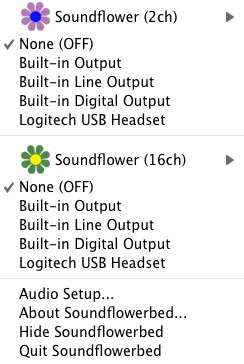
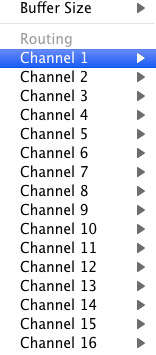
Click on the Soundflower icon on the Menu Bar and make sure the settings are put to “None (OFF)” for both Soundflower (2ch) and Soundflower (16ch). In the Soundflower (16ch) short menu make sure that Channels 1, 2, 3 and four are “None”. And that’s it, there’s nothing else you need to do with Soundflower.
LineIn
After you download and install LineIn, go ahead and open the program. There isn’t much to it at all.
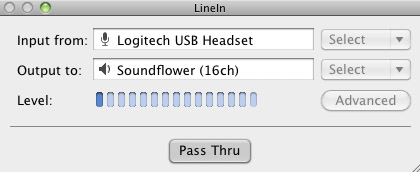
Input from: should be for your input device (mine is my Logitech USB Headset. Output to: select “Soundflower (16ch).
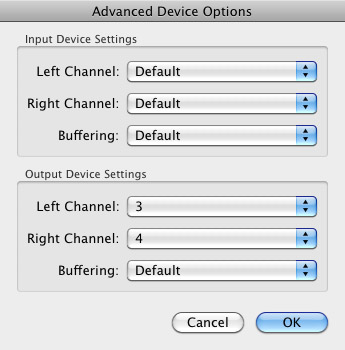
Click “Advanced” and make sure everything is set to default except for the “Output Device Settings” which should be “Left Channel: ” and “Right Channel: 4”. Click “OK”.
Select “Pass Thru” to make sure that your signal is going through LineIn.
Skype
Skype for Mac is very simple. Sometimes a bit too simple as it wont let you have certain functions like the PC version. See my post on the How to Fix the Auto Gain Control for Skype. This will alleviate the problem of Skype cranking down the gain when you are talking on your headset. If you are noticing that the louder you talk the lower your level goes then read this post.
Setting up Skype for audio podcasting is very simple.
Select Skype>Preferences and click on the “Audio” tab.
Set these parameters:
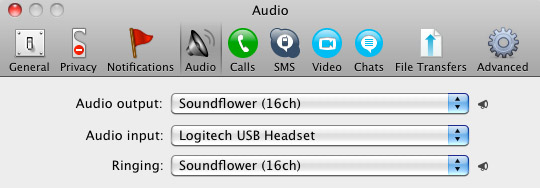
- Audio Output: Soundflower (16ch)
- Audio Input: Your input device (mine is my Logitech USB Headset
- Ringing: Soundflower (16ch)
And you’re all done with Skype.
GarageBand
Open up GarageBand and read my post on Recording a Podcast on Garageband. This will get you all set up for your record minus the setup for Skype, which I’ll let you know below.
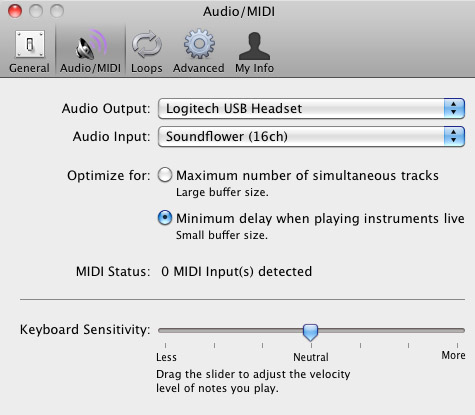
Go to the pulldown menu GarageBand>Preferences>Audio/Midi, here you will be able to select the inputs and outputs of GarageBand. Set the Audio Output to your headphones (Logitech USB Headset for me) and the Audio Input to “Soundflower (16ch). Your done with preferences.
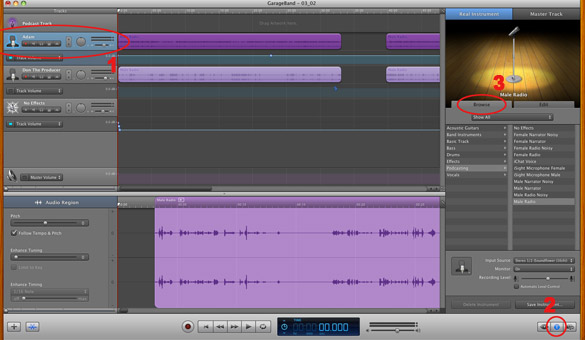
(1)Select track 1 which I have Adam on from the Ask Adam League. (2)And select the “View/Hide the Track info” button on the bottom right of the interface. (3)Also make sure you have the browse tab open as well.
At the bottom right, you have several options available for controlling the audio of this particular track which I have Adam on.
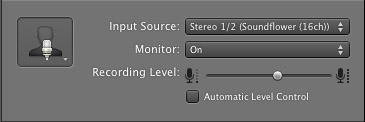
Select the parameters; Input Source: Stereo 1/2 (Soundflower (16ch)) and put the Monitor: On. You can also adjust the Recording Level here.
Repeat this for track 2 which I have as myself on my setup except that the Input will be Stereo 3/4 (Soundflower (16ch)).
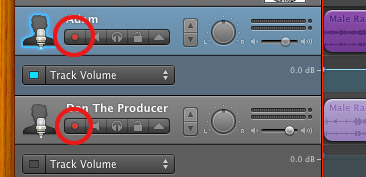
Finally, click the “Enable Recording” button for each of your tracks or else you wont be recording those tracks respectively.
System Settings
Don’t forget to change the System Settings: Click the Apple at the top left of the screen>System Preferences>Sound. Put the Output to your headphones (in my case the Logitech USB Headset) and the Input to your microphone (again the USB Headset in my case).
Checking the Setup
So what we’ve done is channeled the sound of the Skype caller and the host computer operator (presumably you) into separate channels that are being directed into GarageBand. The next step is to make sure that all your programs are fired up and double-check your settings. Skype makes it very easy to test your settings by providing the “Skype Test Call”. She’s a lovely Brit which will allow you to hear a mock call from Skype and even and ‘talk-back’ feature that will record your own voice for input checking.
Make sure your Record Enable buttons are on, hit the Record Button and hit the Skype Test Call button on Skype. Go ahead and talk over your new girlfriend and speak through the talk-back. After you’re done, check your recording. Check to see that the levels are where you want them and the fidelity of the sound. It should be fantastic.
Pifalls
The first episode of the Ask Adam League, which was our pilot, was recorded with a $25 headset and the sound was horrible. I have since gotten a $50 headset and it sounds fantastic. Any audio issues may stem from poor quality equipment and possibly not your setup.
Double-check your filters applied to each individual track. They may be interfering with the quality of your record by adjusting settings over your audio. See my post Recording a Podcast on Garageband for details.
Good Luck on your recordings! If you have any trouble at all, just post here and I’ll get back to you promptly.

Forgive my lack of technical knowledge, but can this be used to record a Skype conversation between two people? Does the person on the other end need to also use a headset? I want to set up a series of interviews and am looking for the best way to record them through phone or skype to then create podcasts.
This setup is optimal for having a two person conversation via Skype and having it recorded on GarageBand. Both users will need Skype (which is free of course) or they can call you on a regular phone which may cost money (I’m not sure). There are a lot of notebooks out there with built in mics and speakers but you will want to wear a headset so you don’t get feedback (sound coming out of your speakers that leak back into your mic and loop). Both users should have headsets to alleviate the feedback issue.
My recommendation is that you will want to buy a quality headset. I’ve found that there is a threshold at $50 for decent headsets with great sound. You can check out askadamleague.com for the sound quality we have for our podcast. We are using the same setup I described in this post.
Good luck!
Thanks for the reply. That helps. I have a feeling though that I’ll have some trouble ensuring the interviewees will have headsets.
You’ll be fine if people are using a standard phone also. They’ll have the phone up to their ear and your sound going to them shouldn’t interfere with their receiver creating the feedback loop.
So in the simplest form, if you are on your headset (with your speakers turned off) and they are on a phone or chatting with you directly on Skype (with headset), everything is a go. Just tell them to turn off the speakers and everything’s good. 🙂
Hi Mr. Sinatra. Thanks so much for putting this together. I’m excited that I’m supposed to record my first podcast for my website this coming Wednesday night. Your posts have helped me greatly in putting this together. My only problem is that my track in garageband only seems to play back in my left ear. I assume it’s because that’s how it’s recording. Any idea how to fix that? Feel free to email me if you prefer. Thanks again for your great posts!
Hi Matty, thanks for the kind words. It may be something as simple as the pan knob that is right next to the track volume control on each individual track. If it’s greyed out then that means that you have enabled a keyframed panning function on your track which is a blue band underneath your track (this can be brought up by clicking the triangle exposing the Volume/Track functions which can be changed by the pull down menu right next to it). This is the most common culprit. It may also be your output for your system settings as well. That can get changed to left or right by the slider bar.
If all those are clear then it must be something in the software. Skype doesn’t seem to have any panning functions so it could be the setup with Soundflower or LineIn. If you’ve followed everything I wrote exactly (the Stereo 1/2 (Soundflower 16ch) Input for the track in Garageband, setting your channels to None in Soundflower, and setting the Advanced Options in LineIn output device settings to 3 and 4 Channels respectively) then there shouldn’t be any issues.
As a last resort you can try going to the Audio Setup in the Soundflower pulldown. There you can monitor all of your audio setting including the pan levels on your devices.
And remember that we are trail blazers, this stuff can be very difficult so don’t be dismayed if things don’t work exactly as you need them to at first. Let us know how things worked out for you. Good Luck.
Thanks a lot. Why are there so many versions of this setup that don’t work?
Do you know how to record a third person calling in on a landline or cell phone?
Ron
That is where it looks to get a bit sticky. Firstly, a three-way or more call on Skype is going to cost you money. One-to-one calls are all free but if you want anyone to call in on their LAN or cell phone then you’re talking about charges.
If you don’t mind the money then the other issue problem is that LineIn only allows for two channels to pass through. SoundFlower and GarageBand have the capacity to use more than 2 channels. Unfortunately LineIn is the culprit for not allowing more than two stereo channels.
We have investigated having a third person on the Ask Adam League and when that day comes, you bet that I’ll write a post on how to have more than two people on a podcast. Thanks Ron. I appreciate your input.
Hi Donald, I recorded my first podcast and it went well! Unfortunately I didn’t see your quick reply before the recording so when I set up for episode 2 tonight I’ll run through those options.
One other issue I’ve had is getting multiple people from Skype onto separate tracks. Specifically, I’m doing the recording and speaking into a mic so I’ve tracked myself (onto one track), but everyone on Skype (anywhere from one to three additional people) are stuck on one track. The sound quality isn’t bad or anything, but I was wondering if there’s a way to get them onto different tracks.
Thanks so much for your help with this, Donald!
And now having read the comment directly above mine from this morning I see that it may be impossible to do using LineIn.
As far as getting multiple people on Skype, I can tell you that that is actually free, but only if you use Audio only. Having what amounts to a video conference call with more than two participants will cost you.
To have multiple people on my podcast (and I’ve only done this once so I am no expert!) I just recorded called two people on Skype and then hit record on GarageBand. My voice was Track 1 and the Skype call (containing two people) was Track 2.
Right. All LineIn is doing is allowing playthrough of your devices (Skype). And since it only has two stereo channels, that means that you can only break your podcast into 2 tracks on GarageBand.
I just checked out your first episode. It sounds great. See if you can even out your volume levels between your host and talent. That’s the only issue I see, otherwise it looks all good.
Awesome post and great tutorial video Donald. I’m going to be doing a podcast and the co host will be on skype, so this helps us out tremendously. Thanks for taking the time to post this and the video. Much appreciated good sir.
Awesome. Thanks Joshua. Please drop by some comments about what worked and any challenges you might have come by.
Hi Donald. Thanks so much for checking out the podcast. The only remaining issue I’ve had is my audio is only in the left ear. The Skype guests are in both ears, but my audio remains only on the left side. It’s strange. I ran through all the stuff you suggested above and ran through your article again just in case I’d messed something up, but nope. I’m stumped. Any more suggestions? Thanks again for all your work on all of our behalf.
Donald,
I want to record a podcast using all of the above but:
1) I want to record my skype phone conversation with another person;
2) I want to alter my voice, via Garageband
3) I want the other person to hear my voice altered
4) I want to record as the other person’s voice NOT altered, but mine altered.
Right now I can’t figure out how to have Garageband record the other person’s voice as unaltered, while they hear mine altered.
Suggestions?
Donald,
I have a bit of an issue and I hope you can help: I have 2 USB headsets plugged in (for me and my co-host) in Garageband. I need to find a way for both of us to hear a caller we’re recording via Skype or Google Voice. How do I do that? It’s driving me nuts!
Hey Boyd. I don’t have a solution to your problem. I did find this link however stating that you might be able to run two instances of Skype on your computer and conference call the whole thing. Another solution may be to go old school and use mini-jack headsets and just get a splitter. That may be the simplest solution.
Hey Donald,
I just wanted to say thanks for this post. I haven’t done a full episode recording just yet, but the set up seems to be working so far. I just wanted to post a possible answer to Mattymatty2000 because I almost ran into the same issue with only being able to hear in one ear as well. In the “LineIn” section, if you just go by the text instructions it says the Output Device Settings it says “Left Channel: †and “Right Channel: 4″. So when I followed that I didn’t put anything on the left channel and I set the right to 4 and I was only getting audio in my right ear. So the only thing I can think of is that Matty may have done the same thing and then possibly has his headphones on backwards since it is coming on via the left side. I hope this helps and I’ll definitely comment again once I post an episode recording with this setup. Thanks again, my cohost and I live in the same city, but this will save us gas money. =)
Thanks for your input Casper, it’s much appreciated. Definitely write back your experiences with your new episode and a link to it as well. 🙂
Awesome post man. I’m just now learning Garage Band, and podcasting is 90% of the reason I’m using it. Skype interviews are high on my to-do list, so thank for taking the time to do this.
Now if I can just figure out this Zoom h4n I’ll be good to go 😀
This couldn’t have been more perfect for what I was looking for! Very much appreciated!
My friends and I are doing a podcast with this, but we can only get 1 track for the guy recording, and 1 track for the 3 of us on skype. Is there a way to separate the 3 of us into different tracks?
Brilliant, and so far working like a champ.
So, is there anyway I can get other programs to do sound output to, say, channels 5/6 or 7/8 of Soundflower, so I could, for instance, have iTunes play something and record it on yet another track. (And more importantly, can i set it up so that when I play something like that, the other people on the call can hear it as well?
Brilliant… thanks for the info! I look forward to using it on my podcasts soon!
Is there a way to do a podcast through Google Voice?
Hello! I can’t find soundflower option on my channels on garage band when I open up the options for each track. Soundflower is open on my mini bar at the top of the screen and the settings are correct as you instructed. Also, headphones option is not coming up in my apple sound settings. I have my headphones plugged in – they are not the kind with a microphone though they are of good quality. It is set on “line in built in audio” right now…
thanks for your help!
Donald, is there a way to do the podcast with 2 usb headsets in the mac and a skype caller (3 inputs)?
Hey donald, I don’t have a sound flower app, I’m running OSX Lion and can’t change any of sound flowers settings i.e. which channel does what
Hello All,
Great post, Donald!
I, too, am looking for the easiest and most reliable way to record 3-way skype chats with each participant getting his/her own track.
Can you or anyone else recommend a way to do this?
Best,
Jeremy
Donald,
First, thank you for putting this together. I’m having a little trouble, though, and I was hoping you could help. After I set the Skype settings, I no longer have any audio coming in from Skype. The caller can hear me, but I cant’ hear them. Any help would be appreciated.
i am having problems with lineln… my mac downloads the zip file but when i unzip lineln it dissapears and i can not find the file anywhere on my mac
Donald,
Thanks for these instructions! I’ve been using this very setup for over a year now. However, just recently something is not allowing GarageBand to record anything. I checked all the settings (Soundflower, Line-In, including Pass Thru, System Settings, Skype, and Garage Band). Everything looks right. However, I cannot hear the people over Skype, but they can hear each other. Also, I get no “bouncing lights” in GarageBand. Even if I try to record just me there is nothing. Any thoughts? Is there some “gotcha” that I messed up?
Having a similar issue. Was working, but I believe a recent GarageBand update broke it.
Hey Donald! Sooooo helpful thank you. I set up everything link you said but I’m using a professional mic with a digidesign box (used for interfacing with mid etc) and I tried a test with my husband calling me on skype and you could hear us both and record but they were not separated even though I had 2 tracks on 1/2 and 3/4. I am using the podcast element at garage band and I will try just the regular garage band project but am I doing something wrong? Should I just get a headset – like the the digidesign mbox screwing things up?
Thanks! – katie
Good morning Mr. Sinatra:
I came across your video just recently. I found it to be very helpful and was extremely excited about getting started with my Podcast. I purchased a blue snowball mic and downloaded everything you indicated to my MacBookPro. Sadly the Blue Snowball could not be detected on the Mac? Then when I tried to just use my regular garage band suddenly my microphone (built in one) no longer works. I was thinking it was because I now had the Soundflower set up so my mic was no longer available. I’m hoping you will be able to shed some light on this for me. I have searched online and there are people out there who say the Snowball isn’t recognized by their Mac??? Please advise and if you have anything to offer as to why the mic no longer works that would be most helpful..
Thank you
Trei (tree)
Do you know if this FREE option you have detailed here on your blog and on youtube still works? I have MAC OS 10.6.8, Skype 5.7.0, and Garageband 7 6.0.5
I followed all your instructions because they are probably the most up to date version I found online and I couldn’t get the skype call to record in Garageband. Is there a new way of doing this? Any help would be VERY appreciated! Thanks!
Well I searched for this title and found this, great read
I can’t bear reading time-consuming content, simply because i
have got a bit of dislexia, but i actually liked this one
Hello Web Admin, I noticed that your On-Page SEO is is missing a few factors, for one you do not use all three H tags in your post, also I notice that you are not using bold or italics properly in your SEO optimization. On-Page SEO means more now than ever since the new Google update: Panda. No longer are backlinks and simply pinging or sending out a RSS feed the key to getting Google PageRank or Alexa Rankings, You now NEED On-Page SEO. So what is good On-Page SEO?First your keyword must appear in the title.Then it must appear in the URL.You have to optimize your keyword and make sure that it has a nice keyword density of 3-5% in your article with relevant LSI (Latent Semantic Indexing). Then you should spread all H1,H2,H3 tags in your article.Your Keyword should appear in your first paragraph and in the last sentence of the page. You should have relevant usage of Bold and italics of your keyword.There should be one internal link to a page on your blog and you should have one image with an alt tag that has your keyword….wait there’s even more Now what if i told you there was a simple WordPress plugin that does all the On-Page SEO, and automatically for you? That’s right AUTOMATICALLY, just watch this 4minute video for more information at. Seo Plugin
The body can become used to ester, or the type, of testosterone that’s being used
if the same therapy is continued for a surplus of
1 or 2 years.
My web-site: http://urbanhideouts.ie/?option=com_k2&view=itemlist&task=user&id=20154
my site: William
Despite the fact that spas weren’t introduced here till the
early 1990s, Thailand has speedily become a single of the highest ranking spa destinations in the globe.
Also visit my website … Emerson
Based on the FDA, the use of testosterone therapy has increased considerably,
from 1.3 million patients in 2009 to 2.3 million patients who
had a prescription for testosterone products in 2013.
Also visit my blog :: anti aging supplements for men
Thailand also celebrates an impressive choice of festivals, with the water festival of Songkran (Thai new year) in mid-April becoming the greatest of
all.
Stop by my site … Alejandro
Loww is correlated witth hip fracture and height decrease in postmenopausal women.
my web-site … http://sblaowai.com/profile/AleidaNewb
No matter if some one searches for his necessary thing, thus he/she desires to be available that
in detail, thus that thing is maintained over here.
hey there and thank you for your info ? I’ve definitely picked up anything new from right here.
I did however expertise some technical issues using this web
site, as I experienced to reload the website lots of times previous to I could get it to load correctly.
I had been wondering if your hosting is OK?
Not that I’m complaining, but slow loading instances
times will very frequently affect your placement in google and could
damage your high-quality score if ads and marketing
with Adwords. Anyway I am adding this RSS to my e-mail and
can look out for a lot more of your respective exciting content.
Ensure that you update this again soon.
my blog: plasticsurgerydetroit.xyz
Pregnant girls and these considering becoming pregnant ought to avoid travel to Thailand.
Also visit my homepage :: Marc